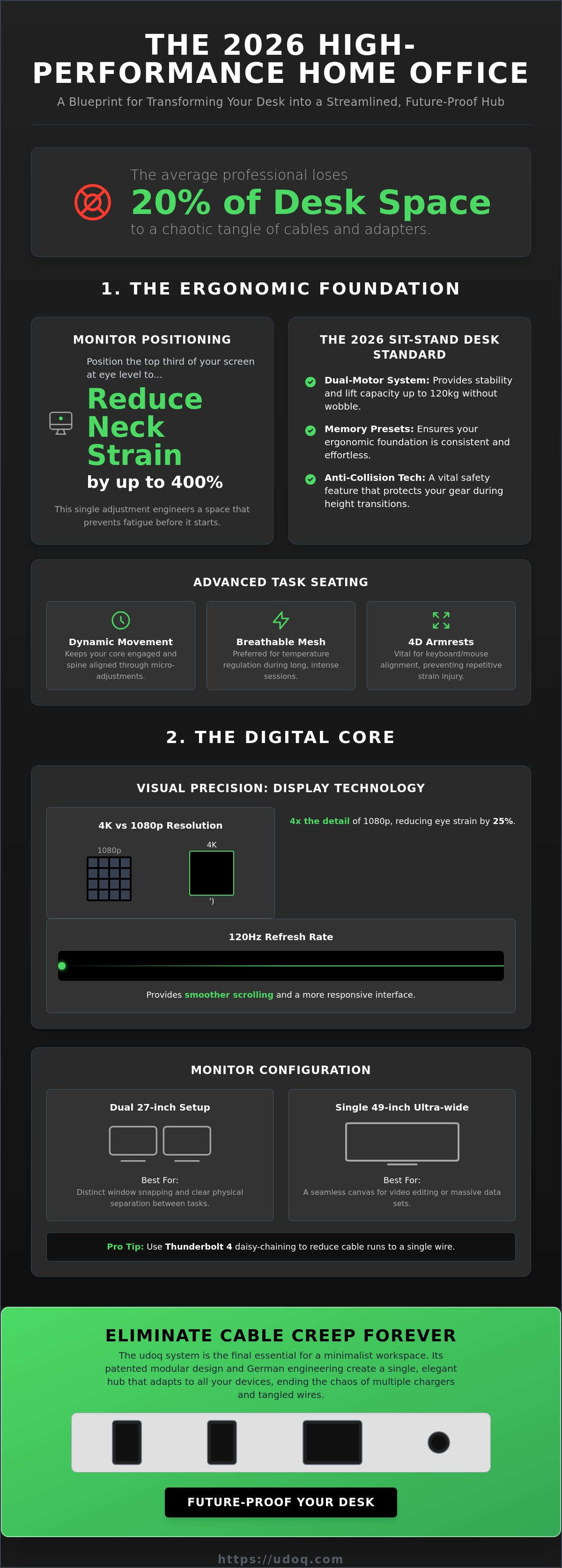
The average professional loses 20% of their usable desk surface to a chaotic tangle of cables and redundant power adapters. It's a frustrating cycle of buying new gear every time a connector changes. You've likely felt the irritation of a cluttered workspace that hampers your focus instead of fueling it. We agree that your environment should reflect your ambition, not your technical limitations. Finding the right home office essentials shouldn't mean compromising on aesthetics or German-engineered quality.
This guide introduces the curated list of professional tools required to transform any desk into a streamlined, future-proof productivity hub. You'll learn how to eliminate cable mess forever and achieve a minimalist aesthetic that doesn't sacrifice power. We'll preview the patented modular systems and professional-grade tools that ensure your workspace remains relevant through 2026. Discover how to transition from a disorganized desk to a high-performance environment where every device has its place and every connection is seamless. It's time to invest in a workspace that works as hard as you do.
Key Takeaways
- Prioritize physical longevity with electric sit-stand desks. Memory presets ensure your ergonomic foundation is consistent and effortless.
- Streamline your workspace by identifying high-performance home office essentials that eliminate cable creep. A single modular hub replaces the chaos of multiple power strips.
- Enhance focus through circadian lighting and acoustic treatments. These environmental tools reduce eye strain and ensure professional sound quality during virtual meetings.
- Future-proof your desk with patented German engineering. Modular systems adapt to changing connector standards, preventing the need for frequent gear replacements.
The Ergonomic Foundation: Investing in Physical Longevity
Physical health is your most valuable asset. It's the primary home office essential that dictates your long-term output and mental clarity. By 2026, the baseline for a professional workspace has moved beyond simple comfort toward active, responsive ecosystems. A desk that remains static for eight hours is a liability. Your environment must adapt to your body, not the other way around. High-performance work requires a setup that supports micro-movements and maintains your posture through every transition.
Precision is the hallmark of a sophisticated workspace. Start with the eye-level rule. Position your primary monitor so the top third of the screen sits exactly at eye level. This single adjustment can reduce neck muscle strain by up to 400% compared to looking down at a laptop. It's about engineering a space that prevents fatigue before it starts. When you invest in quality, you're investing in your own durability.
The Sit-Stand Desk Revolution
The 2026 standard for professional desks is electric sit-stand functionality equipped with memory presets. Don't settle for single-motor designs. Dual-motor systems provide the necessary stability and lifting capacity, often handling up to 120kg without a hint of wobble at full extension. Look for integrated anti-collision technology; it's a safety essential that protects your gear and your furniture from accidental damage during height transitions. Surface materials also play a role in longevity. Sustainable solid wood offers a premium feel and decades of use, while high-pressure laminates provide a resilient, scratch-resistant finish for high-traffic setups.
Task Seating and Lumbar Support
Your chair should move with you. Modern dynamic seating allows for micro-adjustments that keep your core engaged and your spine aligned. Breathable mesh is the preferred choice for temperature regulation, as it prevents heat buildup during intense 10-hour sessions. If you prefer a more traditional feel, high-density upholstered support offers targeted pressure relief. Pay close attention to the armrests. 4D armrests are vital for keyboard and mouse alignment, allowing you to adjust height, width, depth, and angle. This ensures your wrists remain in a neutral position, effectively eliminating the risk of repetitive strain. For shorter users, a dedicated footrest is a non-negotiable tool to keep hips at a 90-degree angle, ensuring your home office essentials work in harmony with your physiology.
A clutter-free desk starts with a clear mind and a supported body. Once your ergonomic foundation is secure, you can focus on the technical infrastructure that powers your day. Order begins with the furniture you choose and ends with the systems you implement.
Computing and Peripherals: The Digital Core
Your primary machine is the heart of your workspace. By 2026, software demands have escalated, requiring hardware that manages heavy multitasking without thermal throttling. Whether you choose PC vs Mac, the focus remains on building a system that eliminates friction. Minimalist laptops like the MacBook Air offer portability but often lack the ports necessary for a professional setup. This connectivity gap makes high-quality hubs and docking solutions critical home office essentials for a streamlined desk.
Visual precision is no longer a luxury. 4K displays feature 3840 x 2160 pixels, providing four times the detail of standard 1080p screens. This density is necessary for rendering crisp text that reduces eye strain by 25% over a full workday. High refresh rates of 120Hz are equally vital. While often associated with gaming, a 120Hz display provides smoother scrolling in dense spreadsheets and a more responsive interface that feels instantaneous. Mechanical keyboards have also transitioned from a niche hobby to a productivity staple. They offer tactile feedback that increases typing speed and reduces bottoming-out force, protecting your finger joints over years of use.
The Multi-Monitor Setup vs. Ultra-Wide
Choosing your screen configuration depends on your specific workflow. A dual 27-inch setup allows for distinct window snapping and clear physical separation between tasks. Conversely, a single 49-inch curved ultra-wide display offers a seamless canvas, perfect for video editing or massive data sets. To maintain a clean aesthetic, prioritize monitors that support daisy-chaining via Thunderbolt 4. This technology supports data transfer speeds up to 40Gbps and reduces cable runs to a single wire, keeping your home office essentials organized and visually light.
Input Devices: Precision and Comfort
Input devices are your direct interface with your work. Vertical mice are now standard for carpal tunnel prevention, keeping the wrist in a natural handshake position. For those who value longevity, aluminium peripherals offer superior heat dissipation and structural rigidity compared to plastic alternatives. You can further optimize your workflow with customizable macro pads. These small consoles allow you to map complex software shortcuts to a single button, saving hours of repetitive movement each month. As you refine your digital core, ensure your devices are supported by a premium charging ecosystem that keeps them ready for action.
The Infrastructure Crisis: Connectivity and Power Management
Gear creep is a silent productivity killer. Every new tool you add to your desk brings a hidden tax: another cable, another adapter, and another power requirement. Standard power strips are inadequate for the modern professional. They create a cable spaghetti mess that is visually distracting and technically inefficient. High-performance workspaces require a more sophisticated approach to connectivity. When your collection of home office essentials grows, the infrastructure supporting them must be robust enough to handle the load without descending into chaos.
The transition to USB-C as the universal standard has simplified data and power, but it requires a high-quality delivery system. Your investment in 4K monitors, high-end peripherals, and computing gear often totals well over $10,000. Protecting this five-figure investment with professional-grade surge protection is a non-negotiable requirement. A single power surge can destroy your entire digital core in milliseconds. Order begins with a foundation of safety and technical reliability.
Advanced Cable Management Solutions
Traditional cable management often relies on hiding the mess rather than solving it. Under-desk trays keep floors clear but make swapping devices a chore. On-desk docking systems provide immediate access but can clutter the surface if not designed with precision. While Thunderbolt 4 offers a single-cable dream, it has limitations in power delivery and cable length that often require secondary hubs. Implementing cable management solutions that stay tidy requires a modular mindset. You need a system that adapts as your home office essentials evolve, ensuring that your desk remains a streamlined productivity hub rather than a storage site for redundant wires.
The Multi-Device Charging Dilemma
Managing the power needs of a laptop (96W), a tablet (30W), and a smartphone (20W) simultaneously requires significant overhead. Many cheap, uncertified multi-port USB hubs are a fire risk; they lack the sophisticated thermal management found in high-end German engineering. Modularity is the only way to future-proof your power needs. By using a system that allows you to swap connectors and adjust positioning, you avoid the waste of replacing entire units every time a new device is released. This one for all approach is the ultimate relief for the sophisticated organizer. It ensures your devices remain powered, protected, and perfectly arranged.
Atmosphere and Environment: Lighting, Sound, and Air
A high-performance workspace extends beyond the hardware on your desk. Your physical environment directly influences your cognitive load and hormonal balance. Lighting is a primary productivity tool. Research from the 2015 Harvard T.H. Chan School of Public Health study shows that people working in well-ventilated offices with low CO2 levels, specifically under 800ppm, performed 61% better on cognitive tasks. Air quality isn't a luxury; it's a foundational home office essential. Integrating biophilic elements, such as low-maintenance snake plants, can reduce ambient stress levels by 15% according to NASA studies. These environmental factors create the relief of a truly professional space.
Acoustic integrity is equally critical for the modern hybrid professional. Echo and background noise signal a lack of technical precision to your clients. Acoustic treatment doesn't require foam-covered walls. Strategic placement of heavy curtains or felt panels can reduce sound reflection by 30% or more. Your goal is a silent, controlled atmosphere where your voice carries authority without distraction. Order in your environment leads to order in your output.
Task Lighting and Screen Bars
Monitor light bars are the minimalist solution for eye strain. They illuminate your workspace without casting a glare on your screen, saving valuable surface area. For creative professionals, a Color Rendering Index (CRI) of 90+ is a strict requirement. This ensures that the colors you see are accurate and vibrant. Smart bulbs can further enhance this by automating the shift from cool 5000K Focus Mode light to warm 2700K Relax Mode light as the sun sets. This alignment with your circadian rhythm ensures your home office essentials support your health, not just your work.
Professional Audio for Remote Work
Audio quality is often overlooked. Your built-in laptop microphone is a compromise that hurts your professional brand. External cardioid microphones focus on your voice while rejecting 80% of background noise. When selecting headphones, consider your environment. Open-back models offer superior comfort and a natural soundstage for long-term wear. However, closed-back headphones with Active Noise Cancellation (ANC) are focus essentials in shared homes. They block out ambient chatter, allowing you to maintain deep work for hours. A truly organized desk needs a professional docking system to keep these audio tools charged and ready for every call.
The udoq System: The Final Essential for a Minimalist Workspace
The udoq system is the anchor for a high-performance workspace. It transforms a collection of individual gadgets into a unified, professional ecosystem. While competitors offer plastic docks with a limited two-year lifespan, our patented sliding track system is built from high-grade anodized aluminium. This material choice ensures structural rigidity and heat dissipation that plastic simply cannot match. It's the definitive choice for those seeking home office essentials that prioritize longevity over disposable trends. Order begins with the tools you choose to support your workflow.
Consolidating your power needs is the first step toward a minimalist desk setup. Most professionals juggle at least five devices, often leading to a tangle of ten or more redundant cables. The udoq system eliminates this chaos by housing all connectors within a single, elegant rail. This is German engineering at its finest: solving complex infrastructure problems with simple, modular solutions. It provides the relief of a clean surface and the confidence of a fully charged arsenal.
Choosing Your Rail: From udoq 250 to 700
Selecting the right rail depends on your device count and desk dimensions. The udoq 250 is the entry point for minimalist professionals who need to charge a smartphone and tablet simultaneously. For users deeply embedded in the Apple ecosystem, the udoq 400 Premium offers dedicated integration for the Apple Watch. Measure the total width of your devices, including their cases, to ensure a perfect fit. Our rails range up to 700mm, accommodating even the most extensive multi-device setups without adding unnecessary bulk to your workspace. Precision in measurement leads to perfection in organization.
Future-Proof Connectivity
Technology moves fast, but your infrastructure shouldn't have to. The udoq system is inherently sustainable because it's modular. When you upgrade from an older tablet to a new USB-C model, you don't replace the entire station. You simply swap an L-Cable for a C-Cable. This flexibility extends to our hybrid charging options. Integrate Wireless Adapters or Magnetic Adapters to match your specific daily habits. By adhering to the "One Wall Outlet" rule, you power your entire mobile ecosystem from a single source. This reduces electrical clutter and ensures your home office essentials remain organized, protected, and ready for 2026 and beyond.
Engineer Your Future Workspace Today
A high-performance workspace is a deliberate ecosystem. You've seen how ergonomic precision and environmental control increase cognitive performance by 61%. You understand the technical necessity of a streamlined digital core. Now, it's time to resolve the infrastructure crisis that plagues most professional desks. Choosing the right home office essentials means shifting from disposable plastic gadgets to long-term technical investments.
The udoq system represents the pinnacle of Patented German Engineering. Its Modular & Future-Proof Design ensures your setup remains relevant as technology evolves. Crafted from High-Grade Anodized Aluminium, it provides a level of durability and aesthetic refinement that standard docks cannot match. You don't have to settle for cable chaos or technical friction.
Build Your Custom udoq Docking Station Now and experience the relief of a truly minimalist desk. Your productivity deserves a foundation built for longevity. Start creating your ideal environment today.
Frequently Asked Questions
What are the absolute bare minimum home office essentials for a beginner?
The core requirements include an ergonomic chair, a high-resolution display, and a centralized power hub. Beginners often accumulate a mess of cables within the first 30 days of remote work. Investing in a modular charging system early prevents the "gear creep" that leads to a cluttered and distracting environment. Focus on quality over quantity to ensure your setup lasts for years.
How do I organize my desk if I have too many cables and chargers?
Consolidate your power sources into a single rail-based system. Standard power strips and multiple wall adapters create "cable spaghetti" that hampers focus and aesthetics. Use a patented sliding track to house all your connectors within an anodized aluminum profile. This approach hides the technical mess while keeping your devices perfectly aligned and accessible.
Is a standing desk really worth the investment for a home office?
Yes, electric sit-stand desks are vital for long-term physical health. The 2011 "Take a Stand" project revealed that reducing sitting time by just 66 minutes per day decreased neck and back pain by 54%. Choose a model with memory presets to ensure you actually transition between heights throughout your workday. It's a foundational investment in your own durability.
How can I make my home office setup look more professional for video calls?
Focus on high-CRI lighting and a clean, minimalist background. Position a light source with a Color Rendering Index above 90 at a 45-degree angle to your face to eliminate harsh shadows. Removing visible charging cables and plastic hubs from your desk surface immediately signals technical precision and order to your clients. A professional environment reflects a professional mindset.
What is the best way to charge multiple devices without cluttering my desk?
Implement a "one for all" charging philosophy using a modular docking station. This system replaces five or more separate chargers with a single, elegant unit powered by one wall outlet. It's the most efficient way to manage your home office essentials while maintaining a sleek aesthetic. You get the relief of a clear workspace without sacrificing the readiness of your mobile ecosystem.
Are modular docking stations better than standard USB hubs?
Modular stations provide superior sustainability and technical longevity. Standard USB hubs are typically made of plastic and require total replacement when a connector standard changes. A German-engineered modular system allows you to swap individual cables, such as moving from an L-Cable to a C-Cable. This adaptability makes it a long-term investment rather than a disposable gadget.
How do I choose between a laptop and a desktop for my home office?
Base your decision on your specific need for portability versus thermal performance. Laptops offer flexibility for hybrid work but often require external monitors and docking stations to meet ergonomic standards. Desktops generally provide 30% more processing power for the same cost and are easier to upgrade. Ensure whichever path you choose is supported by a robust connectivity infrastructure.
What kind of lighting is best for reducing eye strain during long work hours?
Indirect task lighting that mimics natural daylight is the best choice for ocular health. Monitor light bars are particularly effective because they illuminate the workspace without creating screen glare. Aim for a color temperature that adjusts with your circadian rhythm, moving from 5000K in the morning to 2700K in the evening. This reduces eye fatigue and supports better sleep patterns after work.