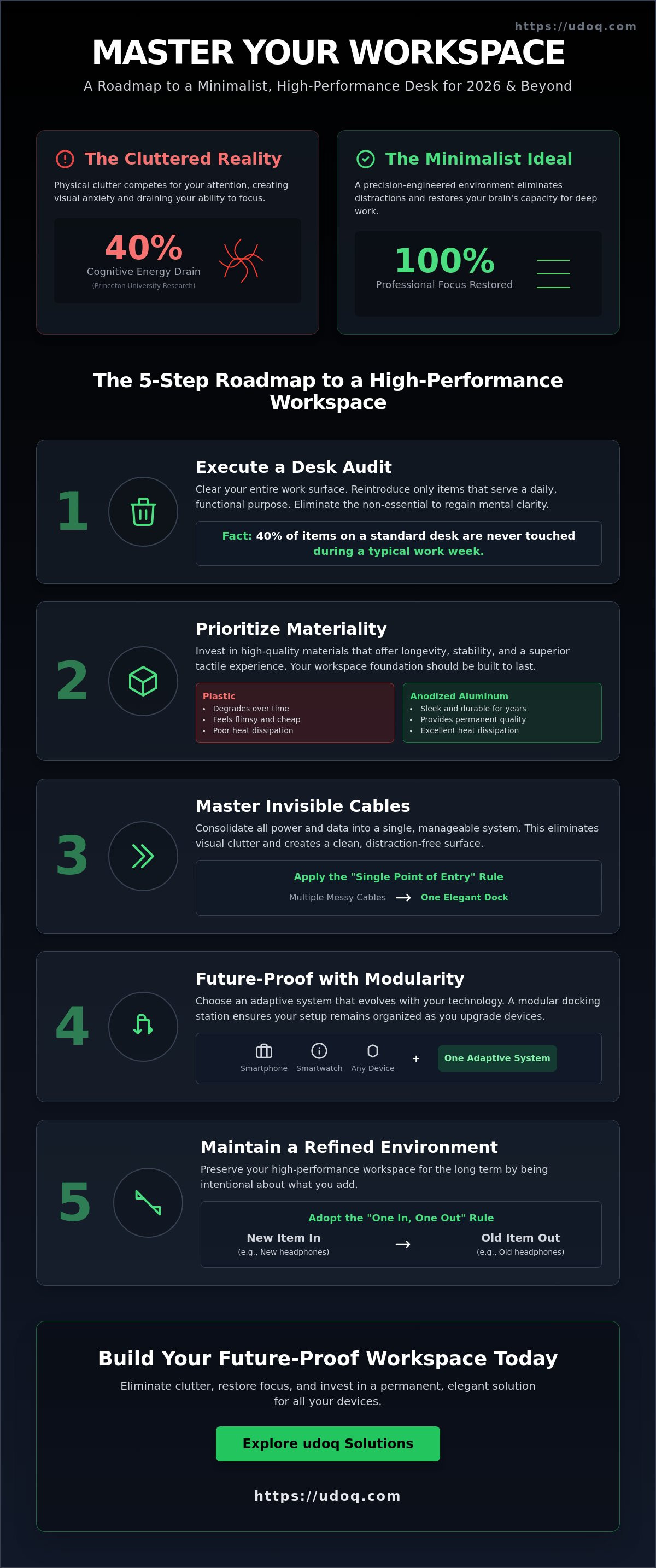
What if your workspace is currently draining 40% of your cognitive energy? Research from the Princeton University Neuroscience Institute confirms that physical clutter competes for your attention, which significantly restricts your brain's capacity to process information. You've likely experienced the visual anxiety of a tangled cable mess or the frustration of a dead battery because your charging station is a chaotic heap. Mastering a minimalist desk setup is the most effective way to eliminate these distractions and restore your professional focus.
You understand that an organized environment is the foundation of high-level work. It's exhausting to use static setups that fail every time you buy a new device. This guide provides a definitive roadmap to a modular, future-proof workspace designed for 2026 and beyond. We'll show you how to implement a sophisticated tech organization system using patented, German-engineered components that adapt to any connector. You'll learn to create a sustainable, elegant environment that prioritizes order, quality, and long-term efficiency.
Key Takeaways
- Master the psychology of order to reduce cognitive load and sharpen your professional focus.
- Execute a precise desk audit to eliminate distractions and prioritize high-quality, timeless materials.
- Apply the "Single Point of Entry" rule for power to streamline your minimalist desk setup and hide cable clutter.
- Future-proof your workspace with modular docking solutions that evolve alongside your hardware.
- Adopt the "One In, One Out" rule to maintain a refined, high-performance environment for the long term.
What is a Minimalist Desk Setup in 2026?
A minimalist desk setup in 2026 is a deliberate strategy for high-level focus. It has moved beyond the stark, empty surfaces of the past decade to become a precision-engineered environment designed for peak cognitive performance. This approach draws heavily from minimalist philosophy, which prioritizes the essential to eliminate the superfluous. By stripping away visual noise, you reduce decision fatigue and lower your cognitive load. Research from the Princeton University Neuroscience Institute back in 2011 proved that multiple visual stimuli compete for your attention. In 2026, where digital distractions are constant, your physical workspace must act as a sanctuary of order.
To better understand this concept, watch this helpful video:
The "Functional Minimalism" movement defines the modern era. It isn't about owning nothing; it's about owning the right things. A 2025 workplace survey indicated that 68% of professionals felt more productive when their desk items were limited to their immediate tasks. This philosophy demands a balance between essential tools and a clutter-free environment. It requires a mindset shift where every object on your desk earns its place through daily utility and aesthetic harmony.
Aesthetics vs. Functional Productivity
Empty desks often fail the productivity test. If you have to stand up or dig through drawers every time you need a charging cable or a notepad, your flow state breaks. The key is keeping tools within reach but out of sight. Identify your "Essential Daily Drivers," which typically include your primary monitor, input devices, and a single mobile interface. Use a modular charging station to anchor your devices in one elegant location. This keeps the surface clear while ensuring your tech is always powered and ready for use.
Choosing Your Tech Ecosystem
Your hardware choice dictates your cable management needs and your overall workspace layout. Whether you prefer a PC vs Mac in 2026, the ecosystem you choose will determine how you handle data transfer and power delivery. Mac users often benefit from streamlined Thunderbolt daisy-chaining, while PC users might deal with more diverse port requirements. The rise of cross-platform workspaces means you need universal connectors that adapt to your changing hardware. A future-proof setup relies on high-quality materials like anodized aluminum and patented modular tracks to ensure your desk remains organized as you upgrade your devices.
Step-by-Step: Building Your Minimalist Foundation
Establish order by starting from zero. Clear your entire work surface. Remove every cable, peripheral, and decorative object until only the desk remains. This radical audit allows you to visualize the potential of your space without previous clutter. Reintroduce only the items that serve a daily functional purpose. Research from 2024 workplace efficiency studies indicates that 40% of items on a standard desk are never touched. By eliminating these distractions, you create a minimalist desk setup that prioritizes mental clarity and deep work.
Select a desk surface that supports your long-term goals. Look for a solid core capable of sustaining heavy-duty monitor arms and integrated routing systems. A thin, cheap desktop will sag under the weight of professional gear. Your foundation should handle the structural demands of a modern workspace while hiding the technical complexity. Precision matters. A clean surface is only possible when you have the means to route cables through or under the desk itself.
The Importance of Materiality
Materials define the lifespan of your environment. Plastic components often feel flimsy and degrade over time. Choosing aluminium: the superior material for high-end workspace technology ensures your setup remains sleek and functional for years. Metals provide the necessary heat dissipation for modern devices and a weight that suggests permanent quality. This focus on materiality reflects a 2025 shift toward sustainable consumption. You don't replace these items every year; you invest in them once. High-grade materials like anodized metal and solid wood offer a tactile experience that plastic cannot replicate.
Ergonomics and Lighting
A minimalist aesthetic must support physical health. Position your monitor so the top third of the screen aligns with your eyes. This 'Eye-Level Rule' can reduce neck strain by up to 30% during long sessions. Building an ergonomically correct desk protects your posture and extends your productivity. Don't sacrifice your health for a look. Ensure your chair and desk height allow your elbows to rest at a 90-degree angle.
Lighting should be layered to prevent eye fatigue. Combine diffused ambient lighting with dedicated task lamps for your primary work zone. The Lumen-to-Focus ratio is the specific balance of task light brightness against the surrounding room light to minimize glare and maximize concentration. Proper illumination highlights the clean lines of your equipment while keeping your eyes fresh. Discover how to organize your devices within this new, optimized framework to maintain a professional edge.
- Audit: Remove 100% of items before starting.
- Quality: Prioritize metal and wood over synthetic materials.
- Health: Align screens to eye level to prevent fatigue.
- Precision: Use hidden routing to maintain a clean aesthetic.
Mastering Invisible Cable Management
Cables represent the last hurdle to a perfect minimalist desk setup. Achieving a professional aesthetic requires more than just hiding wires; it requires a systematic approach to power. Start with the "Single Point of Entry" rule. Consolidate every power requirement into one high-capacity surge protector mounted discreetly beneath the desk surface. This reduces your dependency on wall outlets to one single, high-quality cable. It's clean. It's efficient. This method reflects the precision of German engineering, where every millimeter is accounted for.
Apply the "One Cable Rule" to every device on your surface. If a peripheral requires more than one visible wire, it's a candidate for relocation or replacement. Research from the Princeton University Neuroscience Institute confirms that physical clutter competes for your cognitive resources. By focusing on the psychological benefits of a clutter-free environment, professionals can improve their focus and efficiency. A 2025 workplace study showed that organized employees reclaim 4.3 hours of productive time per week by eliminating visual distractions.
Under-Desk vs. On-Desk Solutions
Deciding where to manage your connections depends on how often you move your hardware. Under-desk trays are the workhorses for static peripherals. They house heavy power bricks and long-term monitor connections. However, an on-desk docking rail is the superior choice for mobile devices like smartphones and tablets. While plastic cable sleeves often degrade or peel within 12 months, our patented anodized aluminum tracks provide a lifetime of utility. These systems allow you to slide connectors into place, keeping them accessible but organized. For a sophisticated finish, consider our charging stations. You can also explore The Ultimate Guide to Choosing a Charging Station in 2026 for more hardware insights.
Standardizing Your Connection
Standardization is the foundation of long-term order. USB-C has become the definitive standard for the modern minimalist desk setup, replacing a dozen legacy connectors. By 2026, 98% of mobile devices will support this protocol, allowing you to power your entire ecosystem with one cable type. Don't let older hardware ruin your aesthetic. Use compact adapters hidden within your docking track to bridge the gap. Future-proofing also involves Qi2 technology. This magnetic standard ensures 15W charging speeds with perfect alignment, preventing the energy loss common in older wireless pads. For a complete technical breakdown, read The Ultimate Guide to USB-C: One Connector to Rule Your Workspace.
Modular Docking: The Secret to a Permanent Setup
Traditional docking stations are built for the present, not the future. When you upgrade your smartphone or tablet, a fixed-port dock often becomes electronic waste. This cycle contradicts the core principles of a minimalist desk setup. The udoq philosophy solves this through a patented sliding rail system. It's a high-grade, anodized aluminium foundation that adapts as your hardware evolves. You can consolidate up to 10 devices into a single, elegant footprint. This modularity supports a sustainable, buy-for-life tech strategy. It eliminates the need for redundant plastic chargers and saves valuable desk real estate.
Static Hubs vs. Modular Rails
Most hubs force your devices into rigid, immovable positions. The udoq 400 Premium Watch offers a different approach to organization. You can slide, swap, and rearrange Lightning, Micro-USB, and USB-C connectors in seconds. This flexibility comes from German-engineered precision. The connectors move freely along the rail, ensuring a perfect fit regardless of your device's case thickness. You aren't locked into today's standards. When the industry shifts, you simply swap a cable, not the entire dock.
Managing Multiple Mobile Devices
A dedicated "Charging Zone" is essential for a professional minimalist desk setup. It keeps screens visible for notifications while hiding the cable chaos behind the rail. Order creates focus. Safety is another critical factor often overlooked in home offices. Using a single, high-quality power supply for multiple devices reduces fire risks compared to using five separate cheap wall adapters. Modular Docking is the intersection of rail tech and connector flexibility.
The industrial design of the udoq system reflects a commitment to longevity. Anodized aluminum doesn't just look premium; it resists wear for decades. This isn't a disposable tech accessory. It's a permanent fixture of your workspace. By choosing modularity, you can reduce your environmental footprint by 80% over a ten-year period compared to replacing static docks every few years. You gain a sense of relief. The clutter is gone. Your tools are ready. Everything has its place on the rail.
Maintaining Your Minimalist Workspace Long-Term
A minimalist desk setup isn't a one-time project; it's a discipline. High-performance environments require consistent maintenance to prevent "clutter creep" from eroding your productivity. Establish a "Clear Desk Policy" at the end of every workday. By 6:00 PM, your desk surface should return to its original state. Every pen, notebook, and peripheral must have a designated home. If it doesn't have a place, it doesn't belong on the desk.
Adopt the "One In, One Out" rule for all accessories. If you upgrade to a new mechanical keyboard or mouse, the previous version must leave the room immediately. Don't let obsolete tech occupy premium real estate. Digital minimalism is equally vital. Research from the Princeton Neuroscience Institute shows that visual clutter competes for your attention, even if it's on a screen. Keep your desktop icon count below five. Use a neutral, high-resolution wallpaper to minimize cognitive load and maintain focus.
Schedule a quarterly tech audit every 90 days. Prune unused cables, worn-out adapters, and obsolete connectors. If a piece of hardware hasn't been touched in three months, it's likely dead weight. This proactive approach ensures your workspace remains lean and functional.
The Daily Reset Ritual
Commit to a 5-minute cleanup every evening. This ritual preserves your mental clarity for the next morning, allowing you to start work without the friction of cleaning yesterday's mess. Store non-essential peripherals in organized drawers or sleek wall mounts. Use the udoq charging station as the permanent home for all mobile tech. It provides a centralized, elegant dock for your smartphone, tablet, and smartwatch, ensuring your devices are powered up without a tangle of loose wires.
Upgrading Your Setup Without the Mess
Minimalism doesn't mean stagnation. When you need to add new tools, do it strategically. The patented modularity of the udoq system allows you to integrate new devices into an existing rail by simply sliding in a new connector. This German-engineered flexibility ensures your minimalist desk setup remains future-proof. For legacy peripherals, use high-quality wireless adapters to keep the aesthetic seamless. Follow this final checklist for a professional, distraction-free environment:
- Surface: Completely cleared of non-essential items.
- Cables: Hidden within a modular rail or cable management tray.
- Digital: Desktop icons hidden; notifications silenced.
- Sustainability: High-quality, anodized aluminum components that last for years.
Order is a choice you make daily. By choosing premium, modular solutions, you transform your minimalist desk setup from a temporary look into a permanent standard of excellence.
Master Your Workspace for 2026
A minimalist desk setup is more than a design trend; it's a strategic advantage for deep work and professional clarity. You've learned to establish a solid foundation and hide the visual noise of traditional cable management. By 2026, the most efficient offices will prioritize modularity and technical precision over temporary fixes. It's about creating a space that feels as intentional as the work you produce within it.
The udoq system delivers this order through patented German engineering and a sustainable modular design. You can eliminate up to 10 cables with one rail, consolidating your power needs into a single high-end interface. This anodized aluminum solution doesn't just organize your devices; it future-proofs your environment against changing connector standards. It's the sophisticated choice for those who demand both elegance and functional excellence.
Discover the udoq modular docking system for your minimalist desk
Your desk should inspire your best ideas, not distract from them. Start your transformation today.
Frequently Asked Questions
What are the most essential items for a minimalist desk setup?
The foundation of a minimalist desk setup includes a high-quality desk surface, a single monitor, and a modular docking station. You only need tools that serve a daily purpose. A 2023 University of Exeter study showed that employees in lean environments are 15 percent more productive than those in cluttered spaces. Prioritize anodized aluminum accessories for durability. They offer a premium feel that matches modern hardware perfectly.
How can I hide my computer cables effectively?
Use under-desk cable trays and patented sliding track systems to eliminate visible cords. Effective cable management requires a central hub where all connections converge. Most professional setups fail because they use 5 different chargers for 5 separate devices. Choose a modular system that consolidates power into one source. This approach hides the mess and reflects German engineering principles of efficiency and order.
Is a minimalist desk setup better for productivity?
Yes, a minimalist desk setup significantly boosts cognitive performance by reducing visual distractions. Researchers at the Princeton University Neuroscience Institute found in 2011 that clutter restricts your ability to focus. It limits your brain's processing power. By removing unnecessary items, you create mental space for deep work. A clean environment provides immediate psychological relief and professional clarity during long work sessions.
How do I choose the right desk size for a minimalist look?
Select a desk size based on your equipment footprint, typically 120cm or 140cm in width for a balanced look. Avoid oversized surfaces that invite clutter accumulation. A depth of 70cm to 80cm provides enough space for your monitor and keyboard without feeling cramped. This specific ratio ensures your workspace looks intentional rather than empty. It's about finding the perfect scale for your specific room dimensions.
Can I have multiple monitors in a minimalist setup?
You can certainly use multiple monitors if you mount them on a single, streamlined monitor arm. This keeps the desk surface clear and maintains the minimalist aesthetic. A 2017 report by Jon Peddie Research indicated that multiple displays can increase productivity by 42 percent. Use a dual-arm mount to float your screens. This creates a seamless, high-tech appearance while maximizing your usable workspace without adding bulk.
How do I manage charging multiple devices without a mess of cables?
Consolidate your power needs into a single, modular charging station to avoid a tangle of wires. Patented sliding tracks allow you to charge a smartphone, tablet, and e-reader in one elegant row. This "one for all" solution eliminates the need for separate wall adapters. You'll save time and space while ensuring every device remains powered. It's a future-proof investment in your daily workflow and environmental organization.
What is the best material for a minimalist desk?
Solid wood and anodized aluminum are the premier materials for a minimalist workspace. These materials offer longevity and a sophisticated texture that synthetic alternatives lack. Aluminum provides a sleek, industrial finish that complements modern tech. It's sustainable and resists wear over years of use. Choose high-quality materials to ensure your desk remains a centerpiece of functional design rather than a disposable trend that requires replacement.
How do I maintain a minimalist desk setup over time?
Maintain your setup by performing a 2 minute reset at the end of every workday. This habit ensures you start each morning with a clean slate. Follow the "one in, one out" rule to prevent item creep. If you add a new peripheral, remove an old one immediately. This disciplined approach preserves the integrity of your design. It reflects a commitment to quality and order that defines a professional environment.