

The single connector on your desk has the power to either streamline your entire workflow or silently degrade your $2,000 workstation. Since the 2024 European Union mandate standardized the usb c port across all mobile devices, the promise of a universal connection has finally arrived. However, a port that looks the same does not always act the same.
You likely believe that a universal standard should simplify your life, yet you still find yourself untangling a mess of cords just to find the one that actually works. It's stressful to worry if a cheap cable might damage your expensive hardware or fail during a critical data transfer. We agree that a premium workspace should be defined by order and technical certainty, not a guessing game of compatibility.
This guide will show you how to master the complexities of modern connectivity to achieve a truly minimalist desk. We'll break down the technical differences between power delivery and data speeds so you can choose high-quality hardware with confidence. Discover how to transform your cluttered setup into a high-performance environment built on the principles of precision and durability.
Key Takeaways
- Distinguish between physical connector shapes and data protocols to eliminate connectivity confusion.
- Decode power delivery and data speed specifications to maximize your hardware's performance.
- Learn to navigate the compatibility maze between Thunderbolt and usb c for a seamless, high-speed workflow.
- Spot the difference between certified quality and "no-name" risks to safeguard your premium devices.
- Future-proof your desk with modular German engineering that adapts to every device generation.
The USB-C Revolution: Understanding the Universal Connector
The USB-C standard represents the pinnacle of modern connectivity. Developed by the USB Implementers Forum (USB-IF), this 24-pin connector provides a single interface for power, data, and video. It's vital to distinguish between the physical "Type-C" shape and the underlying protocols like USB 3.2, USB4, or Thunderbolt 4. While the connector looks identical across devices, the internal capabilities vary significantly. This discrepancy often creates confusion for users who expect every cable to perform every task. A cable that charges a smartphone might fail to drive a 4K monitor or transfer data at 40 Gbps. Precision in selection is the only way to ensure peak performance.
Universal adoption has finally arrived. From the latest iPhone 15 series to high-end workstations and minimalist peripherals, the industry has standardized around this slim port. This shift promises a "one cable" future, yet the reality requires a sophisticated understanding of hardware. At udoq, we view this transition as an opportunity for order. We replace the mess of tangled wires with patented, modular systems designed for the technical demands of usb c. Our German engineering ensures that your workspace remains as high-performing as the devices you rely on.
Physical Design: Why Reversible Matters
The 8.4mm by 2.6mm footprint of the usb c connector changed device aesthetics forever. By eliminating the "wrong way" frustration of USB-A and Micro-USB, it offers a seamless user experience. The reversible design isn't just about convenience; it protects the internal pins from damage caused by forced entries. These connectors are rated for 10,000 insertion cycles, ensuring long-term durability. This slim profile allows engineers to create thinner, more elegant hardware without sacrificing structural integrity or power delivery.
The Universal Shift: Apple, Android, and Beyond
Legislative action accelerated this technological evolution. EU Directive 2022/2380 mandates a common charging port for all mobile phones, tablets, and cameras by the end of 2024. This regulation forced a global shift, most notably seen in Apple’s transition from Lightning to Type-C. For long-term users, this change creates a temporary hardware gap. Your legacy accessories don't have to become electronic waste. A smart, modular upgrade path allows you to integrate new standards while maintaining a clutter-free environment. udoq provides the bridge to this future, offering sustainable solutions that adapt as your device portfolio grows. Invest in quality that lasts beyond a single device generation.
Power and Performance: Decoding USB-C Specifications
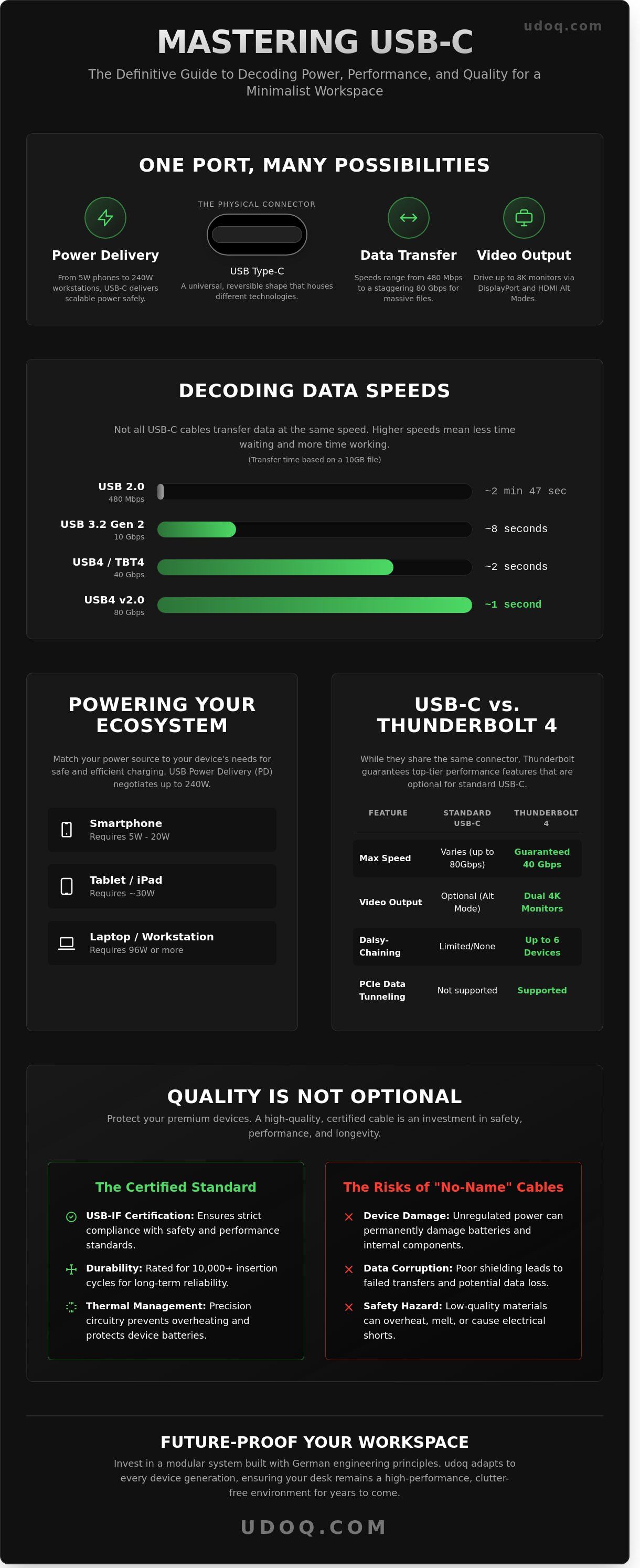
USB-C is more than a physical shape. It is a sophisticated communication system designed for efficiency. Data transfer rates vary significantly across different versions. You might see speeds from 480 Mbps on legacy USB 2.0 configurations to a staggering 80 Gbps with the latest USB4 2.0 standard. This versatility makes it the universal choice for high-end workspaces. Understanding these specifications is essential to achieving peak performance. This comprehensive guide to USB-C provides additional technical context on how these standards have evolved over time.
Charging Capabilities: Not All Ports Are Equal
Power requirements differ by device. A standard smartphone charger typically provides between 5W and 20W. A MacBook Pro or a high-performance workstation often requires 96W or more to operate under load. If your power source doesn't match the device's demand, charging will be slow or non-existent. USB Power Delivery (USB-PD) is a protocol that enables high-speed charging through a negotiated handshake, supporting power outputs from 5W up to a maximum of 240W. This negotiation ensures your device only receives the power it can safely handle.
High-quality engineering is the foundation of safety. Premium charging stations use precision circuitry to prevent battery degradation. They manage thermal loads to protect internal components. Cheap, uncertified chargers often bypass these safety protocols, which leads to overheating. At udoq, we value the longevity of your hardware. Our systems prioritize stable power distribution to ensure your devices remain healthy for years. Reliable power isn't just a convenience; it's a long-term investment in your tech ecosystem.
Data and Video: The Multi-Tasking Port
The true power of usb c lies in its ability to multi-task. Through Alternate Mode, the connector carries video signals like DisplayPort 2.1 and HDMI 2.1 alongside data. This allows you to drive an 8K monitor at 60Hz while simultaneously transferring large files. It's a seamless solution for professionals who hate cable clutter. One cable manages your display, your peripherals, and your power supply.
Low-quality cables create a bottleneck. High-performance cables require E-Marker chips to function correctly. These small controllers sit inside the connector and tell the connected devices how much power and data the cable can safely carry. Without an E-Marker chip, a cable is limited to 60W and slower data speeds. If you want to unlock the full potential of your hardware, the cable quality must match the device's capability. Eliminate the mess of tangled wires and organize your devices with a modular system designed for the future of usb c connectivity.
The Compatibility Maze: USB-C vs. Thunderbolt
Identical shells often hide vastly different capabilities. While the usb c connector is a universal physical standard, the protocols running through the wire vary. Thunderbolt 4 and 5 represent the premium tier of this architecture. Intel mandates a rigorous certification process for Thunderbolt hardware, ensuring every device meets a 40Gbps minimum bandwidth for version 4. Standard ports lack this strict performance floor, leading to the confusion many users face at their desks.
Identifying these capabilities requires a keen eye for iconography. A lightning bolt icon signifies Thunderbolt power. The classic "trident" logo indicates a standard data port. While a Thunderbolt 4 cable functions in any usb c port, it only delivers its maximum speed when paired with matching hardware. This cross-compatibility ensures your devices won't fail to connect, but they might not perform at their peak without the right pairing. udoq solves this discrepancy through a modular approach. Our system allows you to swap and slide connectors to match your specific hardware requirements, ensuring your premium devices get the premium connection they deserve.
Thunderbolt: The High-Performance Variant
Intel’s certification is more than a label; it's a guarantee of reliability. Professionals prioritize Thunderbolt for its ability to handle massive data streams without bottlenecking. A single port can daisy-chain up to six individual devices, including high-speed storage arrays and external GPUs. This creates a streamlined workflow that eliminates the need for multiple bulky hubs. Thunderbolt 5, announced in September 2023, pushes these boundaries further by providing up to 120Gbps of bandwidth for high-resolution displays. It's the definitive choice for those who value efficiency and German-engineered precision in their workspace.
Making the Right Connection
Choosing the correct cable is a matter of calculating your needs. A basic cable is sufficient for charging a smartphone or a wireless mouse. However, driving dual 4K monitors at 60Hz requires the higher specifications of Thunderbolt. The price premium for Thunderbolt reflects its active electronics and guaranteed throughput. It's a long-term investment in a future-proof setup. Don't settle for cables that throttle your productivity.
The udoq advantage lies in our patented sliding track system. Instead of being stuck with a static dock, you can adjust the position and type of your connectors within an elegant, anodized aluminum frame. It's a sophisticated solution for the modern professional. You can integrate Thunderbolt cables for your laptop and standard connectors for your peripherals in one seamless line. Organize your devices. Experience the relief of a clutter-free environment. Discover how udoq brings order to the chaos of changing standards.
Choosing Quality: How to Spot a Superior USB-C Cable
Cheap cables are a gamble that rarely pays off. A generic usb c cable might look identical to a premium one, but the internal differences are staggering. Low-grade hardware often lacks the necessary resistors to regulate power flow. This leads to "handshake" failures between your device and charger. In the worst cases, uncertified cables can deliver a 20V surge to a device expecting 5V, permanently destroying sensitive logic boards. Quality is a safety requirement, not a luxury.
Material choice defines the lifespan of your setup. Premium cables utilize anodized aluminum housings because they dissipate heat faster than plastic. This prevents the connector from warping during high-wattage 100W or 240W charging sessions. Inside, triple-layer shielding protects data from electromagnetic interference. This ensures that your 40 Gbps transfer speeds remain stable even in environments crowded with wireless signals.
Length is the enemy of performance. Standard passive cables lose signal integrity and charging efficiency as they get longer. A 2-meter cable often drops to USB 2.0 speeds of 480 Mbps unless it includes active chipsets to boost the signal. For maximum data throughput, keep your cables under 1 meter. German engineering focuses on these tolerances, ensuring a precision fit that clicks into place without "wobble" or port wear. It is about creating a connection that lasts for years, not months.
The Anatomy of a Premium Cable
Internal copper thickness determines how much current a cable can handle without overheating. High-end cables use 24 AWG copper wiring for power delivery, which reduces resistance and speeds up charging. Strain relief is a flexible transition point between the rigid connector and the flexible cable that prevents internal wiring from snapping under repeated bending. A well-designed strain relief can withstand over 10,000 bends. Beyond function, look for minimalist designs. A sleek, braided cable complements a professional workspace and resists tangling, keeping your desk orderly and efficient.
Safety and Certification
Always look for the USB-IF (USB Implementers Forum) certification logo on the packaging. This mark proves the cable passed rigorous 2024 industry testing for safety and compatibility. Poorly manufactured hardware is a leading cause of electrical fires and voltage spikes in home offices. Investing in certified gear protects your expensive hardware from catastrophic failure. High-status engineering means you never have to worry about your equipment's reliability.
Upgrade your workspace with precision-engineered power solutions. Discover the udoq system and experience the relief of a clutter-free environment.
Future-Proofing Your Workspace with Modular USB-C Solutions
Technology moves fast. Your hardware shouldn't become obsolete every time a connector standard changes. The udoq philosophy centers on a singular, elegant docking station that adapts to every device generation. By utilizing a modular rail system, you eliminate the tangled cable soup that defines most modern desks. This is a shift from disposable tech to permanent infrastructure. It's about creating a workspace that remains functional for years, not just months. When you choose a modular approach, you stop buying temporary fixes and start investing in a lasting solution.
From Chaos to Order: The udoq System
The patented sliding track is the heart of the udoq system. It allows you to move and swap connectors to fit any smartphone, tablet, or e-reader, regardless of the brand or the thickness of the protective case. A single wall outlet powers the entire array, hiding the messy wiring inside the aluminum profile. This design eliminates the visual noise of multiple power bricks and tangled leads. Whether you choose the compact udoq 400 or the expansive udoq 700, you can charge up to 10 devices simultaneously in one centralized location.
The transition provides immediate mental relief. A clean desk fosters a focused mind. By aligning your devices in a sleek, upright position, you reclaim valuable surface area. This isn't just about power; it's about the aesthetic of a design-forward environment. Efficiency becomes the default state of your workspace. You no longer hunt for the right cable or fish a dropped connector from behind the desk. Everything is where it should be, ready to perform.
Investing in Longevity
Sustainability is often overlooked in consumer electronics. Most docks end up in landfills when a new port standard emerges. udoq breaks this cycle. When the industry shifted from older standards to usb c, udoq users simply swapped a single cable within their existing rail. This modularity saves money and significantly reduces e-waste. It's a responsible way to stay current with modern charging speeds and data requirements. Every component is designed for easy replacement, ensuring the dock itself never becomes electronic waste.
The build quality reflects this long-term vision. Each dock is milled from high-grade anodized aluminum. This material provides a premium weight and texture that plastic alternatives cannot match. It's German engineering designed to last for decades. The usb c connectors fit precisely, providing a stable connection that won't wobble or degrade over time. You're not just buying a charger; you're installing a piece of professional-grade furniture. Elevate your desk today. Discover the udoq collection and experience the gold standard of workspace organization.
Master Your High-Performance Workspace
The usb c standard has transformed digital connectivity since the USB Implementers Forum first released the specification in 2014. You now understand that navigating the maze of Thunderbolt compatibility and 100W power delivery is essential for peak performance. Choosing quality components prevents hardware damage and ensures your 40Gbps data transfers remain stable. It's time to move beyond the tangle of mismatched cables and fragile adapters that clutter your desk.
Invest in a workspace that reflects your commitment to excellence. Our patented German engineering delivers a sophisticated, modular solution designed to support every device brand you own. Each station features premium anodized aluminum construction, ensuring your setup remains a permanent fixture of your office rather than a disposable accessory. Experience the relief of a perfectly ordered environment where technology serves your productivity, not the other way around.
Take control of your environment today. Organize your digital life with udoq’s modular USB-C docking stations. Your streamlined, future-proof desk is ready for you.
Frequently Asked Questions
Is USB-C the same as Thunderbolt 4?
No, they aren't the same. USB-C refers to the physical shape of the connector, while Thunderbolt 4 is a high-performance communication standard. Thunderbolt 4 requires a USB-C port and guarantees a minimum data transfer rate of 40 Gbps. It also supports dual 4K displays. Our modular systems utilize this versatility to keep your workspace organized and future-proof.
Can I use any USB-C cable to charge my laptop?
You can plug any cable in, but charging speed depends on the Power Delivery rating. A basic usb c cable might only handle 60W, which is insufficient for a 16-inch MacBook Pro that draws 140W. Always check for the 240W rating if you want the fastest possible charge. High-quality cables prevent heat buildup and protect your device's long-term battery health.
What is the difference between USB-C and USB-A?
The primary difference is the physical design and data capacity. USB-A is the older, rectangular port that only fits in one direction and maxes out at 10 Gbps. USB-C is smaller, reversible, and supports speeds up to 80 Gbps under the USB4 2.0 specification. It eliminates the frustration of cable clutter by replacing multiple legacy connectors with one elegant solution.
Does USB-C charge devices faster than older ports?
Yes, USB-C is significantly faster due to the Power Delivery protocol. While traditional USB-A ports often provide only 5W to 12W, USB-C can deliver up to 240W. This allows a modern laptop to charge fully in under 90 minutes. It's a professional solution for users who value efficiency and want to minimize downtime at their desks without using bulky adapters.
Why does my USB-C cable only work in one orientation?
This happens when there is a hardware fault or a build-up of dust. The USB-C connector features 24 pins designed for a symmetrical handshake. If one side of the internal circuit is damaged or obstructed, the connection fails. Using premium, precision-engineered cables ensures a reliable connection every time. Replace any cable that exhibits this behavior to protect your device ports.
Is it safe to leave my devices plugged into a USB-C dock overnight?
It is perfectly safe to leave devices connected to a high-quality dock. Modern electronics use sophisticated battery management systems that stop charging once the battery reaches 100 percent capacity. Our patented docking systems are designed with German engineering standards to provide a stable, safe environment. You'll wake up to fully charged devices in an organized, minimalist workspace every morning.
How do I know if my USB-C cable supports video output?
You must check the cable's specifications for Alt Mode or DisplayPort support. Not every usb c cable is built the same. A standard cable might only support USB 2.0 speeds of 480 Mbps, which lacks the bandwidth for video. Look for the D shaped DisplayPort icon or a 10 Gbps label on the connector to ensure it can power your 4K monitor.