Knowledge workers spend approximately 60% of their time on "work about work" instead of their primary duties, and a messy desk only fuels this inefficiency. Task switching alone can reduce your productivity by up to 40%. You've likely tried standard cable management solutions like plastic clips or generic boxes, only to find they break or fail to support the five or more devices the average household now manages. If your workspace feels like a server room rather than a sanctuary, it's time for a change.
We agree that visual clutter creates unnecessary stress and halts deep work. You deserve a desk that reflects the precision of your output. Discover how to transform your environment into a high-performance hub using modern modular systems. We'll explore the shift toward minimalist luxury and show you how a single anodized aluminum rail can replace a dozen messy wires. It's time to stop hiding cables and start centralizing power with a future-proof system that adapts as fast as your technology.
Key Takeaways
- Identify how "visual tax" and tangled wires disrupt focus, and learn to reclaim your mental clarity through intentional organization.
- Compare the three tiers of cable management solutions—routing, bundling, and docking—to find the perfect fit for your specific hardware needs.
- Discover why high-grade industrial materials like aluminum offer a more sustainable and durable alternative to cheap, injection-molded plastics.
- Follow a professional blueprint to audit your current tech, purge outdated chargers, and map out a streamlined power distribution plan.
- See how patented sliding tracks and modular connectors allow your workspace to evolve alongside new technology standards.
The Hidden Cost of Cable Chaos: Why Management Matters in 2026
Cable management is more than a cleaning chore. It's the strategic arrangement of power and data lines to optimize safety and workflow. Think of it as the infrastructure of your productivity. When done correctly, it transforms a chaotic desk into a precision tool. For a deeper look at these principles, consult this comprehensive guide to cable management. In 2026, the trend has shifted. We're moving away from hiding a mess in plastic boxes. Instead, we're embracing visible order through high-end industrial design. High-performance workers now demand cable management solutions that are as modular as the tech they support.
Tangled wires impose a "visual tax" on your brain. Every stray cord increases cortisol levels and fractures your focus. This chaos creates a constant background noise that competes for your attention. Beyond the mental drain, "cable nests" present physical risks. They're fire hazards and tripping obstacles. Effective cable management solutions eliminate these dangers while elevating your room's aesthetic. To better understand this concept, watch this helpful video:
The Psychology of a Clutter-Free Workspace
Your environment dictates your mental state. A messy desk increases cognitive load, which leaves less room for complex problem-solving. Knowledge workers already spend 60% of their time on "work about work," according to Breeze.pm data from March 2026. You can't afford to lose more time to a disorganized desk. Task switching and environmental distractions reduce productivity by up to 40%. A minimalist desk setup removes these friction points. It fosters "flow," allowing you to stay immersed in your work for longer periods. Professional confidence grows when your surroundings reflect the quality of your output. Order isn't just for show; it's a performance multiplier.
Safety and Longevity: Protecting Your Tech Investment
Expensive peripherals deserve better treatment than being shoved behind a monitor. Improper bending and constant cable strain reduce the lifespan of your hardware. When cables are bundled tightly behind a PC, they restrict airflow. This leads to localized overheating and hardware throttling. Dust is the hidden enemy of electronics. Tangled wires act as magnets for debris, making it nearly impossible to keep your gear clean. By using charging stations designed with precision, you ensure your devices stay cool, clean, and functional for years. Protecting your investment starts with how you power it. A future-proof system adapts to your hardware, ensuring your cables never become a tangled liability.
A Roundup of Modern Cable Management Solutions for Every Setup
Modern cable management solutions fall into three distinct tiers: Routing, Bundling, and Docking. Routing involves the physical path cables take from the wall to your desk. Bundling focuses on grouping those wires into clean, manageable lines. Docking represents the final evolution; it centralizes power to eliminate individual cables entirely. Selecting the right combination depends on your hardware density and how often you swap devices. While industrial-grade parts work for server rooms, a minimalist workspace requires a more refined approach to organization.
Under-Desk Management: Trays and Raceways
The space beneath your desk is the foundation of order. For heavy power bricks and large bundles, a steel tray offers the necessary structural support. Felt baskets provide a softer aesthetic for lighter setups but lack the durability for complex rigs. If you use a sit-stand desk, J-channels are essential. These rigid pathways prevent cables from snagging or pulling tight during height transitions. Mount your power strips directly to the desk underside using industrial adhesive or screws. This keeps the "power spine" off the floor and out of sight.
Desktop Organisers: Ties, Clips, and Anchors
Surface-level clutter is often the result of "cable creep." Velcro ties are the gold standard for bundling because they are reusable and don't damage delicate insulation like plastic zip ties. For devices you move frequently, magnetic cable anchors keep connectors from sliding off the desk edge. However, these often leave wires dangling in plain view. Weighted cable holders offer a temporary fix for charging lines but lack the permanence of a dedicated dock. For those seeking expert strategies, Work Well provides excellent solutions for managing messy cables that prioritize both form and function.
The Problem with Traditional Solutions
Most standard cable management solutions suffer from a fundamental design flaw: they only hide the mess. We call this the "cable loop" problem. You spend hours meticulously routing wires, only to ruin the system the moment you add a new tablet or upgrade your phone. These methods are reactive rather than proactive. They don't solve the issue of changing connector standards or the sheer volume of individual plugs required for modern tech. To break this cycle, you must move toward a system that centralizes power through modular design. Explore The Ultimate Guide to Choosing a Charging Station in 2026 to see how docking replaces the need for traditional management. By investing in modular charging stations, you solve the problem at the source instead of just covering it up.
Evaluating Materials: Why Premium Design Outlasts Plastic Alternatives
Most cable management solutions rely on cheap injection molded plastic. These materials are designed for low cost, not long term performance. Over time, plastic becomes brittle. It warps under the heat of power supplies and snaps under the tension of heavy data lines. Choosing industrial grade materials is a statement of intent. It shows you value the infrastructure of your work as much as the work itself. High end tech environments require structural integrity that flimsy clips simply cannot provide. A professional workspace deserves components that remain stable and reliable for years.
Sustainability in 2026 is defined by the "buy once, buy well" philosophy. Every broken plastic tray or frayed sleeve contributes to a growing cycle of electronic waste. Investing in premium materials breaks this cycle. It is the most sustainable choice a tech enthusiast can make. Forbes notes that reducing visual clutter is vital for a productive home office; premium materials ensure that this order is permanent. When your organization system doesn't break, your focus doesn't break either.
The Case for Anodized Aluminium
Aluminum is the cornerstone of sophisticated workspace design. It offers a refined, cool to the touch feel that plastic cannot replicate. Beyond its aesthetics, aluminum serves a critical technical purpose. It acts as a natural heat sink. As devices charge and transfer data, they generate heat. Metal components dissipate this warmth, protecting your battery health and preventing thermal throttling. A solid metal track provides the necessary mass to dock and undock devices with a single hand. Discover more about why Aluminium: The Superior Material for High-End Workspace Technology is the standard for the modern executive.
Wood, Felt, and Natural Textures
Natural materials play a supporting role in softening a tech heavy environment. Wood and felt add tactile warmth to a desk. Felt cable ties are excellent for bundling delicate wires without scratching polished surfaces. They provide a softer look than industrial sleeves. However, natural materials often lack the mechanical precision required for modular tech. Wood expands and contracts with humidity, which can interfere with moving parts. The most effective cable management solutions combine the organic beauty of natural textures with the rigid, patented precision of German engineering. This balance creates a workspace that is both inviting and incredibly efficient.
Your choice of materials reflects your professional identity. A workspace built with anodized aluminum and high grade finishes signals a commitment to quality. It demonstrates an obsession with detail. Cheap alternatives might hide a wire for a week, but they won't support a high performance lifestyle for a decade. Choose materials that match the caliber of your technology.
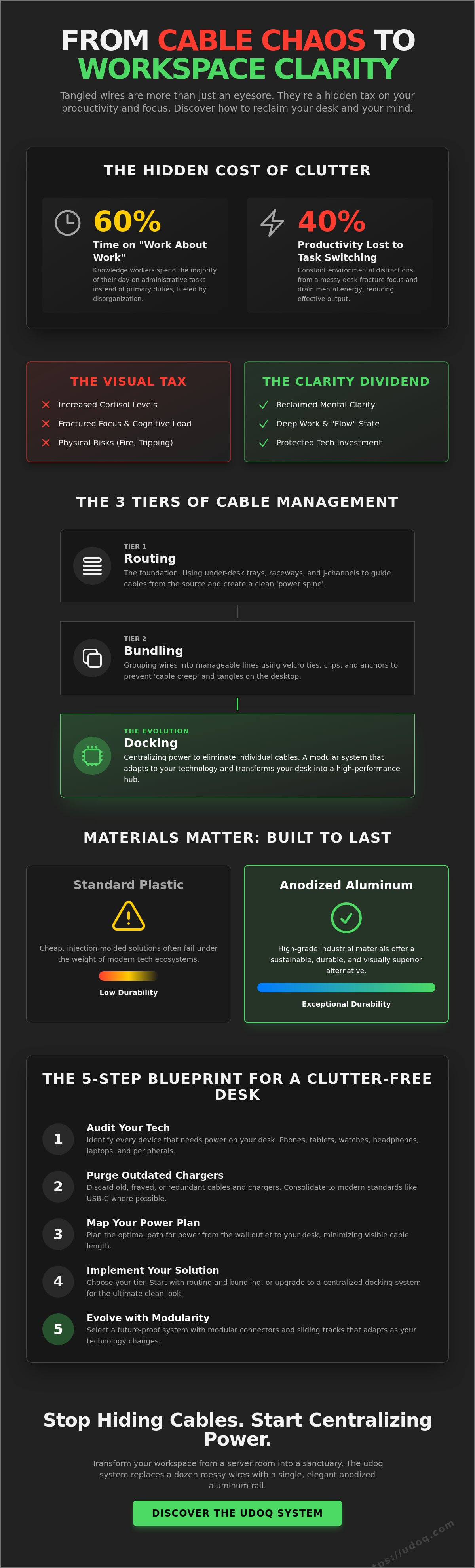
The 5-Step Blueprint for a Clutter-Free Modular Workspace
Transforming your desk requires a systematic approach. You can't just throw cable management solutions at a mess and expect it to stay organized. True order comes from architecture. By following a structured blueprint, you create a system that scales with your technology. This process moves from high level auditing to precise modular implementation. It's the difference between hiding clutter and eliminating it entirely. A well planned desk is a high performance environment.
Step 1: Audit and Purge. Start by identifying every wire on your desk. Most people find redundant cables from devices they no longer own or use. If you haven't touched a charger in the last 90 days, remove it. Step 2: Map Your Power. Locate your primary wall outlets. Plan a "power spine" that runs along the back or underside of your desk. This creates a clear, invisible path for electricity to reach your hardware without crossing your open workspace. Step 3: Centralize Charging. Stop using five separate wall bricks for five different devices. Replace them with a single, high output multi port solution that hides the bulk.
Step 4: Route and Secure. Use under desk tools for cables that never move. Your monitor, PC, and speakers should have fixed pathways. Secure these with rigid channels to prevent sagging. Step 5: Modularize the Rest. For mobile devices like phones, tablets, and e-readers, implement a sliding or adjustable dock. This allows you to adjust your setup instantly as you swap hardware or upgrade to new generations. This final step is what separates a static desk from a future proof workspace.
Auditing Your Tech: The 80/20 Rule
The 80/20 rule applies to desk clutter. Approximately 80% of your visual mess comes from 20% of your devices. These "repeat offenders" are usually the mobile gadgets you charge daily. Consolidating your USB-C, Lightning, and Micro-USB cables into a single system is the fastest way to clear space. Transitioning to a unified standard reduces the number of individual wires you need to manage and route. Read The Ultimate Guide to USB-C: One Connector to Rule Your Workspace to master this transition and simplify your tech stack.
Implementing the "One Outlet" Philosophy
The ultimate goal of a minimalist setup is powering up to 10 devices from a single wall socket. This isn't just about aesthetics; it's about efficiency. Centralizing your charging hub reduces "phantom power" draw by eliminating multiple idle transformers. Choose a power supply capable of handling tablets, phones, and watches simultaneously. This creates a clean, streamlined energy flow that originates from one point. It's the pinnacle of German engineering applied to the home office. You'll gain a sense of relief every time you sit down to work. Build your custom udoq system to achieve the perfect one-outlet setup.
The udoq Philosophy: Solving Cable Management via Modular Innovation
Most cable management solutions are reactive. They focus on hiding the mess after it has already occurred. The udoq philosophy is different. It provides a systemic, architectural foundation for your workspace. By using the udoq 250 or 400 series, you centralize your power and data lines within a single, precision milled aluminum rail. This isn't just about aesthetics; it's about engineering a permanent end to the "cable loop" problem. You stop managing wires because you have replaced them with a unified docking system.
The core of this innovation is the patented sliding track. This system allows you to move connectors freely along the length of the rail. Whether you use USB-C, Lightning, or Micro-USB, the connectors slide into place and lock securely. It's the "one for all" solution that adapts to any device brand or generation. This level of precision is the hallmark of German Engineering. It ensures that your setup remains clean even as your device collection grows. You gain the relief of a clutter free environment without sacrificing accessibility.
From Chaos to Minimalism: The udoq Transformation
Compare the traditional "cable nest" to the sleek profile of a udoq rail. A standard setup often involves five or more cables dangling from the desk edge. The udoq system consolidates these into one elegant line. For power users, the udoq 400 Premium Watch offers a dedicated space for phones, tablets, and smartwatches. If you want to maximize your workspace, you can wall-mount your charging station. This reclaims 100% of your desk surface, turning your technology into a functional piece of industrial art. It's the ultimate expression of minimalist luxury.
Sustainability Through Modularity
Modularity is the highest form of sustainability. In a world of disposable tech, udoq stands apart. When you upgrade your phone and the connector standard changes, you don't need a new dock. You simply swap a $15 connector instead of buying a new $100 station. This reduces electronic waste and protects your long term investment. It makes udoq a future proof choice that evolves with the industry. By choosing a system that lasts, you contribute to a more sustainable tech ecosystem. To see how this fits into your broader office design, read How to Create a Minimalist Desk Setup: The Ultimate 2026 Guide. This is the last of the cable management solutions you'll ever need to buy. Invest in quality. Organize your devices. Power up in style.
Master the Art of Minimalist Order
You've identified the psychological cost of chaos and mapped your path to a cleaner desk. True order isn't about temporary fixes or cheap plastic boxes. It requires a fundamental shift in how you view cable management solutions. By choosing high-grade materials and a modular architecture, you ensure your workspace remains future-proof. You stop fighting your tech and start letting it work for you. The relief of a clutter-free environment is finally within reach.
udoq is the definitive answer to modern workspace clutter. Our systems are milled from high-grade anodized aluminum and feature patented German Engineering. They're compatible with all mobile device brands, ensuring your setup adapts as quickly as your needs change. This isn't just a temporary gadget; it's a long-term investment in your productivity and environmental sustainability. It's time to reclaim your focus and eliminate the visual tax of tangled wires forever.
Explore udoq Modular Charging Stations and transform your desk into a high-performance hub today. Your most productive work starts with a clear space.
Frequently Asked Questions
What are the best cable management solutions for a standing desk?
J-channels and flexible cable spines are the most effective cable management solutions for height-adjustable desks. J-channels provide a rigid, under-desk path for stationary wires, while a flexible spine manages the vertical run to the power source. This setup prevents cable strain during the 20-inch transition between sitting and standing heights. It ensures your hardware remains secure and your aesthetic stays intact at every level.
How do I hide cables on a desk in the middle of a room?
Route all wires to a centralized under-desk tray and use a single "power spine" cord cover for the run to the floor. This groups five or more individual cables into one clean, braided line. If your desk is in an open-concept office, a weighted floor raceway protects the cables from foot traffic. It maintains a professional profile from every angle, hiding the mess from clients and colleagues alike.
Are cable management boxes worth it?
Cable management boxes are worth the investment for hiding bulky power strips and excess floor-level wiring. They act as a "catch-all" for the chaos that under-desk trays can't fully conceal. However, they don't address desktop clutter. Combine a box with a modular dock to achieve a truly seamless look. Use the box for permanent power and the dock for your daily mobile devices.
How can I organize cables without drilling into my desk?
Adhesive-backed clips and heavy-duty mounting tape allow for high-performance organization without damaging your furniture. You can mount metal trays or plastic raceways to the underside of any desk using industrial adhesives. These non-permanent cable management solutions provide the same structural integrity as screwed-in parts. They're perfect for high-end wood desks or rental office spaces where drilling isn't an option.
What is the best way to manage multiple charging cables for different devices?
Replace individual charging bricks with a single multi-port power supply and a modular docking rail. This system allows you to slide different connectors along an aluminum track to fit your specific device mix. It eliminates the need for five separate cables dangling over the desk edge. This architectural approach creates a permanent home for your tech, ensuring every device has a dedicated, clutter-free charging spot.
How do I stop my cables from falling off the back of my desk?
Use magnetic cable anchors or weighted holders to secure connectors at the desk edge. These tools provide enough resistance to keep the cable from sliding backward when disconnected. For a more sophisticated environment, a fixed docking station holds the connector in a vertical position. This removes the risk of cables falling entirely, saving you from the repetitive task of retrieving them from the floor.
Can cable management improve my computer’s performance?
Proper organization improves performance by maximizing airflow and preventing thermal buildup. Tangled nests behind a PC can increase internal temperatures, leading to hardware throttling. Industry data shows that clear cable paths can improve airflow by up to 15% in compact setups. Keeping cables organized also reduces dust accumulation, which is the primary cause of long-term hardware failure in high-end electronics.
How do I choose the right size cable sleeve?
Measure the total diameter of your cable bundle and select a sleeve that is 25% larger. This extra space allows for natural bending and the addition of future peripherals. Braided sleeves are superior to rigid plastic tubes because they expand and contract as needed. Choosing the correct size ensures a snug, professional fit that doesn't look strained or bulky on your desk.