A cluttered desk is a cluttered mind. You've spent years curating a professional workspace, yet tangled cables and slow USB ports continue to disrupt your daily focus. Choosing a second charging station for home desk use isn't about adding more gear. It's about implementing a specialized, high-performance tool for high-visibility device management.
We understand the irritation of knocking over a smartphone while reaching for your mouse or waiting hours for a tablet to charge. It's time to move beyond temporary plastic accessories. This guide shows you how to select a premium, aluminum-finished power solution that aligns with the latest 2026 standards, including Qi2.2 wireless charging and USB PD 3.1. We'll explore how modular systems like the udoq 400 POWER adapt to the new EU USB-C mandates while keeping your devices positioned for easy notification viewing. Discover how to create a future-proof workspace that values your time and your environment.
Key Takeaways
- Eliminate transition friction by establishing a dedicated hub for active devices, keeping your workflow uninterrupted.
- Prioritize heat-dissipating aluminum and modular components to ensure your hardware outlasts shifting tech standards.
- Select the ideal second charging station for home desk use by comparing the visibility of vertical docks against the footprint of wireless pads.
- Master minimalist organization with advanced cable routing techniques that hide clutter behind sleek industrial rails.
- Invest in longevity with patented German engineering that allows for seamless cable upgrades as your device ecosystem evolves.
Why You Need a Dedicated Second Charging Station for Your Home Desk
Productivity isn't just about the software you use. It's about the physical environment you create. Many professionals make the mistake of moving their phone charger from the bedroom to the office every morning. This creates "transition friction." It's a minor ritual that breaks your focus before you've even started your first task. A dedicated second charging station for home desk use eliminates this unnecessary movement. It ensures your tools are ready the moment you sit down, creating a clear boundary between rest and work.
Relying on a computer's USB port is a common but inefficient habit. Most standard ports provide limited amperage, resulting in sluggish charging speeds that can't keep up with heavy data use or video calls. Modern devices require higher wattage to reach full capacity quickly. Without a specialized hub, you're tethered to a slow trickle that leaves your battery vulnerable when you need to step away from the desk. High-quality power solutions solve this by providing direct, consistent energy to every device simultaneously.
To better understand how a centralized power hub transforms a workspace, watch this visual guide:
The Productivity Cost of Cable Chaos
Visual clutter acts as a persistent cognitive tax. Every stray wire is a micro-distraction that pulls your attention away from deep work. A dedicated dock secures your cables in place, preventing the frustrating hunt for a cord that slipped behind the furniture. Desk flow is the seamless interaction between your digital tools and physical space, unencumbered by mechanical obstacles. When your environment is orderly, your mind follows suit, allowing for longer periods of sustained concentration.
Bedroom vs. Desk: Different Power Profiles
Your bedside table and your workspace serve different masters. A bedroom station is designed for passive, overnight replenishment where speed is secondary. At your desk, charging must be active. You need your devices positioned upright. You need to see notifications at a glance without breaking your ergonomic posture or reaching for a handset. This is where wireless charging standards like Qi2 become essential for rapid, visible power delivery. Integrating a minimalist desk setup philosophy means choosing a station that prioritizes vertical visibility and industrial durability over cheap, flat plastic pads. This investment in quality reflects a commitment to a professional, high-status workspace.
Key Features to Evaluate for Your Home Office Power Hub
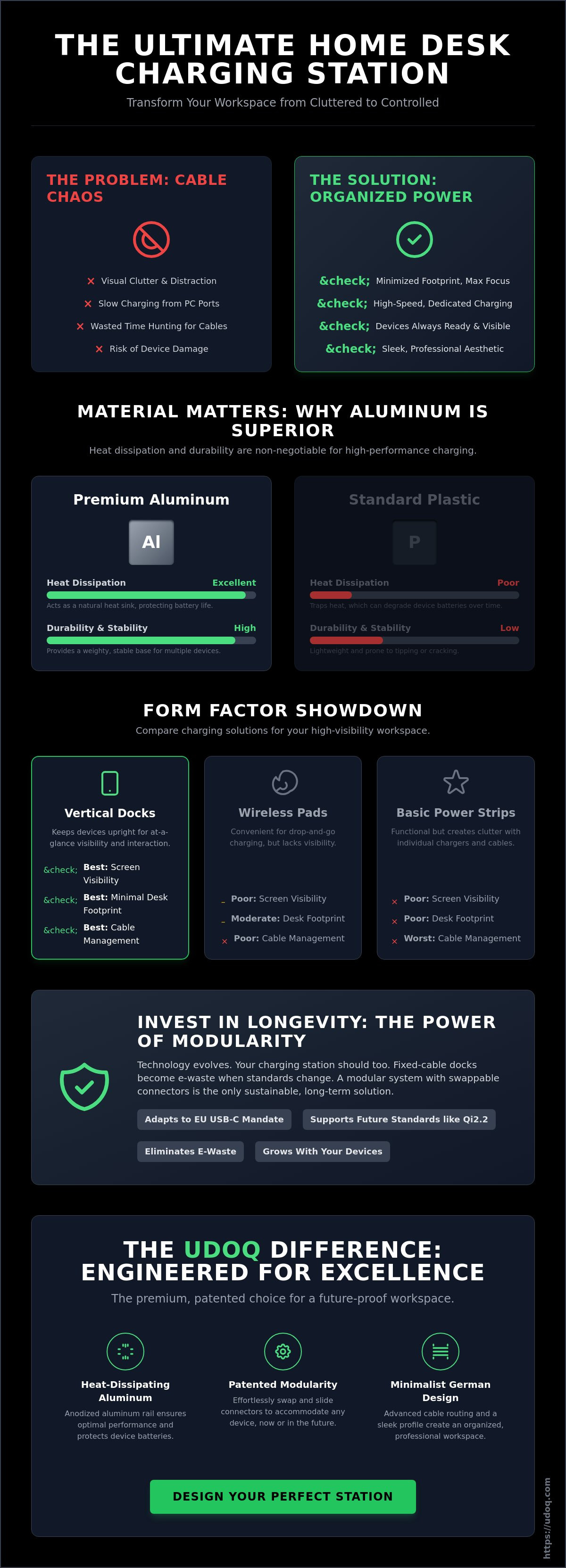
Selecting a second charging station for home desk use requires a shift in perspective. You aren't just buying a power strip. You're investing in industrial hardware that must manage heat, weight, and evolving standards. Most consumers settle for plastic or wood. These materials are poor thermal conductors. High-performance charging generates heat. If that heat isn't dissipated, it degrades your battery life. Aluminum is the superior choice. It acts as a natural heat sink, ensuring your devices stay cool while following charging safety best practices.
Port density and footprint are equally critical. You likely manage a phone, a tablet, wireless earbuds, and a smartwatch. A station that occupies too much square footage defeats the purpose of organization. Look for vertical designs. They maximize power delivery while minimizing the impact on your desk real estate. This allows you to explore modular docking systems that grow with your tech stack rather than cluttering it.
Modularity and Future-Proofing
Fixed-cable docks are a poor long-term investment. They lead directly to the "e-waste trap." When industry standards shift, fixed docks become obsolete. A modular system allows you to swap individual connectors, like moving from an L-CABLE to a C-CABLE, without discarding the entire station. This adaptability is vital as new regulations, such as the EU USB-C mandate, take effect. Check the Ultimate Guide to USB-C for technical specifications on these transitions. Sliding connector systems also provide a mechanical advantage. They adjust to accommodate various device thicknesses and protective cases, ensuring a secure fit every time.
Material Quality and Industrial Design
Aesthetics and functionality are inseparable in a premium workspace. High-grade aluminum provides a refined, minimalist look that plastic cannot replicate. Weight is a hidden performance metric. A light dock slides when you try to remove a device. You want a station with enough mass for one-handed operation. This stability is a hallmark of German engineering. It reflects a meticulous obsession with detail and craftsmanship. Choosing a station built to these standards ensures your workspace remains a professional environment. It's the difference between a temporary accessory and a permanent fixture in your home office.
Comparing Desk Charging Form Factors: Docks vs. Pads vs. Strips
Designing a professional workspace requires choosing the right form factor for your power needs. You generally have three options: vertical docks, flat pads, or multi-port power strips. A second charging station for home desk use should simplify your life, not complicate your surface area. One major advantage of a high-end rail system is the "single outlet" benefit. You can power five or more devices from one wall plug. This eliminates the nest of bulky adapters usually found under the desk, replacing them with a single, streamlined power source.
Vertical Docks: Maximizing Desk Real Estate
Vertical docks are the gold standard for space management. By aligning devices vertically, you clear significant room for your keyboard, mouse, and documents. This orientation isn't just about saving square inches. It's about professional ergonomics. Your phone or tablet becomes a functional second screen, positioned at the ideal angle for viewing notifications or attending video calls without breaking your posture. For those managing multiple ecosystem devices, the udoq 400 Premium Watch offers a specialized combination that keeps your watch and phone in a single, elegant line. This verticality ensures your tech is accessible but never in the way.
Flat wireless pads are often marketed as "drop and go" solutions. In reality, they are desk hogs. They consume valuable surface area while typically charging only one device at a time. If you need to charge three devices, you've lost a massive section of your workspace to horizontal clutter. Furthermore, alignment on flat pads can be finicky. If you don't place the device perfectly, it won't charge. Vertical docks with sliding connectors or magnetic alignments remove this guesswork entirely. They provide a secure, guaranteed connection every time you dock.
The Hidden Pitfalls of Generic Power Strips
Generic power strips are the enemy of a minimalist aesthetic. They create the "Cable Octopus" effect where wires tangle, trap dust, and create visual stress. More ports don't equal more order; they usually lead to more chaos as cables sprawl across your desk. Reliability and safety are also major concerns. Many uncertified multi-port chargers found on discount sites lack the sophisticated power management circuitry required for expensive electronics. According to independent lab tests, performance and charging speeds vary wildly between different form factors and brands. A rail-based charging station provides a structured, safe, and professional alternative. It reflects a commitment to quality and ensures your home office remains a high-productivity environment.
Designing the Ultimate Minimalist Desk Charging Setup
Visual order is a prerequisite for professional performance. A second charging station for home desk use shouldn't just provide power; it should conceal the complexity of your tech. Most setups fail because they treat cables as an afterthought. A rail-based system allows you to route every cord through internal channels, hiding the clutter behind a sleek aluminum profile. This creates a clean horizon on your desk, allowing your mind to focus on the task at hand rather than the tangle of wires.
Placement is a strategic decision. Consider your dominant hand and your workflow. If you're right-handed, placing the station on the left side of your desk keeps your primary workspace open for mouse movement. If you frequently use a tablet for reference, position the dock so the screen aligns with your primary monitor. Coordination is key. Match the industrial finish of your station with your monitor arms and desk mats. This level of detail transforms a collection of gadgets into a cohesive, high-status environment.
Ergonomics and Device Accessibility
Angle and stability define the user experience. Set your dock at a precise angle to facilitate FaceID unlocking without needing to touch the phone. This keeps your hands on the keyboard and your momentum high. For the busy professional, one-handed docking and undocking is non-negotiable. You need a station with enough mass to remain stationary when you grab your phone to take a call. Frictionless charging encourages better battery habits by making the act of docking an effortless, automatic reflex at the end of every session.
Integrating Smartwatches and Accessories
Small devices often create the most clutter. A dedicated spot for an Apple Watch or Galaxy Watch eliminates the "charger dangle" that plagues most home offices. By securing these accessories to a fixed point on the rail, you maintain a consistent, organized aesthetic. AirPods and other peripherals also require a designated home to prevent them from getting lost under papers or hardware. A modular approach ensures every item has its place. Explore the full range of modular charging stations to find the configuration that matches your personal device ecosystem. Maintenance is a simple matter of a weekly wipe with a microfiber cloth to keep the aluminum finish pristine. A well-maintained hub is a long-term investment in your workspace. Choose a professional charging solution that reflects your commitment to quality.
Why udoq is the Premium Choice for Your Second Station
True innovation is often found in the details. The udoq rail system is the result of patented German engineering, designed to solve the persistent problem of tech clutter. Choosing a second charging station for home desk use shouldn't mean adding another generic plastic hub to your environment. Our system replaces the chaos of ten different wall adapters with a single, elegant power source. It's a professional solution for those who value both aesthetic order and technical precision.
Sustainability is built into our design philosophy. Most consumer electronics are designed for obsolescence, but udoq is built for longevity. You buy the aluminum rail once. As your devices evolve, you simply swap the internal cables. This modularity ensures your station remains relevant whether you use a C-CABLE or an L-CABLE. Unlike wood alternatives that degrade or plastic that cracks, our high-grade aluminum is a permanent investment in your workspace.
Engineered in Germany, Built for Longevity
Our rails are milled from 4mm thick aluminum. This provides the weight necessary for one-handed operation and the durability to last a lifetime. The system adapts to any brand, including Apple and Samsung, providing a universal utility that competitors cannot match. It serves as a sophisticated premium iPhone charger alternative that keeps your device visible and accessible. This is industrial design that respects your time and your environment.
The udoq 250 is the ideal choice for a secondary desk setup. Its compact 250mm width provides ample space for a smartphone, a tablet, and a smartwatch without dominating your surface area. It delivers the same high-performance power as our larger models in a footprint optimized for minimalist home offices. You gain a high-productivity hub while maintaining the clean, open feel of your desk.
Ready to Declutter Your Workspace?
The shift from cable chaos to organized power is a fundamental upgrade for any professional. A tidy desk reduces cognitive load and allows for deeper focus. Before you finalize your setup, consider this checklist:
- Identify the number of active devices you use daily.
- Choose a rail size, like the udoq 250 or udoq 400, that fits your available space.
- Select the specific cables and adapters for your current tech stack.
- Plan your placement for optimal notification visibility.
Stop settling for temporary fixes. Invest in a system that evolves with your technology. Build your custom udoq station now at udoq.com and transform your home office into a high-performance environment.
Elevate Your Professional Workspace
A productive environment is built on intentional choices. Integrating a second charging station for home desk use is more than a convenience; it's a commitment to a clutter-free, high-performance workflow. By choosing vertical alignment over horizontal chaos, you regain valuable desk real estate and keep your essential tools within sight. This shift in organization transforms your office from a collection of gadgets into a unified, high-status command center.
Quality and longevity define a true professional investment. Our patented modular design ensures your charging hub adapts as technology standards evolve, while precision milled aluminum provides the necessary thermal management your devices require. Engineered in Germany, udoq is compatible with 100% of mobile brands, offering a universal solution that far outlasts disposable plastic alternatives. You don't need more cables; you need a better system.
It is time to replace cable frustration with industrial elegance and mechanical precision. Design your perfect desk charging station at udoq.com today. Your workspace deserves the clarity and efficiency of professional organization. Build a desk that reflects your standards.
Frequently Asked Questions
Can I use my existing cables with a desk charging station?
Most premium stations require proprietary or specialized cables to ensure a secure fit within the housing. The udoq system uses specifically engineered C-CABLE and L-CABLE connectors that slide into the aluminum rail. This mechanical precision allows for one-handed docking and undocking. Standard third-party cables often lack the necessary shielding and head dimensions to function within a minimalist rail system.
Is it better to have a vertical dock or a flat wireless pad for a home office?
Vertical docks are the superior choice for professional productivity. They occupy significantly less surface area and position your devices at an ergonomic angle for FaceID and notification viewing. A second charging station for home desk use should act as a functional stand, not just a power source. Flat pads consume valuable desk real estate and often suffer from finicky magnetic alignment issues.
Will a second charging station damage my phone's battery over time?
Quality charging stations protect your battery through intelligent power regulation. Heat is the primary cause of battery degradation, which is why material choice matters. Aluminum rails dissipate heat much more effectively than plastic or wood. Using a system like the udoq 400 POWER ensures your devices stay cool while following modern charging safety standards, preserving your hardware's long-term health.
How do I hide the cables behind my desk charging station?
Effective cable management is built into the architecture of a premium dock. The udoq rail features a hollow internal channel where all connectors are routed and concealed. This design eliminates the visual clutter of tangled wires and keeps the "cable octopus" off your desk. All power lines exit from a single point, allowing you to maintain a clean, professional workspace with minimal effort.
Can a modular charging station support both Apple and Android devices simultaneously?
Modular systems offer universal utility by allowing you to mix and match different connectors on the same rail. You can position an L-CABLE for an iPhone next to a C-CABLE for a Samsung tablet without any compatibility issues. This flexibility is essential for multi-device households. It ensures your second charging station for home desk remains useful even if you switch mobile ecosystems in the future.
What is the best size charging station for a small home desk?
The udoq 250 is the optimal size for compact workspaces. At 250mm wide, it provides ample room for two to three devices while leaving your desk open for other tasks. If you manage more hardware, the udoq 400 offers expanded capacity without a bulky footprint. Both models prioritize verticality to ensure you get the most power possible out of every square inch of desk space.
Do desk charging stations support fast charging for tablets?
High-performance stations equipped with dedicated power supplies support the wattage required for tablet fast charging. The udoq POWER series is engineered to deliver consistent, high-speed energy to multiple devices at once. This is a significant upgrade over standard computer USB ports, which often lack the amperage to charge a large tablet efficiently while you work.
Is aluminum better than plastic for a desk dock?
Aluminum is the gold standard for industrial design and thermal performance. It is infinitely more durable than plastic and provides the weight necessary for a stable, non-slip docking experience. Plastic acts as an insulator that traps heat, potentially slowing down charging speeds. Milled aluminum acts as a heat sink, ensuring your station remains a permanent, high-status fixture in your home office.