What if your most powerful productivity tool is the one you currently mistake for a simple charging cable? It's easy to feel frustrated when a premium laptop still requires a messy web of adapters to function. You likely recognize that 85 percent of modern workspaces suffer from cable creep, where the promise of a minimalist desk is buried under mismatched cords. The confusion between standard USB-C and the high-performance Thunderbolt interface often leads to expensive mistakes and throttled data speeds.
You deserve a workspace that reflects the precision of German engineering. This guide clarifies the technical complexities of the latest standards to help you reclaim your desk. We'll show you how to transform chaos into a seamless, high-speed environment. Discover how to maximize the 120Gbps potential of the newest hardware and build a future-proof setup. It's time to replace clutter with the relief of an organized, high-status office. Master the modularity of your devices and power up in style.
Key Takeaways
- Distinguish between the physical USB-C connector and the high-performance "brain" that powers your most demanding professional peripherals.
- Explore the 120Gbps bandwidth potential of thunderbolt 5 to ensure your 2026 workstation is fully prepared for elite 8K workflows.
- Eliminate cable chaos by implementing a streamlined "Hub and Spoke" model that consolidates power, data, and video into one elegant connection.
- Pair your high-speed devices with modular German engineering to create a future-proof workspace that prioritizes both order and innovation.
What Is Thunderbolt? Defining the 'One-Cable' Standard
Thunderbolt is the elite hardware interface designed through a strategic partnership between Intel and Apple. It serves as the definitive solution for high-speed data transfer and video output. This technology consolidates power delivery, massive data pipelines, and multiple 8K display support into a single, elegant connection. It eliminates the chaos of proprietary cables. While many connectors look identical, the Thunderbolt (interface) carries a strict certification. This guarantee ensures your hardware maintains peak performance. Generic USB-C cables often fail under high load; Thunderbolt does not. Certification is the invisible boundary between professional tools and consumer toys. Intel maintains rigorous testing for every Thunderbolt device to ensure that power delivery and data speeds never fluctuate. When you see the lightning bolt icon, you know the cable meets a specific, high-tier standard. It eliminates the guesswork associated with generic USB-C variants that often throttle speeds or fail to charge laptops. The system also supports daisy chaining. This allows you to link up to six devices in a linear sequence. You only need one port on your computer to power an entire ecosystem of drives and monitors. It reduces desktop cable mess significantly. To better understand how this technology differs from standard connections, watch this helpful comparison:The Evolution of Speed: From v1 to Thunderbolt 5
The journey began with the original Mini DisplayPort version in 2011. It later transitioned to the universal USB-C shape. By 2026, Thunderbolt 5 has become the undisputed benchmark for creative professionals. It provides the bandwidth required for real-time 8K video editing and massive file transfers. Thunderbolt 5 triples the previous generation's capacity, moving from 40Gbps to a staggering 120Gbps of Bandwidth Boost for high-intensity video workflows.Why Design Matters in Connectivity
High-end technology requires a physical form that matches its capability. Premium interfaces deserve premium hardware like anodized aluminum. This material choice reflects the precision of the electronics inside. It mirrors the core of German engineering: precision, durability, and functional beauty. Technical reliability creates emotional relief. A setup that just works brings peace to a busy workday. You can focus on your craft instead of troubleshooting connections. Order is the foundation of productivity. A minimalist desk setup often starts with high-quality charging stationsThunderbolt vs. USB-C: Understanding the Difference
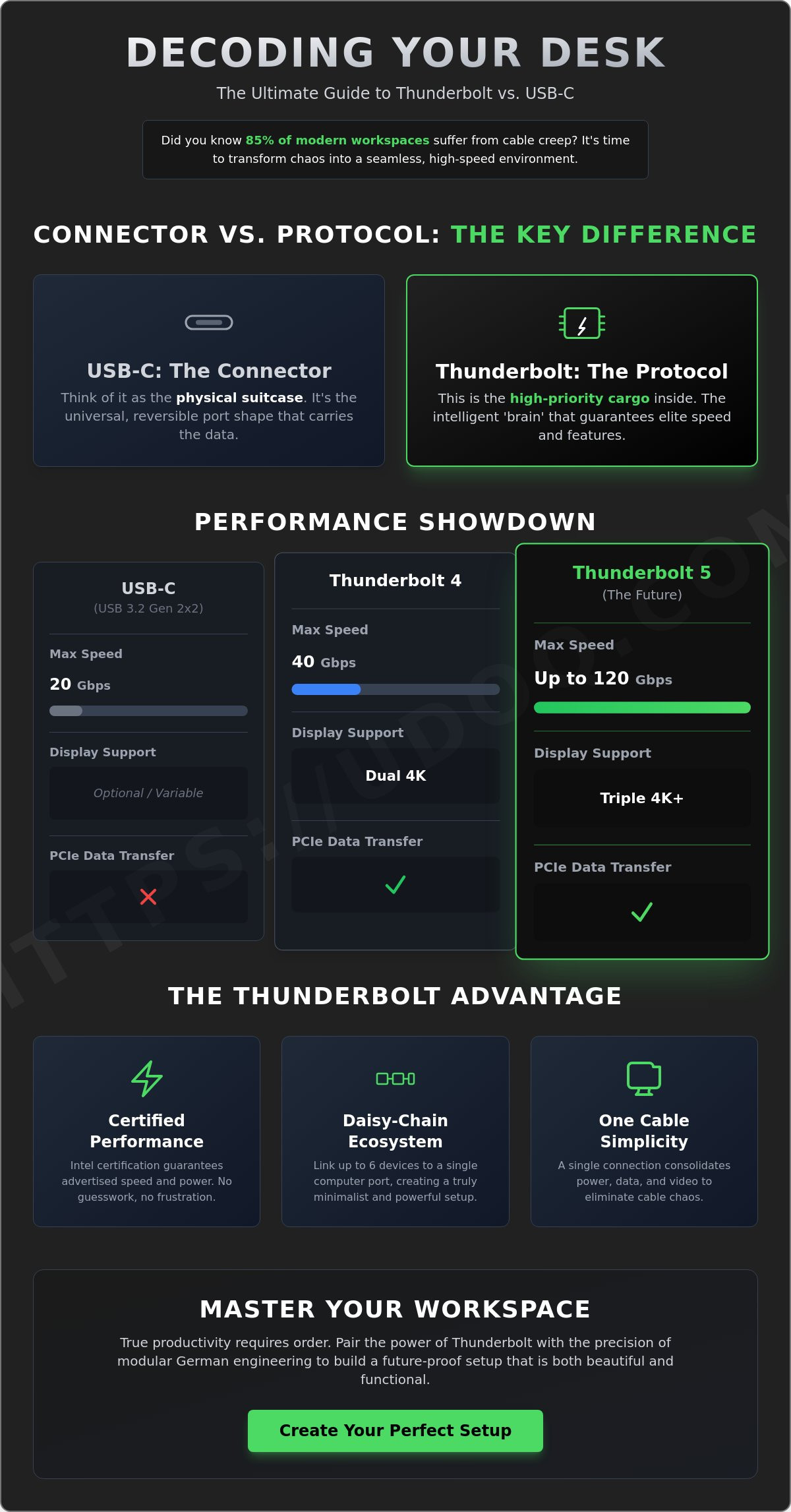
Confusion often surrounds these two terms. It's a simple distinction to master. USB-C refers to the physical shape of the connector. It's the hardware. Thunderbolt is the protocol. It's the intelligence driving the data. Think of USB-C as the suitcase. It's the vessel that travels between devices. Thunderbolt is the high-priority cargo inside that suitcase. While every Thunderbolt port utilizes the USB-C shape, many USB-C ports lack the high-performance "brain" of the thunderbolt standard.
USB-C uses "Alt Modes" to function. These modes allow the cable to carry different signals like video or power. Standard USB-C ports make these features optional. This leads to consumer frustration when a cable doesn't support a monitor. Thunderbolt removes this guesswork. It mandates support for high-resolution displays and fast data transfer. It's a guarantee of performance, not a possibility.
The Technical Comparison Table
Precision requires data. This table outlines the performance gap between standard USB-C and the latest Thunderbolt iterations. These metrics represent the minimum requirements for certification as of 2026.
| Feature | USB-C (USB 3.2) | Thunderbolt 4 | Thunderbolt 5 |
|---|---|---|---|
| Max Speed | 20 Gbps | 40 Gbps | 80 - 120 Gbps |
| Display Support | Optional | Dual 4K / Single 8K | Triple 4K / Dual 8K |
| Min. Power Delivery | Variable | 15 Watts | 15 Watts |
Thunderbolt requires PCIe data transfer. This feature is non-negotiable. It allows external GPUs and NVMe SSDs to communicate directly with your processor. Without this, professional workflows stall. Always look for the lightning bolt icon on your hardware. It signifies a certified thunderbolt connection and ensures you're getting the bandwidth you paid for.
Compatibility and Cross-Platform Use
Modern connectivity should be effortless. Thunderbolt 4 and Thunderbolt 5 operate seamlessly across Mac, Windows, and Linux. This cross-platform reliability is a hallmark of German engineering philosophy. It prioritizes the user experience over proprietary barriers. Backward compatibility is equally robust. You can plug a Thunderbolt 3 drive into a Thunderbolt 5 port without hesitation. The system scales to the fastest common speed automatically.
Cable quality is the final piece of the puzzle. A weak cable creates a bottleneck in a premium system. Using a high-quality udoq C-CABLE ensures your signal remains pure and your desk stays clutter-free. Proper cables prevent data loss and heat buildup during intensive transfers. Once your connections are secure, you can organize your devices with a modular docking station to complete your professional environment.
Thunderbolt 5 in 2026: Do You Need the Extra Power?
By 2026, the connectivity landscape has shifted toward extreme efficiency. Thunderbolt 5 is the catalyst. It offers a standard 80Gbps of bi-directional bandwidth; however, its true strength lies in the Bandwidth Boost feature. This technology dynamically reconfigures data lanes to provide up to 120Gbps for display-heavy outputs. It's a 300% increase over the 40Gbps limits of previous generations. For creators handling 8K uncompressed video or complex 3D environments, this overhead isn't a luxury. It's a requirement.
Power management has also evolved. The 240W Power Delivery standard eliminates the need for proprietary charging bricks. A single cable now powers high-performance laptops while transferring data at peak speeds. This reduces desk clutter and streamlines your workspace. If you're a video editor, a competitive gamer using 540Hz refresh rates, or a power user managing three 4K displays, the transition to thunderbolt 5 is logical. It ensures your hardware remains relevant as software demands grow.
Future-Proofing Your Workspace
Investing in the latest thunderbolt hardware prevents obsolescence through 2028. While many users still find value in the foundations laid by What Is Thunderbolt 4?, the new generation supports PCIe Gen 5 external storage. This allows for data transfer speeds exceeding 10GB/s. It's the ideal architecture for 8K ultra-wide monitors and massive architectural datasets. You're building a system that scales with the next three years of innovation. Choose modularity to keep your desk organized as standards advance.
The Security Advantage
Professional environments require more than just speed. They demand integrity. Intel uses VT-d based Direct Memory Access (DMA) protection to secure every port. This hardware-level defense prevents unauthorized devices from accessing your system memory during a physical connection. In shared or open offices, this protection is vital. Professionals choose this standard because it combines elite performance with a locked-down data environment. It's the hallmark of German-inspired engineering: precision, power, and absolute reliability. Secure your data while you power your ambition.
The Minimalist Advantage: Eliminating Cable Chaos
Clutter isn't just an eyesore. It's a mental tax. The most common complaint among modern professionals is the "cable jungle" that inevitably grows behind every monitor. You have too many cables and never enough ports. Thunderbolt solves this by transforming your workspace into a refined hub and spoke system. Your laptop is the spoke. The Thunderbolt dock is the hub. One single connection delivers everything you need to be productive.
This single cable replaces a bulky power brick, an HDMI cord, and a tangled USB hub. It carries up to 240W of power and enough data to run multiple high-resolution displays simultaneously. This efficiency is the core of the udoq philosophy. We value sophisticated organization and the relief that comes with a clean environment. Our German engineering ensures that your desk remains a place of focus, not a collection of plastic wires. Order brings clarity. Chaos brings distraction.
- Power Delivery: Charge your laptop at full speed without a dedicated power adapter.
- Video Output: Drive dual 8K monitors through one port.
- Data Transfer: Move massive files at speeds up to 120Gbps.
- Peripheral Support: Connect keyboards, mice, and audio interfaces via a single link.
Creating a Productive Desk Setup
Moving your laptop from a bag to a desk should be instant. Thunderbolt makes this a reality. You plug in one cable and your entire desktop environment wakes up in less than two seconds. This immediate transition reduces visual noise. A 2011 study from the Princeton University Neuroscience Institute found that physical clutter in your surroundings competes for your attention. By eliminating the mess, you increase your brain's capacity to focus on deep work. For those looking to extend this order to their mobile devices, explore our Ultimate Guide to Choosing a Charging Station for more professional organization strategies.
Sustainable Tech Habits
Modularity is the best defense against electronic waste. Cheap, single-use adapters are designed to be replaced every two years. Thunderbolt is built for longevity. Its massive bandwidth ensures your hardware remains relevant for the next decade of innovation. You buy once. You use it for years. This "one for all" approach is a signature of udoq’s patented design. We create tools that adapt to changing standards so you don't have to replace your entire setup every time you buy a new device.
Experience the relief of a perfectly organized desk. Organize your workspace with udoq today.
Integrating High-Speed Tech with the udoq Modular System
High-performance connectivity requires more than just raw speed. It demands a workspace that matches the power of your hardware. While thunderbolt technology manages your data at 80Gbps or higher, udoq manages your physical environment. It's the essential bridge between your high-speed peripherals and your essential mobile devices. This system doesn't just hold your gear; it integrates it into a unified, professional workflow. Order meets innovation.
The udoq 400 stands as the definitive companion for any modern MacBook or PC setup. It utilizes high-grade anodized aluminum to mirror the aesthetic of premium laptops. This isn't a plastic accessory. It's a piece of German engineering designed to last. The patented sliding track allows you to move connectors freely. You can swap old cables for the latest USB-C or Thunderbolt-compatible versions in seconds. Your investment stays relevant even as standards evolve. It's sustainable, elegant, and functional.
- Patented sliding connector system for total flexibility.
- Future-proof modularity for all mobile devices.
- Premium anodized aluminum construction.
- Sustainable design that reduces electronic waste.
The udoq system complements the mobile side of your tech equation. While your laptop handles the heavy lifting, your phone, tablet, and smartwatch need a dedicated space. udoq provides that space with technical precision. It eliminates the friction of searching for cables. It turns a chaotic desk into a streamlined command center. This is the relief of a clutter-free environment.
The Perfect Pair: Thunderbolt Docks and udoq Rails
Picture a desk where every cable has a purpose. A single thunderbolt dock powers your dual 6K monitors and external NVMe SSDs. Next to it, an udoq rail organizes your mobile ecosystem. It hides the chaotic tangle of charging cables behind its sleek profile. This combination creates a "one-plug" lifestyle. You get the visual peace of an organized desk without sacrificing connectivity. Explore the variety of udoq charging stations to complete your professional desktop architecture.
Final Steps to a Seamless Workspace
Start by auditing your current hardware. Identify which devices support the latest high-speed standards and which need a permanent home for charging. Choose a central anchor for your desk. A high-quality dock handles the data. An udoq rail handles the order. Don't settle for a messy workspace that drains your productivity. Build a modular, high-speed environment that reflects your standards. Start building your workspace today.
Master Your Digital Environment
The evolution of thunderbolt technology in 2026 has redefined what's possible for your desktop. With the arrival of Thunderbolt 5, you now have access to 80 Gbps of bi-directional bandwidth and up to 120 Gbps with Bandwidth Boost. This performance ensures your high-resolution displays and external storage operate without a single bottleneck. It's about more than just raw speed; it's about reclaiming your space from the clutter of legacy cables. You've seen how this standard bridges the gap between high-end performance and minimalist aesthetics.
A high-performance setup deserves a foundation that matches its technical specs. Our system utilizes patented German engineering to provide a stable, organized hub for every device you own. Built from sleek anodized aluminum, the udoq charging station is a future-proof modular design that adjusts as your hardware evolves. Don't let tangled cords disrupt your focus or ruin your professional aesthetic. Invest in a solution that values your time and your desk space equally.
Discover the Modular udoq System for Your Minimalist Workspace and experience the relief of a perfectly ordered office. Your most productive days are ahead of you.
Frequently Asked Questions
Is Thunderbolt the same as USB-C?
No, USB-C refers to the physical connector shape, while Thunderbolt is the high-performance technology standard that uses that shape. Every Thunderbolt port uses the USB-C interface, but not every USB-C port supports the 120Gbps speeds or advanced video protocols. Think of USB-C as the vehicle and the protocol as the high-speed engine inside. This distinction is vital for maintaining a professional, efficient workspace without technical bottlenecks.
Do I need a special cable for Thunderbolt?
Yes, you must use a certified cable to reach the full 80Gbps or 120Gbps potential of the standard. Look for the distinct lightning bolt icon on the connector housing to verify its authenticity. Standard USB-C cables often lack the internal wiring for high-speed data and might throttle your transfer to 480Mbps. High-quality, certified cables ensure your modular system operates with the technical precision udoq users expect from premium German engineering.
Can I use a Thunderbolt 4 device with a Thunderbolt 5 port?
Yes, the protocol is designed with full backward compatibility for all previous generations. Your existing Thunderbolt 4 or 3 peripherals will connect seamlessly without requiring new hardware or adapters. While they'll operate at their original 40Gbps limit, the connection remains stable and reliable. This future-proof design ensures your investment in high-end hardware remains relevant as you transition to 2026 connectivity standards. It's a sustainable approach to tech integration.
Is Thunderbolt 5 worth it in 2026?
Yes, the upgrade to Thunderbolt 5 is essential for professionals managing 8K video files or 240Hz refresh rate displays. The new 120Gbps Bandwidth Boost provides a 300 percent increase over the previous 40Gbps standard. This allows you to run three 4K monitors at 144Hz through a single connection. If your workflow involves transferring 1TB of data daily, the time saved justifies the upgrade. It's the ultimate solution for a high-status environment.
Does Thunderbolt work with the latest iPhones?
iPhones with USB-C ports are compatible with Thunderbolt cables but don't utilize the full protocol. These devices, starting with the iPhone 15 Pro, use USB 3.2 Gen 2 speeds of 10Gbps for data transfers. You can use a high-speed cable to charge your iPhone or sync files, but you won't see the 120Gbps speeds. This compatibility ensures you can use one cable for all mobile devices, effectively reducing desktop chaos.
Can Thunderbolt charge my laptop?
Yes, most ports support Power Delivery 3.1 for up to 240W of charging capacity. This is enough power for high-end workstations and gaming laptops that previously required bulky proprietary bricks. By consolidating power and data into one cable, you eliminate unnecessary clutter. It's a refined way to keep your professional gear powered while maintaining the minimalist aesthetic of a sophisticated workspace. Power up in style with a single connection.