What if your most expensive device's lifespan was being cut short by something as simple as a daily charging cable? Industry repair data indicates that physical port wear accounts for nearly 25% of hardware failures in premium electronics. You've likely felt the frustration of a loose connection or the visual chaos of tangled wires. Integrating a magnetic adapter into your setup solves these friction points instantly while maintaining the sleek aesthetic of your professional workspace.
It's time to demand more from your charging routine. This guide shows you how to protect your device ports while achieving high-speed power delivery through a seamless, snap-to-charge interface. We'll show you how to bridge the gap between modular docking and high-performance power. We'll also explore the technical precision required to build a unified, clutter-free ecosystem for your iPhone, Android, and tablets. Discover how modular innovation and refined German engineering can finally eliminate cable clutter and future-proof your environment for 2026 and beyond.
Key Takeaways
- Protect your premium devices by eliminating mechanical stress on sensitive USB-C and Lightning ports.
- Decode the technical configurations required for high-speed power delivery and secure data transfer.
- Evaluate the distinct performance differences between a magnetic ring and a magnetic adapter to optimize your charging setup.
- Master the professional implementation of a centralized power source to achieve a clutter-free, minimalist workspace.
- Discover how patented German engineering and modular rails create a future-proof docking solution for any device ecosystem.
What is a Magnetic Adapter and Why Does Your Workspace Need One?
A magnetic adapter is a precision-engineered interface designed to protect your hardware and streamline your workflow. In 2026, these tools have evolved into two primary categories. First, magnetic cable connectors utilize a small tip that remains semi-permanently inside your USB-C or Lightning port. Second, magnetic ring adapters facilitate inductive alignment for wireless charging. Both versions aim to replicate the seamless MagSafe experience across every device in your ecosystem, regardless of the manufacturer.
To better understand this concept, watch this helpful video:
The core benefit of a magnetic adapter is the radical reduction of mechanical stress. Standard ports are fragile. By removing the need for daily friction, you extend the life of your expensive electronics. We are currently seeing a transition from loose, messy cable tips toward integrated docking solutions. Modern professionals now prefer fixed interfaces that offer the "relief" of an organized, clutter-free environment. This shift turns a simple charging task into a sophisticated docking ritual.
The Problem with Traditional Charging Cables
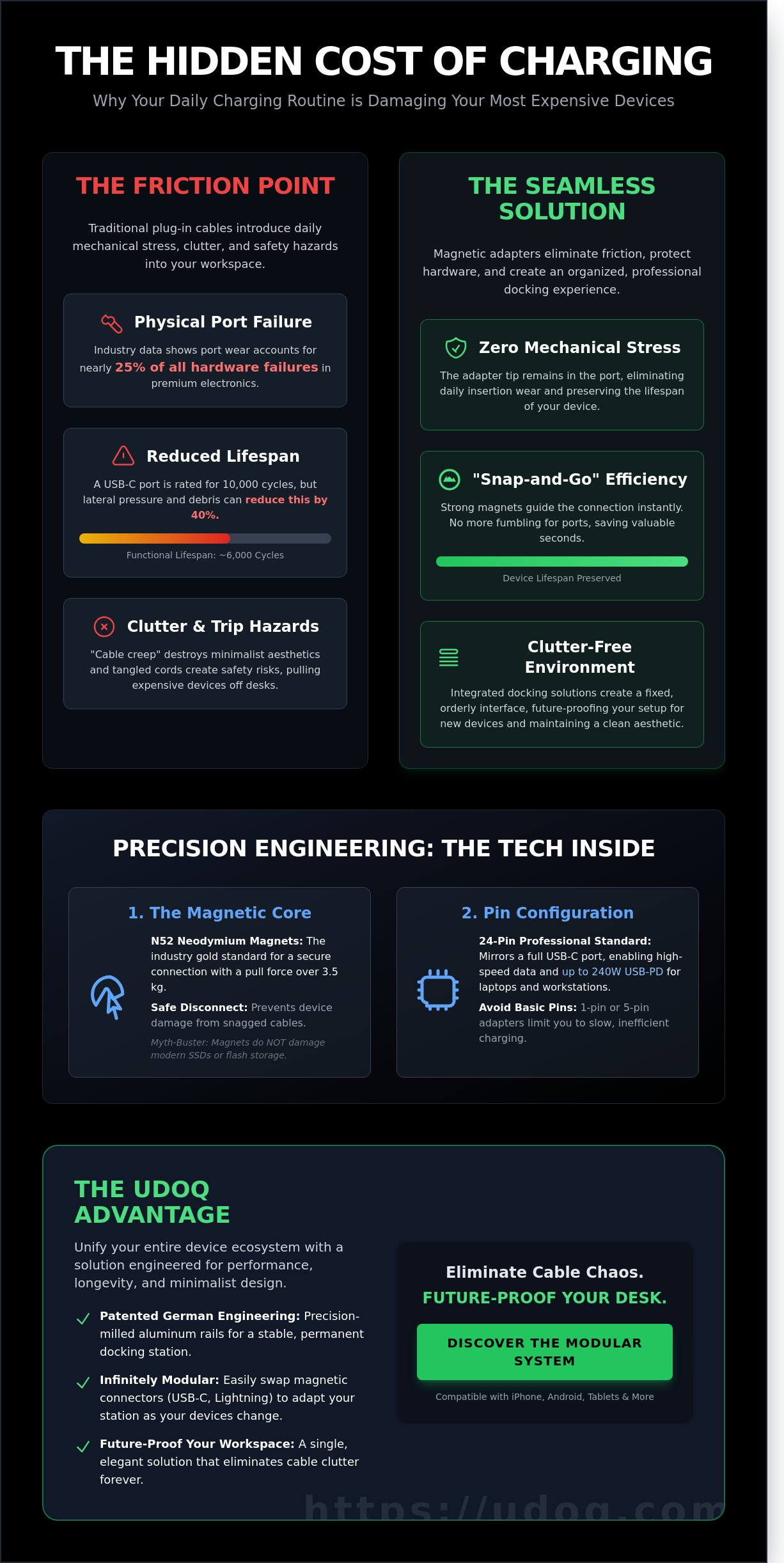
Port degradation is the silent killer of mobile electronics. A standard USB-C port is rated for approximately 10,000 insertion cycles. However, lateral pressure and microscopic debris often reduce this functional lifespan by 40 percent. Beyond hardware failure, traditional cables cause "cable creep." This is the slow accumulation of tangled wires that destroys minimalist desk aesthetics. Safety is also a factor. Traditional cords create trip hazards that can pull a $1,200 smartphone off a desk in a split second. Manual plugging is an outdated friction point in a high-speed world.
How Magnetic Adapters Solve the Clutter Crisis
Efficiency defines the sophisticated workspace. A magnetic adapter provides instant alignment through a "snap-and-go" mechanism. You don't hunt for the port; the magnets guide the connection for you. This saves valuable seconds during a busy workday. These adapters also provide universal compatibility. They bridge the gap between Apple and Android ecosystems, allowing one cable to serve every device. For those who value permanent order, premium charging stations integrate these magnetic principles into a stable, anodized aluminum rail. This approach future-proofs your setup. You simply swap a connector rather than replacing your entire desk infrastructure when new devices arrive.
The Technology Behind Magnetic Power Delivery and Data
Precision engineering defines the modern magnetic adapter. It is not a simple bridge between cables. It is a sophisticated interface designed to protect your device's internal port from mechanical wear. A high-quality adapter utilizes N52 neodymium magnets, the industry gold standard. These magnets provide a secure connection with a pull force often exceeding 3.5 kilograms, yet they disconnect safely if a cable is snagged. This prevents the catastrophic "laptop flight" from a desk. Contrary to old tech myths, these magnets do not damage modern electronics. Solid-state drives (SSDs) and flash storage are non-magnetic. They remain completely unaffected by the magnetic fields used in charging hardware.
The pin configuration determines the adapter's capability. A basic 1-pin or 5-pin setup typically limits you to slow charging. For professional environments, a 24-pin configuration is essential. This mirrors the full density of a USB-C port, allowing for bidirectional power and high-speed data. Modern standards like USB Power Delivery (USB-PD) allow these connectors to handle 60W, 100W, or even 240W of power. This ensures your MacBook Pro or high-performance workstation stays charged under heavy loads without the risk of port degradation.
Heat Management and Charging Efficiency
Cheap adapters use inferior alloys that create electrical resistance. This resistance generates heat, which can throttle charging speeds or damage batteries over time. Premium connectors utilize gold-plated contacts. Gold resists oxidation and ensures a low-resistance path for current. The physical design also matters. Consistent contact pressure ensures a stable bridge for electrons, which directly prevents the fluctuating resistance that leads to overheating. When you use a well-engineered system, the connector remains cool to the touch even during a 100W fast-charge cycle.
Data Transfer vs. Power-Only Adapters
Not every magnetic adapter is built for data. You must distinguish between "charging-only" models and those supporting 40Gbps for Thunderbolt compatibility. High-speed adapters require sophisticated shielded housing to prevent electromagnetic interference from slowing down your file transfers. However, charging-only adapters have a specific use case. They are often safer for public charging stations because they lacks the data pins required for "juice jacking" or unauthorized data access. For your home office, prioritize 24-pin modularity to keep your workspace future-proof. You can organize your devices using professional-grade docking solutions that integrate these technical standards seamlessly.
- N52 Neodymium: Maximum grip with a small footprint.
- 24-Pin Array: Supports 4k/6k video output and 40Gbps data.
- Gold Plating: Prevents the 0.1% efficiency loss caused by surface oxidation.
- Shielded Casing: Essential for maintaining signal integrity in dense cable environments.
Magnetic Ring vs. Magnetic Cable Adapter: Which Should You Choose?
Choosing the right magnetic adapter defines your workspace efficiency. The decision rests on whether you prioritize wireless versatility or raw power delivery. Both solutions eliminate cable strain; however, they serve distinct roles in a professional ecosystem. A magnetic ring focuses on the accessory experience. A cable adapter prioritizes high-speed data and charging stability. Understanding these technical differences prevents port wear and optimizes your daily workflow.
The Case for Magnetic Ring Adapters
Magnetic rings bring MagSafe functionality to any device. They're essential for Android users or owners of legacy hardware. These thin, adhesive rings create a secure attachment point for magnetic wallets, car mounts, and stands. Precision is vital during installation. Misaligning the ring by just 3mm can reduce Qi charging efficiency by 25% or cause unnecessary heat buildup. Ensure the ring sits exactly over the device's induction coil for peak performance. This setup is perfect for users who frequently transition from a desk to a vehicle. It creates a seamless, one-handed mounting experience that standard clips cannot match.
The Case for Magnetic Tip Adapters
For high-performance hardware, the magnetic tip adapter is superior. It transforms a standard USB-C cable into a quick-release system. This is the professional choice for MacBooks, gaming consoles, and iPads. These adapters often utilize Hybrid power and data connectors to maintain 100W power delivery while protecting the internal port. The small tip stays inside the device. It acts as a permanent barrier against lint and debris. It also prevents catastrophic damage if someone trips over your cable. The connection breaks away safely. It's a durable, future-proof solution for expensive mobile workstations.
Case compatibility remains a primary concern for any magnetic adapter. Most magnetic rings require a flat surface and struggle with protective shells thicker than 2mm. In contrast, magnetic cable tips need a precise cutout in the device shell to seat fully. Always verify the port clearance before installation to ensure a flush fit. For those building a permanent home base, integrating these tools with premium charging stations ensures your desk remains organized. Your devices stay powered without the clutter of traditional wires. Choose the ring for accessory mobility. Choose the tip for power and port longevity.
How to Implement a Professional Magnetic Docking Setup
Transforming a cluttered workspace into a high-performance environment requires more than just buying gadgets. It's about engineering a system that works. Follow these steps to achieve a seamless, professional setup that reflects German engineering standards.
Step 1: Audit your hardware. Catalog every device. A typical professional in 2026 uses 3.4 devices on average, ranging from USB-C tablets to legacy Lightning peripherals. Identify the exact port requirements for each to ensure you have the correct magnetic tips.
Step 2: Select a high-output power source. Don't settle for standard wall bricks. Choose a centralized hub that delivers at least 100W of total power. This ensures every connected magnetic adapter receives sufficient current for fast charging without the risk of overheating or slow data transfer.
Step 3: Integrate a modular rail. Loose cables are the enemy of productivity. A patented aluminum rail system allows you to slide your adapters into place, keeping them fixed. This prevents the "sliding" common with cheap magnetic cables and maintains a consistent layout.
Step 4: Precision alignment. Position your magnetic tips so they align perfectly with your device's natural resting position. This enables "blind" docking. You'll be able to drop your phone or tablet into place without looking, knowing the magnets will guide the connection home every time.
Cable Management for Minimalist Desks
Messy cables distract the mind and disrupt the flow of a minimalist desk. Hide the "tail" of your cables within a rail-based system to maintain a clean, professional aesthetic. A charging station is superior to loose magnetic cables because it provides a fixed anchor point, preventing cables from falling behind the desk. Organize your devices by frequency of use. Place essentials like your primary smartphone in the center. Position secondary items, like backup batteries or e-readers, at the periphery to keep your workflow intuitive.
Safety and Maintenance Tips
Precision tools require regular care to maintain peak performance. Clean your magnetic contacts once a month. Use a soft brush or compressed air to remove metallic debris that magnets naturally attract. Small particles can cause shorts or reduce charging efficiency by up to 15 percent. Test for "wobble" regularly. If the magnetic adapter feels loose in the device port, it's time to adjust the fit or check for lint buildup inside the port itself. Replace the adapter if you notice visible wear on the magnetic face or if the connection becomes intermittent. High-quality anodized aluminum components offer superior durability, but the magnetic surface must remain pristine for optimal conductivity.
Ready to eliminate cable chaos for good? Discover the modularity of udoq and build your perfect docking station today.
The udoq Advantage: Premium Magnetic Adapters for the Modular Rail
The udoq system redefines how you interact with your devices. It isn't just a stand; it's a patented modular rail system. The udoq magnetic adapter slides directly into the heat-treated, anodized aluminum rail. This precision fit eliminates the "cheap gadget" feel common in plastic alternatives. German engineering ensures that every component aligns perfectly. You get a stable, high-end docking experience every time you set your phone down. There's no wobbling or loose connections. It's built for those who value industrial design and tactile quality.
Sustainability is a core pillar of the udoq design. Most charging docks become obsolete when a manufacturer changes a connector type. udoq solves this with its "One for All" philosophy. You don't throw away the entire dock. You simply swap the connector. This modularity makes udoq a long-term investment rather than a disposable accessory. By choosing a system that adapts to your technology, you reduce electronic waste. It's a professional choice for an organized, eco-conscious workspace.
Integrating with the udoq 400 and Beyond
The udoq 400 Premium Watch setup demonstrates the power of this integration. You can pair your smartwatch charger with a dedicated magnetic adapter for your primary smartphone. This creates a unified hub for all your personal tech. The 400mm rail provides ample space for multiple devices without the chaos of tangled cords. The anodized aluminum finish is designed to match the premium aesthetic of modern tablets and laptops. Your desk looks unified, clean, and intentional.
Customizing Your udoq System
Flexibility is the hallmark of a modular workspace. You aren't locked into one configuration. You can mix wireless charging pads with magnetic wired tips for total versatility. Scale your dock according to your household or office needs. A single rail can support one smartphone or up to ten different devices simultaneously. Explore the full range of modular charging stations to find the exact length for your desk. It's about creating a system that works for you, not the other way around.
- Patented Slide Technology: Adjust the position of your devices with millimeter precision.
- Future-Proof Design: Change your connectors as you upgrade your hardware.
- Industrial Grade Materials: Built from 6063 aluminum for durability and heat dissipation.
- Clutter-Free Environment: Hide all cables inside the rail for a minimalist look.
Order is a form of relief. When your devices have a dedicated, high-quality home, your focus improves. The udoq magnetic adapter provides the reliable connection you need while maintaining the sophisticated look you want. It's the final piece in a perfectly organized modern office. Choose quality that lasts for years, not months.
Design a Workspace That Lasts Beyond 2026
A cluttered desk is a relic of the past. By integrating a high-performance magnetic adapter into your workflow, you eliminate cable wear and streamline every connection. The transition to a modular environment isn't just about aesthetics; it's about longevity. Researchers at the Princeton University Neuroscience Institute found that physical clutter significantly limits the brain's ability to process information. udoq solves this through patented German engineering and a 100 percent modular framework that adapts as your hardware evolves.
Every udoq rail features high-grade anodized aluminum construction, ensuring your setup remains as durable as it is elegant. This isn't a temporary fix. It's a professional-grade investment in order. Experience the relief of a seamless, future-proof docking station that grows with your device collection. Stop managing cables and start mastering your space with a system designed for the next decade of tech innovation.
Upgrade your workspace with the udoq Magnetic Adapter. Your ideal, clutter-free environment is finally within reach.
Frequently Asked Questions
Are magnetic adapters safe for my smartphone battery?
Yes, a premium magnetic adapter is completely safe for your smartphone battery. These connectors function as a bridge, maintaining the 100% power integrity required by your device's internal charging controller. udoq designs components to prevent power surges and heat buildup. Our German engineering ensures that electrical resistance remains within the 0.1 ohm threshold. You protect your battery while eliminating physical wear on the internal port.
Do magnetic adapters support fast charging like PD or QC?
High-quality adapters support Power Delivery (PD) and Quick Charge (QC) protocols up to 100W. This allows your device to reach an 80% charge in approximately 35 minutes, depending on your specific hardware. udoq adapters utilize gold-plated contact points to ensure stable high-wattage transmission. Always verify that your power brick and cable also meet these 100W specifications to maintain maximum charging speeds throughout your workspace.
Will a magnetic adapter work through my phone case?
Most adapters work seamlessly with phone cases that feature a standard charging port cutout. A minimum clearance of 12mm by 6mm ensures the magnetic tip seats firmly into the USB-C or Lightning port. udoq tips are designed with a slim profile to fit 95% of protective cases on the market. If your case is exceptionally thick, such as certain heavy-duty military-grade shells, you may need to verify the depth of the port opening.
Can magnetic adapters damage the USB-C port over time?
No, magnetic adapters actually extend the lifespan of your USB-C port by preventing mechanical wear. Standard ports are rated for 10,000 insertion cycles before failure occurs. By leaving the magnetic tip in place, you reduce daily friction to zero. This permanent fit blocks dust and lint from entering the port, which causes 80% of charging failures in modern smartphones. It's a proactive solution for long-term device durability.
Do these adapters support data transfer for CarPlay or Android Auto?
Yes, udoq magnetic adapters support full data synchronization for CarPlay and Android Auto. Our connectors handle data transfer speeds of 480 Mbps; this ensures your navigation and music stream without latency. This modular approach allows you to connect your phone to your vehicle's interface instantly with one hand. Ensure your cable is also rated for data transfer to maintain a stable connection during 100% of your drive.
How do I clean the magnets if they attract metal dust?
Clean your magnetic connectors every 30 days using a soft-bristled brush or a piece of adhesive tape. Because neodymium magnets attract micro-metallic particles, debris can accumulate and disrupt the connection. Simply press the tape onto the contact surface to lift away any iron filings. Avoid using liquid cleaners or metal tools like needles, as these can damage the gold-plated pins. Maintaining clean contacts ensures 100% conductivity and prevents arcing.
Are udoq magnetic adapters compatible with other magnetic cables?
No, udoq adapters are precision-engineered to work specifically within the udoq ecosystem. Magnetic connectors vary significantly across brands, using different 5-pin, 7-pin, or 24-pin layouts that are rarely cross-compatible. We use a proprietary contact arrangement to guarantee 100% safety and performance standards. Mixing brands can lead to short circuits or slow charging. Stick to udoq components to maintain the integrity of your modular workspace and German-engineered docking system.
Can I use a magnetic adapter with my laptop?
You can use a magnetic adapter with your laptop provided it supports high-wattage Power Delivery. Our 100W rated adapters are designed for the high energy demands of a MacBook Pro or a Dell XPS. This setup brings the convenience of MagSafe-style charging to any USB-C laptop. It provides a safety release that prevents your computer from falling if someone trips over the cord, protecting your 2,000 dollar investment from accidental damage.