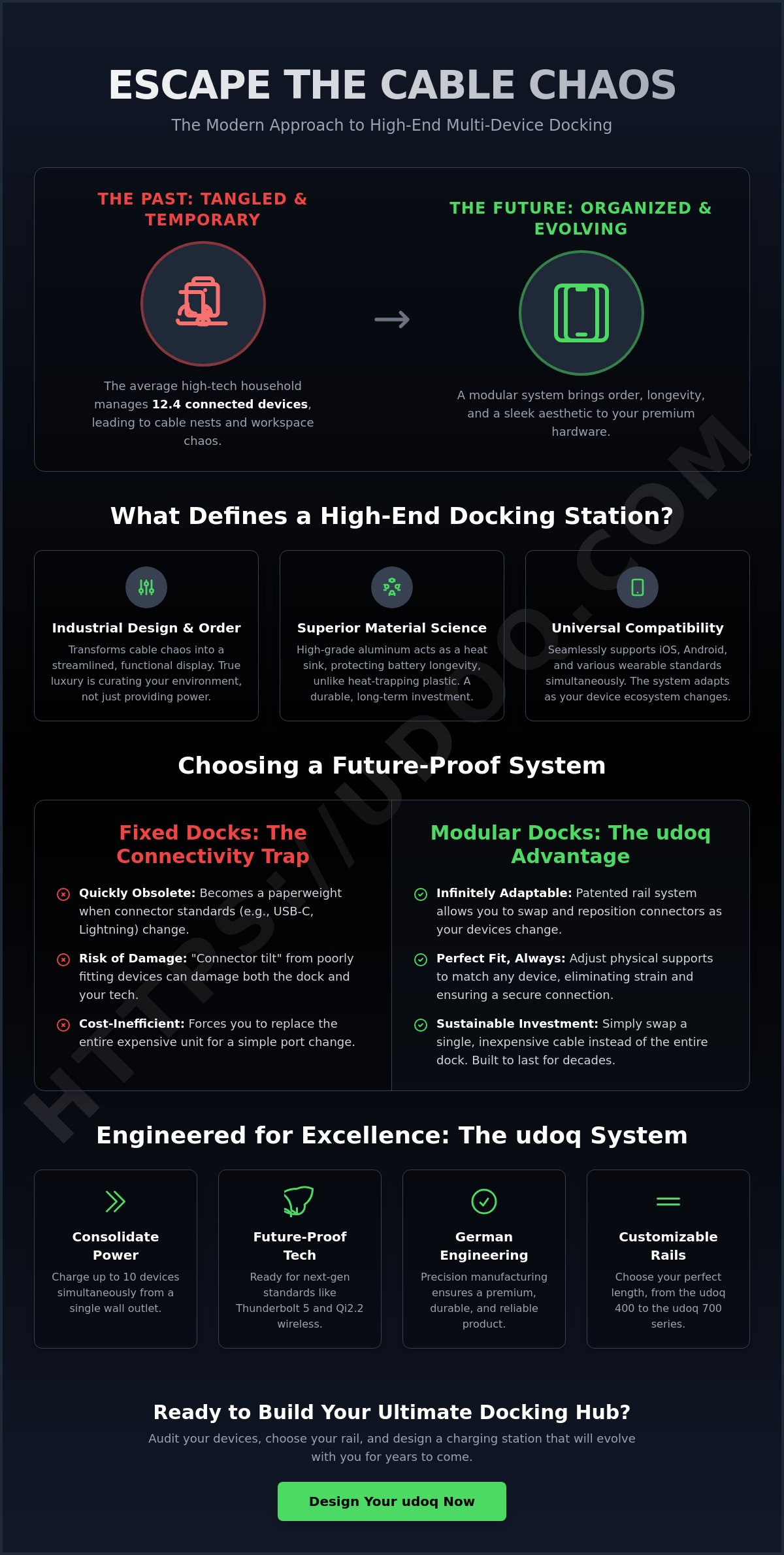
The average high-tech household now manages 12.4 connected devices, yet most charging setups still look like a tangled relic of the past. Your premium hardware deserves better than a nest of cable spaghetti on a designer desk. Choosing a high-end docking station for multiple devices shouldn't mean committing to hardware that becomes a paperweight the moment a new connector standard arrives. You've likely felt the frustration of slow charging speeds on your high-end tablets or the clutter that ruins a minimalist workspace.
We understand that true luxury lies in order and longevity. This article shows you how to eliminate cable chaos using a modular, high-end system designed for the 2026 tech ecosystem. You'll discover how a patented rail system handles everything from Thunderbolt 5 to Qi2.2 wireless charging while maintaining a sleek, industrial aesthetic. We'll explore the udoq 400 and udoq 700 series to show you how to build a future-proof charging hub that evolves as quickly as your technology does.
Key Takeaways
- True high-end docking is defined by the marriage of industrial design and the total elimination of visible cable clutter.
- Choosing a modular high-end docking station for multiple devices allows you to swap connectors easily, making your setup future-proof.
- Consolidate your power needs with smart management systems that charge up to 10 devices simultaneously from a single outlet.
- Audit your current device lineup to determine the perfect rail length and connector configuration for your specific workspace.
- Discover why precision German engineering and high-grade materials offer a sustainable alternative to frequent hardware replacements.
What Defines a High-End Docking Station for Multiple Devices?
True luxury in technology isn't measured by how many ports you can cram into a plastic box. It's found at the intersection of industrial design and electrical engineering. A high-end docking station for multiple devices must do more than just provide power; it must curate your environment. While standard hubs focus solely on data transfer speeds, a premium system prioritizes the physical architecture of your workspace. It transforms a chaotic pile of hardware into a streamlined, functional display.
To understand What Defines a High-End Docking Station, you have to look past the technical specifications and toward the physical environment. We measure the success of a dock by the "Chaos to Order" metric. This evaluates how effectively the system hides the underlying cable infrastructure while keeping every device accessible. A high-end solution ensures that cables remain invisible, leaving only the clean lines of your devices and the docking rail itself.
To better understand this concept, watch this helpful video:
The Shift from Laptop Hubs to Device Organizers
Most consumers mistake a laptop port-replicator for a complete docking solution. These hubs are designed for data, not for the physical organization of your mobile tech. A premium workspace needs a dedicated "home" for your smartphone, tablet, and wearables. Moving your devices from a flat surface to a vertical, organized charging station provides immediate psychological relief. It creates a ritual of order. Your tech is no longer scattered; it's staged and ready for use.
Material Science: Why Aluminum Matters
Material integrity is a non-negotiable standard for high-end hardware. Plastic is an insulator that traps heat, which is detrimental during high-wattage charging for tablets. High-grade aluminum acts as a natural heat sink, dissipating thermal energy to protect your battery longevity. Beyond performance, the aesthetic value of sandblasted, anodized finishes matches the premium decor of a modern office. This isn't disposable tech. It's a long-term investment in your environment, built with the same precision found in German manufacturing heritage. Aluminum ensures your hardware lasts for decades, not just until the next upgrade cycle.
Universal compatibility is the final pillar. A truly high-end system must support iOS, Android, and various wearable standards simultaneously. It shouldn't matter if you're charging an iPad Pro or a specialized Android tablet. The system must adapt. This versatility ensures that as your ecosystem changes, your docking station remains the constant, organized center of your digital life.
Modular vs. Fixed Docks: Choosing a Future-Proof System
Technology moves at a relentless pace. While your desk or nightstand might remain a permanent fixture in your home, the devices resting upon them change every few years. Investing in a high-end docking station for multiple devices shouldn't feel like a temporary fix. Most consumers fall into the "connectivity trap" by purchasing fixed-port hubs that become obsolete the moment a manufacturer updates a connector standard. True luxury is found in adaptability. A modular system ensures that your infrastructure remains constant even as your hardware evolves.
The Problem with Static Charging Stations
Static, all-in-one docks are designed for the present, not the future. When you upgrade from an older smartphone to a new tablet, a fixed-port dock often lacks the specific connector or spacing required for the new device. This leads to the frustrating "connector tilt" where the weight of a larger device puts physical strain on the port. It's a structural failure that can damage both the dock and your expensive tech. Modularity eliminates this risk. It allows you to adjust the physical support and the connector type to match your current ecosystem perfectly. It's the difference between a disposable accessory and a permanent piece of industrial art.
Cost-efficiency is another critical factor. When industry standards shift, owners of fixed docks are forced to replace their entire $300 unit. With a modular system, you simply swap a single cable. Replacing an L-CABLE or a C-CABLE is a minor adjustment that keeps your entire station relevant for another decade. This approach reduces electronic waste and respects your long-term investment. You can explore our modular configurations to see how this system scales with your needs.
How Modular Rails Work
The core of this system is a precision-engineered aluminum track. This patented rail allows you to slide connectors horizontally to accommodate devices of any width. Whether you're using the compact udoq 400 for your daily essentials or the expansive udoq 700 for a full family suite, the mechanics remain the same. You have the freedom to mix and match components as needed. You can integrate a WIRELESS ADAPTER for your earbuds alongside a MAGNETIC ADAPTER for your smartwatch, all on the same sleek rail.
- udoq 250: Ideal for a minimalist nightstand setup with two devices.
- udoq 400: The standard for professional desks, holding up to four devices.
- udoq 700: A comprehensive hub for families or power users with extensive tech suites.
This flexibility is the ultimate luxury. It allows for a customized charging environment that mirrors your personal workflow. By choosing a system that prioritizes modularity, you ensure that your workspace remains organized, efficient, and sophisticated regardless of how the tech industry changes.
Essential Features for Premium Multi-Device Charging
Engineering a premium charging experience requires more than just high wattage. It demands intelligent distribution. A high-end docking station for multiple devices must manage the diverse electrical requirements of a modern tech suite without compromising battery health. In 2026, with standards like USB4 Version 2.0 and Thunderbolt 5 supporting up to 240W of power delivery, the stakes for thermal management are higher than ever. A professional-grade system provides a stable foundation for up to 10 devices simultaneously. This is achieved through single-outlet efficiency. One wall plug powers your entire ecosystem, eliminating the cluster of power bricks that usually congests your outlets.
Safety remains the ultimate luxury. High-end hardware utilizes precision-milled aluminum housing. Unlike plastic, aluminum is inherently fire-safe and acts as a massive heat sink. It draws thermal energy away from your devices during rapid charging cycles. Integrated overcharge protection and surge suppression ensure that a high-value tablet is never at risk from a power spike. This meticulous attention to electrical engineering protects your long-term investment in mobile technology.
Power Delivery (PD) and Intelligent Charging
Intelligent power allocation is what separates a tool from a toy. A high-end system recognizes the difference between a high-capacity tablet and a low-draw smartwatch. The udoq POWER series is engineered to manage these high-demand charging cycles with precision. It supports the latest standards, including Qi2.2 wireless charging at 25W and high-speed wired delivery. It delivers maximum wattage where it's needed most while trickling power to smaller accessories. Cheap multi-port chargers often share power equally across all ports. This either starves your tablet of energy or pushes too much current into smaller batteries, shortening their overall lifespan.
Aesthetic Integration and Wall Mounting
True organization often means removing tech from the horizontal plane entirely. Transitioning your dock from a desk to a vertical surface maximizes your available workspace. Using the udoq WALL MOUNT allows you to create a central tech hub in a hallway, kitchen, or office. This setup adheres to the "Invisible Wire" philosophy. Every cable is routed and concealed within the aluminum rail itself. There are no dangling cords or hidden nests behind furniture. The result is a clean, architectural look that complements high-end interiors while keeping your essential tools at eye level and fully charged. It's a systemic solution for the modern multi-device ecosystem.
How to Build Your Ultimate Multi-Device Docking Hub
Creating a high-end docking station for multiple devices requires a shift from passive charging to active organization. You aren't just plugging in hardware; you're engineering a personal workflow. Most users struggle with ad-hoc solutions like Velcro ties or under-desk trays. These temporary fixes fail because they lack a cohesive, structural approach. A professional hub should look as refined as the premium tech it supports. Follow these steps to build a setup that offers psychological relief through total order.
Step 1: Assessing Your Device Footprint
Start with a comprehensive audit. List every device in your current ecosystem and note their specific connector requirements. If you use tablets, decide if they'll sit in landscape or portrait mode. Landscape orientation requires more horizontal rail space but offers better ergonomics for sidecar display use. Don't forget to account for protective cases. High-end systems feature adjustable connector heights. This ensures a secure fit whether your phone is bare or in a ruggedized shell. For wearables, identify if you need a dedicated MAGNETIC ADAPTER. This prevents your watch from sliding off a flat surface and ensures consistent contact during the charging cycle.
Step 2: Configuring the Modular Rail
Select a rail length that anticipates growth. For a focused desk setup, the udoq 400 provides enough space for your primary essentials. If you manage a full tech suite, consider larger rails like the udoq 700 to avoid overcrowding. Use our guide to evaluate your charging station needs before committing to a size. Next, select your connectors. Mix the udoq C-CABLE for high-speed charging with specialized L-CABLES for legacy hardware. Adding a magnetic adapter allows for effortless, one-handed phone docking. This modularity is your insurance against future industry changes.
Finalize your hub by optimizing the physical layout. Route all wires through the single exit point at the end of the rail. This creates the "floating" look that defines a high-end docking station for multiple devices. Adjust the spacing between devices so you can remove any single item without disturbing the rest. This meticulous attention to detail ensures your environment remains static while your digital life moves forward. Ready to eliminate the chaos? Build your custom docking system today to experience true technical order.
The udoq Advantage: Engineered for Excellence
Excellence isn't accidental. It's the result of meticulous planning and superior materials. When you choose a high-end docking station for multiple devices, you're choosing a philosophy of order. Our system is built on patented German engineering. Every rail is made from precision-milled aluminum designed for a lifetime of use. This isn't a temporary accessory. It's a permanent fixture that evolves alongside your technology. By choosing a modular design, you're embracing sustainable tech. You reduce electronic waste by replacing individual cables rather than entire units. It's a sophisticated solution for the conscientious professional.
The udoq 250 POWER represents the entry point into this elite ecosystem. It's the professional choice for essential device management, offering a compact footprint without sacrificing performance. Every element of our minimalist design is intended to complement high-end interiors. Our award-winning aesthetics ensure that your charging station looks like a piece of industrial art, not a piece of peripheral hardware. It provides a clean, unified look that elevates any workspace or home environment.
Why udoq is the Logical Conclusion for Organizers
The history of udoq began with a simple observation by our founder, Marcus Kuchler. He recognized that the "cable mess" was more than an eyesore; it was a barrier to productivity and peace. He set out to solve this environmental frustration with a proprietary systemic solution. Today, udoq allows you to support up to 10 devices on a single, sleek rail. This consolidation provides the psychological relief that comes from a tidy, reliable charging environment. You'll never hunt for a misplaced cord again. Your tech has a home. It's staged, powered, and ready for action whenever you are.
Ready to Transform Your Workspace?
Your environment dictates your focus. Don't let a chaotic desk undermine your performance. Explore the full collection of modular charging stations to find the configuration that fits your life. While the udoq 250 is perfect for bedside tables, many find the udoq 400 to be the "Goldilocks" size for a modern professional desk. It offers the ideal balance of capacity and physical footprint. Join the minimalist movement today. Invest in a high-end docking station for multiple devices that grows with your tech suite. Order your udoq system and experience the clarity of a perfectly organized workspace.
Master Your Workspace with Modular Precision
High-end hardware requires a docking solution that values longevity over disposable trends. You've seen that a true high-end docking station for multiple devices isn't defined by a fixed set of ports, but by its ability to adapt to your changing ecosystem. By moving from static hubs to modular rails, you protect your investment and eliminate the environmental frustration of cable clutter. Modularity is the only way to ensure your setup remains relevant as connector standards evolve.
This system represents the pinnacle of technical order. Engineered by Marcus Kuchler, our patented German design ensures that your setup remains sleek, fire-safe, and compatible with all mobile brands. Whether you're managing a single smartphone or a suite of ten devices, the solution is a single, elegant rail. It's time to stop fighting with tangled wires and start experiencing the psychological relief of a curated environment. Your premium tech deserves a foundation that matches its quality.
Build your custom udoq docking station now and reclaim your space. Your future-proof workspace is just one rail away.
Frequently Asked Questions
What is the best docking station for multiple Apple and Android devices?
A modular system like udoq is the most effective solution because it accommodates mixed ecosystems. Most fixed docks favor one connector type; however, udoq allows you to slide an L-CABLE for an iPhone and a C-CABLE for an Android tablet onto the same rail. This flexibility makes it the best high-end docking station for multiple devices in a mixed-brand household. It provides a unified home for all your hardware regardless of the manufacturer.
Can I charge my iPad Pro and iPhone on the same docking station?
Yes, you can charge your iPad Pro and iPhone simultaneously on a single udoq rail. The system is designed to handle the physical weight and higher power requirements of a tablet while supporting a smartphone. You simply choose a rail length like the udoq 400 or 700 that matches your total device width. This ensures both devices remain upright and visible during charging, creating an efficient and organized tech hub.
How do I hide the cables for my multi-device charging station?
You hide cables by using a system that routes them through an internal channel. udoq features a hollow aluminum rail that conceals all wiring. Each connector slides into the track, and the cables are tucked away inside. They exit through a single point at the end of the dock. This eliminates the "cable spaghetti" common with standard multi-port hubs and creates a clean, architectural look that complements any high-end interior.
Are modular docking stations better than fixed ones?
Modular stations are superior because they offer longevity and adaptability. A fixed dock becomes obsolete if you change your phone brand or if industry standards shift. Modular systems allow you to swap a single connector for a small fee rather than replacing the entire unit. This "buy it once" philosophy reduces electronic waste and ensures your hardware evolves with your tech suite. It's a long-term investment in your workspace environment.
Do high-end docking stations support fast charging for all devices?
Professional systems like the udoq POWER series are engineered for high-wattage delivery across all ports. They support modern standards like USB4 Version 2.0 and Qi2.2 wireless charging. Intelligent power management ensures that a high-capacity tablet receives maximum current while a smaller wearable is charged safely. This protects battery longevity while providing the fastest possible charging cycles for your entire ecosystem. It's the standard for modern technical management.
Can I wall-mount my multi-device docking station?
Yes, you can transition your setup from a desk to a vertical surface. The udoq WALL MOUNT is designed to secure the aluminum rail directly to any wall. This setup is ideal for creating a central tech hub in kitchens or hallways. It keeps your devices at eye level and completely off your horizontal workspace. It's a highly efficient way to save space while maintaining a minimalist and sophisticated aesthetic in your home.
What happens to my docking station when I buy a new phone with a different port?
You simply replace the individual connector. If you move from a device requiring an older connector to one using a C-CABLE, you slide the old one out and the new one in. The aluminum rail itself never needs replacement. This adaptability is a hallmark of a high-end docking station for multiple devices. It solves the problem of changing industry standards without requiring a new hardware investment every few years.
Is aluminum better than plastic for a charging station?
Aluminum is significantly better for both durability and thermal management. It acts as a natural heat sink, drawing warmth away from your devices during high-wattage charging. Plastic is an insulator that traps heat, which can degrade battery health over time. Beyond performance, precision-milled aluminum offers a premium aesthetic and structural integrity that plastic simply cannot match. It's a long-term investment in quality that reflects a sophisticated industrial design.