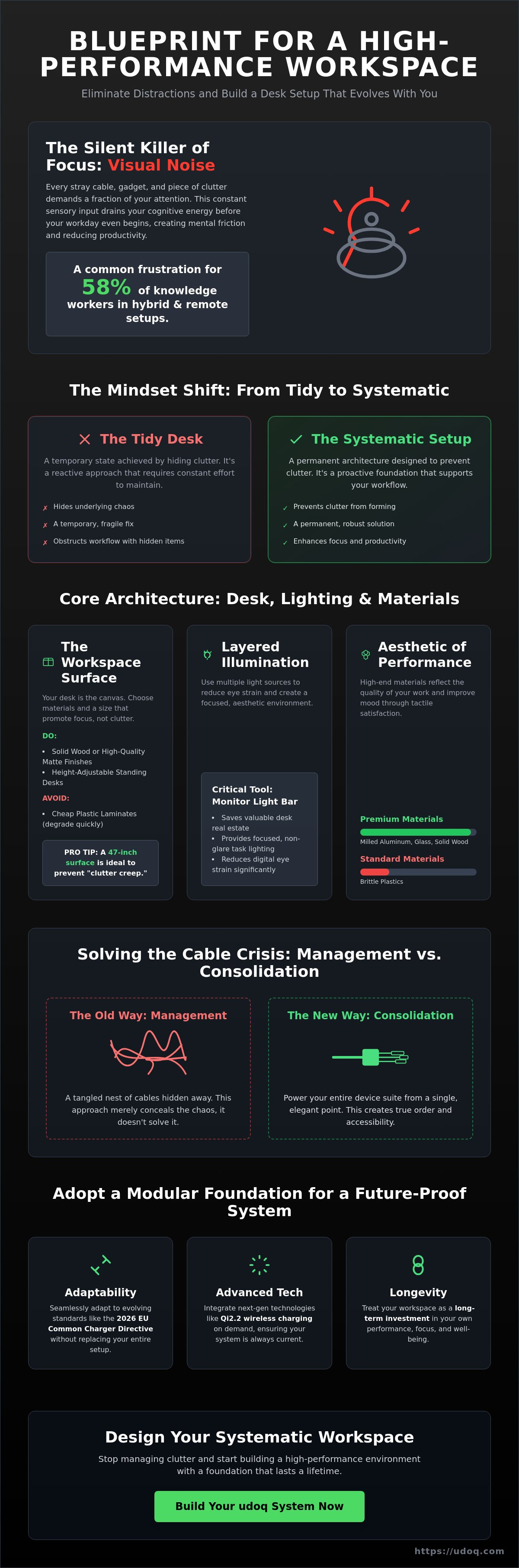
Visual noise is the silent killer of professional focus. You likely feel the weight of this chaos every time you sit down to work, only to be greeted by a tangled nest of cables and brittle plastic organizers that break your aesthetic. It's a common frustration for the 58% of knowledge workers now operating in hybrid or remote environments. We agree that your workspace should be a sanctuary of precision, not a source of daily stress.
This guide reveals how to create a clean and modern desk setup by mastering the art of intentionality. You will learn to eliminate visual distractions and implement a high-performance modular foundation that evolves with your hardware. We'll explore the transition toward warm minimalism, the impact of the 2026 EU Common Charger Directive on your tech choices, and the ergonomic standards that can significantly reduce workplace absenteeism. From integrated Qi2.2 wireless charging to sophisticated cable management, we provide the blueprint for a future-proof system that treats your office as a long-term investment in your own performance.
Key Takeaways
- Reduce cognitive load by identifying and eliminating visual noise within your immediate line of sight.
- Master how to create a clean and modern desk setup using premium materials that offer both durability and aesthetic longevity.
- Replace traditional cable management with a consolidation strategy that powers your entire device suite from a single point.
- Establish an ergonomic foundation with height-adjustable surfaces and layered lighting to protect your long-term health.
- Adopt a modular architectural anchor to ensure your workspace adapts seamlessly as industry charging standards evolve.
The Psychology of a Clean and Modern Desk Setup
Your workspace is not just a surface for hardware. It is a cognitive engine. To master how to create a clean and modern desk setup, you must first acknowledge that your brain processes every object in your peripheral vision. Every stray cable, loose paper, and plastic trinket demands a fraction of your attention. Psychologists refer to this as "Visual Noise." This constant sensory input drains your mental battery before your workday even begins. A minimalist workspace acts as a tool for cognitive clarity, allowing you to direct your energy toward high-output tasks rather than managing environmental chaos.
The evolution of Computer Desks has shifted from bulky, utilitarian furniture to streamlined productivity hubs. Modern design focuses on intentionality. Every item on your desk must earn its place through utility or inspiration. There is a fundamental difference between a "tidy desk" and a "systematic setup." A tidy desk is a temporary state achieved by hiding clutter. A systematic setup is a permanent architecture designed to prevent clutter from ever forming. It is about building a foundation that supports your workflow rather than obstructing it.
To visualize how these psychological principles translate into a physical environment, watch this visual guide on intentional workspace design:
Reducing Mental Friction Through Workspace Design
Decision fatigue is a primary obstacle to professional performance. When you sit down to work, you shouldn't have to decide where to plug in a phone or how to move a monitor. A clean environment reduces these micro-decisions. Physical order correlates directly with creative problem-solving; a clear desk provides the "white space" your mind needs to synthesize new ideas. Set firm boundaries by keeping non-essential tech, such as gaming consoles or secondary tablets, out of your primary work zone. This separation of concerns creates a mental trigger that signals it is time for deep work.
The Aesthetic of Modern Industrial Minimalism
Materials matter. The shift from a cluttered "gaming" look to a professional setup often involves a transition to premium materials like milled aluminum, glass, and solid wood. These elements do more than look good on camera. High-end materials improve your mood through tactile satisfaction and visual consistency. Aluminum, in particular, conveys a sense of durability and precision. By choosing sophisticated charging stations and peripherals that prioritize clean lines, you balance functionality with a high-end lifestyle aesthetic. This isn't just about fashion. It is about creating an environment that reflects the quality of the work you produce.
Building the Foundation: Desks, Lighting, and Ergonomics
A high-performance environment begins with physical infrastructure. Learning how to create a clean and modern desk setup requires moving beyond basic utility toward intentional architecture. Your desk is the canvas for your technology. If the foundation is weak, even the most expensive peripherals will feel like clutter. A true minimalist desk setup starts with furniture that prioritizes both aesthetics and structural integrity. Every choice you make here should reduce friction and support your long-term health.
Choosing the Right Workspace Surface
Solid wood offers a timeless, premium feel, while high-quality matte finishes reduce distracting reflections from overhead lights. Avoid cheap plastic laminates. They break the industrial aesthetic and degrade quickly under daily use. Standing desks have become a standard feature for professional workspaces in 2026. They offer necessary movement and often provide hidden cavities for cleaner cable routing. Size your desk carefully to prevent "clutter creep." A 47-inch surface is often the ideal size for a single-monitor setup. Excess space often invites non-essential items to occupy your primary work zone.
Lighting for Focus and Aesthetics
Lighting should be layered rather than singular. A monitor light bar is a critical tool for the modern professional. It saves valuable desk real estate while providing focused illumination that reduces eye strain. Pair this task lighting with a warm ambient glow from a lamp or LED strip behind the desk to add visual depth to the room. Smart lighting allows you to automate your environment. Set your lights to shift from cool white to warm amber as the workday ends. This visual cue helps establish boundaries between professional and personal time, which is essential for the 58% of knowledge workers now in hybrid roles.
Comfort is a prerequisite for focus. An ergonomic chair is an investment in your productivity. Research indicates that proper ergonomic interventions can lead to a 67% decrease in absenteeism due to musculoskeletal disorders. Conduct a regular ergonomic evaluation to ensure your monitor is at eye level and your wrists remain neutral. This physical alignment is the invisible engine of your daily output. Once your foundation is set, you can begin to integrate the tech that drives your workflow. Consider how a modular charging station can further refine this foundation by keeping your essential devices organized and accessible.
Solving the Cable Crisis: Management vs. Consolidation
Cable management is a reactive solution. It attempts to organize a mess that shouldn't exist in the first place. Most people spend hours zip-tying wires into sleeves, only to realize they've created a rigid, inaccessible system. This is a temporary fix for a deeper design flaw. True workspace intentionality requires shifting from management to consolidation. The goal is a "Single Outlet" workspace where your entire tech suite draws power from one architectural anchor. This approach is the only way to truly master how to create a clean and modern desk setup that remains functional over time.
Proper placement of components is vital for both safety and performance. While OSHA ergonomic guidelines focus heavily on posture, a disorganized cable environment creates hidden risks, including heat buildup and restricted movement. Consolidation removes these variables. By reducing the number of individual power bricks, you create a safer, more efficient environment that complies with modern safety standards.
The Limitations of Traditional Cable Management
Cable trays are the industry's favorite band-aid. They hide the tangle, but they don't reduce the number of cables. Over time, these trays become dust magnets that are difficult to maintain. Common mistakes include over-tightening zip ties, which can damage internal wiring and lead to intermittent power failures. Accessibility is the ultimate casualty of traditional management. Swapping a single cable often requires dismantling the entire bundle, leading to frustration every time you upgrade your hardware.
Consolidating Power at the Source
A central docking rail solves the cable crisis at the source. Instead of individual wall adapters for every phone, watch, and tablet, you can use a single high-wattage power supply. This reduces bulk and heat significantly. The aesthetic result is a "wireless" look for your mobile devices. They sit upright and fully visible while charging, without a single loose wire crossing your desk surface. It transforms a cluttered surface into a streamlined productivity hub.
As of April 28, 2026, the EU's Common Charger Directive has standardized USB-C charging for all new laptops and mobile devices. This regulatory shift makes consolidation easier than ever. Investing in high-quality USB-C cables is now a requirement for a future-proof system. By using a modular charging station, you can slide and swap connectors as your hardware evolves. This allows you to maintain total order without ever reaching for a zip tie again.
Curating High-Performance Peripherals and Materials
Selecting the right materials is the final step in eliminating visual noise. Plastic accessories often feel like temporary solutions. They crack, discolor, and break the aesthetic flow of a professional workspace. High-performance peripherals should mirror the materials of your primary hardware. Milled aluminum, tempered glass, and sustainably sourced wood provide the tactile feedback and durability required for a long-term investment. This material synergy is critical when learning how to create a clean and modern desk setup that doesn't just look good in photos but performs under pressure.
Reclaim your desk surface by moving your display onto a monitor arm. This single change frees up significant real estate on your foundation. It allows for better cable routing and provides the "floating" aesthetic central to modern minimalism. Choose modular accessories that resist planned obsolescence. An adaptable system ensures your setup remains relevant as technology standards shift. Avoid gear that requires proprietary connectors or lacks a clear path for future upgrades.
The Superiority of Aluminum in Workspace Design
Aluminum is the standard for professional industrial design. It offers superior heat dissipation for high-wattage electronics and an anodized finish that resists wear. Match your docking station to the finish of your laptop for a unified look. Choosing metal over plastic is a commitment to sustainability. Gear built from premium alloys lasts a decade rather than a single season. It is a choice that values quality over disposable trends and national manufacturing excellence.
Streamlining Input Devices
Input devices should support your workflow without adding clutter. Wireless mechanical keyboards offer tactile precision, while low-profile chiclet designs provide a sleeker, travel-friendly silhouette. Prioritize peripherals with multi-device pairing. This allows you to switch between work and personal hardware with a single button press. Add a desk pad to provide texture and protect your minimalist foundation. A high-quality felt or leather pad defines your work zone and absorbs sound, further reducing environmental friction.
Upgrade your workspace with a premium aluminum charging station designed for life-long utility.
Implementing a Modular Charging Hub for Total Workspace Order
Mobile device sprawl is the final frontier of workspace chaos. Most setups fail here. Phones lean against monitors. Tablets lie flat on the desk. Cables snake across the surface to reach individual ports. This is the "messy cable" reality that static docks cannot solve. To achieve total order, you need a dedicated architectural anchor. The udoq system transforms this sprawl into a single, organized row of technology. It is the definitive answer for how to create a clean and modern desk setup that remains orderly as your device count grows.
The core advantage is modularity. Industry standards change. Your hardware evolves. The udoq rail allows you to slide and swap connectors as needed. You aren't locked into a static dock that becomes obsolete when you buy a new phone. This system supports long-term viability. It is a one-time investment in your environment. You can organize smartphones, tablets, and smartwatches in a single, streamlined row. This consolidation eliminates the need for multiple charging bricks. Explore the full range of charging stations to find your specific configuration.
The udoq 250 and 400: Sizing Your Solution
Rail length depends on your daily device count. The udoq 250 is compact and efficient. It is ideal for a smartphone and a pair of headphones. The udoq 400 offers more real estate for power users. It accommodates multiple phones or a large tablet alongside your primary mobile device. For a complete hub, integrate the udoq 400 premium watch adapter. This allows your smartwatch to sit at the perfect viewing angle while charging. Customize your rail with C-CABLE and L-CABLE connectors. This tailored fit ensures every piece of tech has a precise home.
Wall Mounting for the Ultimate Minimalist Look
True minimalism often involves removing items from the desk surface entirely. The udoq WALL MOUNT allows you to shift your charging hub to a vertical surface. This creates a dedicated "Tech Command Center" above or beside your workspace. It clears your foundation for deep work. This solution combines German engineering with clean design. It is a legally protected mechanical innovation that sets the standard for workspace organization. By mounting your devices, you eliminate the last traces of visual noise. You create a workspace that is not just tidy, but truly systematic. This is the final step in mastering how to create a clean and modern desk setup for 2026 and beyond.
Architect Your Future Workspace
Your workspace serves as the primary engine for your professional output. By shifting from reactive management to proactive consolidation, you remove the barriers to deep work. Prioritize materials that offer tactile satisfaction and structural integrity to ensure your environment reflects your professional standards. Mastering how to create a clean and modern desk setup is a process of intentional architecture. It requires a commitment to quality over disposable trends and a focus on long-term systemic order.
Finalize your environment with a solution rooted in precision. The udoq platform leverages patented German engineering to provide a future-proof foundation for all your hardware. Its modular design adapts to any mobile device, enabling you to power up to 10 devices from a single outlet. This eliminates the need for bulky power strips and proprietary bricks. It is the definitive anchor for a high-performance office that values both form and function.
Explore the udoq Modular Charging System to reclaim your desk real estate. Invest in a workspace that evolves alongside your technology and provides the lasting relief of a tidy environment. Take control of your physical surroundings to unlock your full cognitive potential. Your path to absolute focus begins with a single, sophisticated choice.
Frequently Asked Questions
How do I hide cables on a desk in the middle of a room?
Route your cables through hollow desk legs or use a dedicated floor cord cover to bridge the gap to the nearest outlet. To simplify this process, consolidate your mobile technology into a single-outlet charging rail. This reduces the number of wires descending from your desk to just one or two essential lines. It eliminates the visual chaos often associated with open-concept office layouts.
What are the essential items for a minimalist desk setup?
A minimalist setup requires a clean surface, a monitor arm, and a consolidated power hub. Focus on high-quality peripherals that serve multiple purposes to keep the foundation clear. Every item must earn its place through daily utility. A height-adjustable desk and a modular charging station are the architectural anchors needed to master how to create a clean and modern desk setup.
Does a clean desk really improve productivity and focus?
Reducing visual noise directly lowers cognitive load and prevents daily decision fatigue. Physical order allows your brain to focus on complex tasks rather than processing peripheral distractions in your line of sight. Research indicates that biometric stress markers decrease when working in an organized environment. It is a psychological tool for sustained professional output and creative problem-solving.
How can I charge multiple devices without using multiple wall outlets?
Implement a high-wattage modular charging rail that draws power from a single wall plug. Systems like the udoq 400 POWER can charge several devices simultaneously using an internal power distribution hub. This consolidation removes the need for multiple power bricks and keeps your workspace clear of unnecessary bulk. It is the most efficient way to manage power in a modern tech suite.
What is the best way to organize a smartphone, tablet, and Apple Watch together?
Align them in a single, upright row using a modular docking system to reclaim horizontal desk space. This orientation keeps all screens visible for notifications while maintaining a tidy footprint. Use a specialized adapter, such as the udoq 400 premium watch adapter, to integrate your wearable into the same rail as your mobile devices. This creates a unified, professional aesthetic for your hardware.
How do I choose between a desk dock and a wall-mounted charger?
Choose a desk dock if you need frequent tactile access to your devices during your workday. Opt for a wall mount if you want to reclaim your entire desk surface for a "floating" minimalist look. The udoq WALL MOUNT is ideal for creating a dedicated tech command center. It keeps mobile hardware accessible but entirely off your primary work surface for maximum clarity.
Are aluminum desk accessories better than plastic ones?
Aluminum accessories offer superior durability, heat dissipation, and aesthetic longevity compared to plastic alternatives. Metal gear resists the cracking and discoloration common with cheaper materials over time. Choosing milled aluminum reflects a commitment to quality and matches the industrial design of premium laptops. This ensures your setup feels like a permanent investment rather than a temporary fix.
How can I future-proof my desk setup for new phone connectors?
Invest in a modular system where you can swap individual connectors without replacing the entire dock. As standards like USB-C evolve or new proprietary ports emerge, a sliding rail system allows you to simply click in a new C-CABLE or L-CABLE. This adaptability solves the problem of planned obsolescence. It ensures your setup remains functional as you upgrade your mobile hardware.