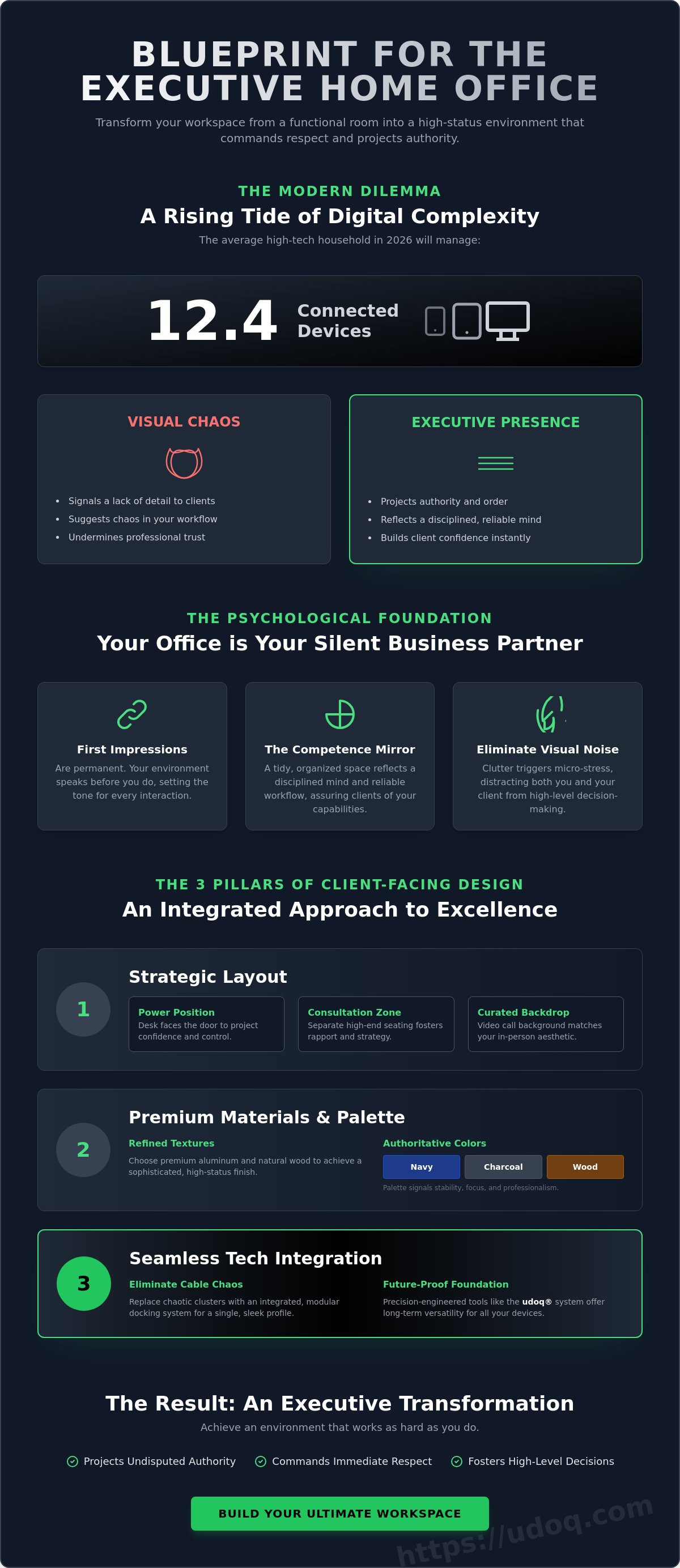
The average high-tech household in 2026 manages 12.4 connected devices. If your workspace hasn't evolved to house that complexity, your professional image is paying the price. You understand that a visible tangle of cables and generic furniture signals a lack of detail to a visiting client. It's difficult to command respect when your environment feels like a temporary setup. Mastering client-facing home office design is no longer optional for the modern executive; it's a requirement for those who value order and quality.
You can transform your workspace into a sleek, minimalist environment that projects authority and facilitates comfortable interaction. This article provides a blueprint for an office that eliminates tech chaos and emphasizes fine craftsmanship. We'll examine how to integrate technology rather than just adding it on, using modular solutions like the udoq 700 or udoq 400 POWER to maintain a tidy environment. You'll learn to balance hospitality with functional precision, ensuring your home office reflects the same high-status standards as a corporate headquarters. It's time to invest in an environment that works as hard as you do.
Key Takeaways
- Position your desk to project authority and ensure your workspace acts as a silent partner in every meeting.
- Eliminate visual static by replacing chaotic cable clusters with integrated, modular docking systems.
- Select premium aluminum and natural textures to achieve a sophisticated client-facing home office design.
- Build a future-proof foundation using precision-engineered tools like the udoq 400 series for long-term versatility.
- Transform your office from a functional room into an executive-level environment that commands immediate respect.
The Psychology of Client-Facing Office Design
First impressions are permanent. Your office is your silent business partner; it speaks before you do. In high-stakes industries, "homey" elements often undermine professional trust. A client needs to see a professional firm, not a spare bedroom. Implement effective office space planning to balance hospitality with executive authority. This layout ensures you remain the focus while providing a premium experience for your guest.
Consider the "Competence Mirror." This psychological concept suggests that a tidy desk reflects a disciplined mind. When a client enters your space, they look for signs of reliability. Chaos on your desk suggests chaos in your workflow. Achieving a superior client-facing home office design requires a shift from personal comfort to professional projection. You aren't just working; you're performing. Your environment must support that performance.
To better understand this concept, watch this helpful video:
Establishing Professional Boundaries
Separate the living space from the business zone. A client should feel they have stepped into a dedicated corporate environment. Use visual cues like floor transitions or specific rugs to define the boundary. Acoustic privacy is also vital. If your client hears household noise or a kitchen appliance, the executive illusion breaks instantly. Choose a color palette that signals stability and focus. Navy, charcoal, and warm wood tones are excellent choices. These colors tell the client you are stable, serious, and prepared.
The Impact of Visual Noise
Visual noise triggers micro-stress in both you and your client. It distracts from the conversation and suggests a lack of detail. Identify your clutter hotspots immediately. These are usually the areas where devices congregate or mail piles up. There is a sharp difference between a "lived-in" office and a "messy" one. A lived-in space has character; a messy space has neglect. To refine your client-facing home office design, eliminate the visual static of tech. Use a modular foundation from the udoq charging stations collection. This organizes your mobile devices into a single, sleek profile. Order is the ultimate signal of competence. It provides the psychological relief necessary for high-level decision-making.
Optimizing Layout for Client Interaction
Your office layout dictates the hierarchy of every interaction. A superior client-facing home office design begins at the threshold. Map the traffic flow from your home's entrance to the office door. This path should be clear, unobstructed, and professional. It establishes the transition from a domestic environment to a business one. Once inside, the "Power Position" is essential. Position your desk so you face the door. Never sit with your back to a client. This orientation communicates preparedness and confidence while ensuring you aren't startled by arrivals.
Consider the consultation zone. While the desk is for data and documents, a secondary area with high-end seating facilitates deeper rapport. Choose chairs that offer ergonomic support without sacrificing executive style. This zone should feel distinct from your workspace; it acts as a neutral ground for strategy sessions. If you've integrated a standing desk, ensure it doesn't tower over a seated guest. Adjust the height to maintain eye level during conversations. This subtle adjustment preserves the professional balance of power.
Consistency across mediums is a 2026 requirement. The background your clients see on a video call must match the aesthetic they experience in person. Avoid digital blurs or generic virtual backgrounds. Instead, curate a physical backdrop that features your credentials or professional literature. To ensure your tech setup remains as organized as your layout, explore the modular docking solutions designed to keep surfaces pristine. Order is not just an aesthetic choice; it's a tool for building trust.
The Desk as a Command Center
Your desk must facilitate document review without screen-sharing awkwardness. Position your monitor at an angle that keeps your private data secure while allowing you to show the client relevant information. Follow the "Clean Sweep" rule: the side of the desk facing the client must remain entirely empty. This provides them with physical space to place their own devices or notes. It signals hospitality through utility and respect for their personal workspace needs.
Lighting for Presence and Clarity
Lighting defines your presence. Avoid the harsh "interrogation" look by using diffused, multi-layered sources. Mix natural light with professional-grade task lighting to eliminate shadows. Aim for a color temperature between 4000K and 5000K. This range provides professional clarity without the sterile feel of a hospital. Use accent lighting to draw the eye toward your achievements or professional library. This creates depth and visual interest, turning a flat room into a sophisticated executive suite.
Mastering Tech Integration and Cable Management
Cables are the visual static of the modern office. They create mental friction and project a sense of disarray. In a sophisticated client-facing home office design, visible wires act as a constant distraction. They suggest a lack of systemic order. Transitioning from messy multi-port hubs to integrated docking systems allows you to reclaim your executive presence. Order is not just a preference; it's a professional requirement.
Hidden cables are always superior to organized ones. Simply bundling wires behind a desk leg is a temporary fix that often fails under scrutiny. Removing them from the visual field entirely is the only permanent solution. Centralize your device power to keep the workspace clear for active work and client interaction. When your desk is free of technical debris, you can focus on the person sitting across from you. This clarity of environment facilitates a clarity of communication.
Visible clutter looks amateur. It signals that you're struggling with your environment rather than mastering it. Since the average high-tech household in 2026 manages 12.4 connected devices, the potential for chaos is high. Without a dedicated system, this volume of tech creates a web of wires that undermines your authority. A professional desk should require only one visible power connection to the wall.
The End of the Cable Tangle
Fumbling with chargers during a meeting is a professional liability. It breaks the flow of conversation and makes you look unprepared. Consolidate your smartphones, tablets, and smartwatches into a single, aesthetic unit. Using a udoq 400 POWER or udoq 700 series provides this foundation. These units dock your devices vertically, keeping screens visible but the desk surface pristine. It's a method of organizing that feels integrated rather than added on.
Modular Power Solutions
Fixed charging stations fail when technology standards change. Hardware must be adaptable to remain relevant. Plastic accessories feel disposable and lack the weight of executive authority. High-grade aluminum hardware offers durability and a premium feel that plastic cannot replicate. It reflects a commitment to longevity and quality manufacturing. To select the right infrastructure for your specific device fleet, consult this multi-device charging guide.
Modular systems allow you to swap cables as your needs evolve. Use a C-CABLE or L-CABLE depending on your current devices. This flexibility ensures your workspace remains functional for years without needing a total overhaul. It prevents the accumulation of "legacy" clutter. Your office stays minimalist, professional, and ready for every visiting client.
Selecting Premium Materials for Executive Presence
Materials communicate values. While your layout establishes the hierarchy of the room, the physical substances within it establish your reliability. Clients equate heavy, solid materials with stability. This "Tactile Trust" factor is a cornerstone of effective client-facing home office design. When a guest touches a desk or observes your hardware, they should feel the weight of quality. Plastic components feel disposable and temporary. Aluminum, solid wood, and leather suggest longevity and a commitment to excellence.
Durability is a professional requirement, not just a preference. The BIFMA G8.1-2026 guideline for furniture surfaces emphasizes that materials in professional settings must withstand frequent cleaning while maintaining their aesthetic integrity. Choose finishes that don't show fingerprints or excessive wear. Matte metal and tight-grained woods like walnut are ideal. They provide a sophisticated backdrop that remains pristine even after a full day of meetings. Incorporating natural textures like leather desk pads also helps to soften the industrial feel of modern technology, creating a space that is both high-tech and human-centric.
Order is maintained through material consistency. Ensure your hardware follows a unified design language. If your laptop is milled aluminum, your charging infrastructure should match. This cohesion eliminates visual friction and reinforces your attention to detail. To ensure your workspace reflects this level of precision, explore our professional-grade aluminum docking systems.
The Case for Aluminum in Tech Design
Aluminum is the standard for executive hardware. Beyond its premium appearance, it offers significant functional advantages like superior heat dissipation. This protects your devices during long hours of use. Aluminum rails provide a stable, weighted foundation that won't slide across your desk when you dock a tablet. It's a long-term investment in your environment that outlasts plastic alternatives. For a deeper look at why metal hardware is essential, read about the benefits of aluminum for desk tech.
Cohesive Accessory Curation
Visual clutter is the enemy of authority. Follow the "Rule of Three" for your desktop: limit yourself to three primary accessories. This might include a high-end lamp, a signature statement piece, and your primary tech hub. A statement piece, such as a unique sculpture or a piece of heritage manufacturing equipment, serves as a natural conversation starter. It adds personality without sacrificing professionalism. Every item on your desk must earn its place through either utility or significant aesthetic value. If an object doesn't contribute to the executive narrative, remove it.
Elevating Your Office with the udoq System
The udoq system represents the pinnacle of tech integration. It provides a sleek, modular foundation for your workspace. While traditional furniture remains static, your technology is dynamic. A superior client-facing home office design requires infrastructure that evolves alongside your device fleet. The udoq 250 and 400 series offer this exact adaptability. They transform a potential eyesore into a sophisticated design focal point. Precision is the ultimate signal of competence.
German Engineering is a signature of reliability. It translates into a trustworthy, authoritative style that clients immediately recognize. This system isn't a temporary accessory; it's a long-term investment in your professional environment. The milled aluminum rail matches the finish of high-end laptops, creating a sense of efficiency and clarity. By centralizing power, you eliminate the visual noise that distracts guests and undermines your authority. Order is maintained through mechanical innovation.
Sustainability is built into the design. As industry standards shift, you don't replace the entire unit. You simply swap internal components to match new devices. This longevity values your time and your environment. It ensures your office maintains its status-quo of order without constant re-investment. Your workspace stays minimalist, professional, and ready for high-stakes interaction. It's a proprietary systemic solution for a modern environmental frustration.
A Tailored Fit for Your Workflow
Customization is the key to a frictionless day. You can equip your rail with udoq 400 components to display essential devices at a professional viewing angle. This setup keeps your smartphone and tablet within reach but out of the visual clutter zone. Use C-CABLE or MAGNETIC ADAPTER options to match your specific hardware requirements. For those with ultra-minimalist floor plans, the WALL MOUNT offers an elegant solution to keep desk surfaces entirely clear. It moves technology to the vertical plane, preserving every inch of your workspace for client interaction.
The Ultimate Professional Upgrade
Executives who value detail choose udoq. It's the preferred choice for those who understand that environmental order is a silent business partner. You can finally eliminate the "junk drawer" of tangled cables and mismatched chargers. This transition creates a psychological relief that allows you to focus on high-level strategy. Your office becomes a sanctuary of productivity rather than a battleground with technology. Every visiting client will notice the difference. To begin your transformation, explore the udoq charging station collection and define your new standard of professionalism.
The New Standard of Workspace Excellence
Your environment is a reflection of your professional discipline. By prioritizing a layout that commands authority and selecting materials that signal stability, you turn your office into a strategic asset. Remember that visible cables are visual static; they distract from your message and undermine your expertise. A meticulous approach to client-facing home office design ensures that every visiting client experiences the same precision you bring to your work.
Transitioning to a high-status environment requires the right infrastructure. Choose a solution that values longevity over disposable trends. Our systems feature patented German engineering and sustainable modular design to evolve with your technology. The high-grade aluminum construction provides the tactile trust and durability an executive desk demands. It's time to eliminate the chaos of mismatched chargers and reclaim your presence. Upgrade your workspace with a modular udoq docking station today. Your office is ready to project the authority you've earned.
Frequently Asked Questions
How do I make my home office look professional for clients?
Establish a clear transition from domestic to business zones using high-end materials like aluminum and walnut. Eliminate visual noise by hiding tech clutter and using professional lighting temperatures between 4000K and 5000K. A professional environment requires a shift from personal comfort to executive projection, ensuring every element signals stability and focus.
What is the best desk layout for hosting client meetings at home?
Position your desk in the "Power Position" facing the door to project confidence and preparedness. This orientation ensures you aren't startled by arrivals and keeps you as the focal point of the room. Maintain eye level with guests and provide a clear, empty space on their side of the desk for documents or personal devices.
How can I hide computer and phone cables on my desk?
Replace individual chargers with a centralized, modular docking station that requires only one visible power connection. This approach removes the visual static of wires entirely rather than just bundling them together. True order is found in the absence of chaos, and a single power source is the gold standard for a clean executive workspace.
Are docking stations better than individual chargers for professional offices?
Docking stations are superior because they consolidate power and eliminate the professional cost of fumbling with cords during meetings. A single aluminum rail, like the udoq 400 POWER, provides a stable and aesthetic foundation that projects authority. It turns a functional necessity into a design focal point that reflects your commitment to precision.
What materials make a home office look more expensive and high-end?
Solid metals and natural textures like leather or walnut signal reliability and high status. Avoid plastic accessories, as they feel disposable and temporary. Milled aluminum is the preferred choice for executive hardware due to its weight, durability, and superior heat dissipation. These materials establish a tactile trust that clients equate with professional stability.
How do I balance a minimalist aesthetic with the need for multiple devices?
Use a vertical docking system to house multiple devices in a single, compact footprint. This strategy is essential for client-facing home office design because it keeps the desk surface pristine while ensuring your devices remain accessible. Vertical docking organizes tech into a single aesthetic unit, preventing the accumulation of device-related clutter across your workspace.
Should I use a wall-mounted charging station in a client-facing office?
A WALL MOUNT is an excellent choice for ultra-minimalist floor plans where desk space is at a premium. It moves technical infrastructure to the vertical plane, keeping the primary workspace dedicated solely to client interaction. This layout emphasizes a clear, unobstructed environment that is ideal for high-stakes strategy sessions and document reviews.
How do I choose the right size docking station for my desk setup?
Select a rail length based on the total width of your current mobile device fleet. The udoq 250 is designed for a smartphone and tablet, while the udoq 700 series accommodates larger executive setups including multiple tablets and smartwatches. Choosing the correct scale ensures your client-facing home office design remains proportional and intentionally organized.