That plastic box sitting under your desk isn't solving your cord problem; it's just hoarding it. While hiding a tangled mess of wires out of sight offers a temporary sense of relief, it does nothing to improve your daily workflow. You still waste time fishing for the right charger and struggle with cluttered surfaces that clash with your premium decor. If you're searching for effective cable management alternatives, it's time to stop settling for "hidden" and start demanding "organized."
You already know that a cluttered desk leads to a cluttered mind. You want a workspace that reflects your commitment to quality and efficiency. This guide explores why traditional storage boxes are only half the battle. You'll learn how to transition to a high-performance environment where one-handed docking is the standard, not the exception. We compare the limitations of static storage against the precision of German-engineered modular systems. Discover how to reclaim your desk surface and invest in a setup that evolves alongside your technology.
Key Takeaways
- Understand why a cable management box is merely a "junk drawer" for power strips and how it fails to prevent internal tangling or wire fraying.
- Evaluate the safety risks of traditional boxes, including heat accumulation and cable strain that can damage expensive USB-C connectors.
- Learn how vertical modular docks reclaim 70% of your desk surface compared to the footprint of bulky storage boxes.
- Discover why German-engineered cable management alternatives offer a long-term, adaptable solution for evolving device ecosystems.
- Master a professional workflow by transitioning from hidden chaos to a sleek, one-handed docking system customized to your specific tech stack.
The Limits of the Traditional Cable Management Box
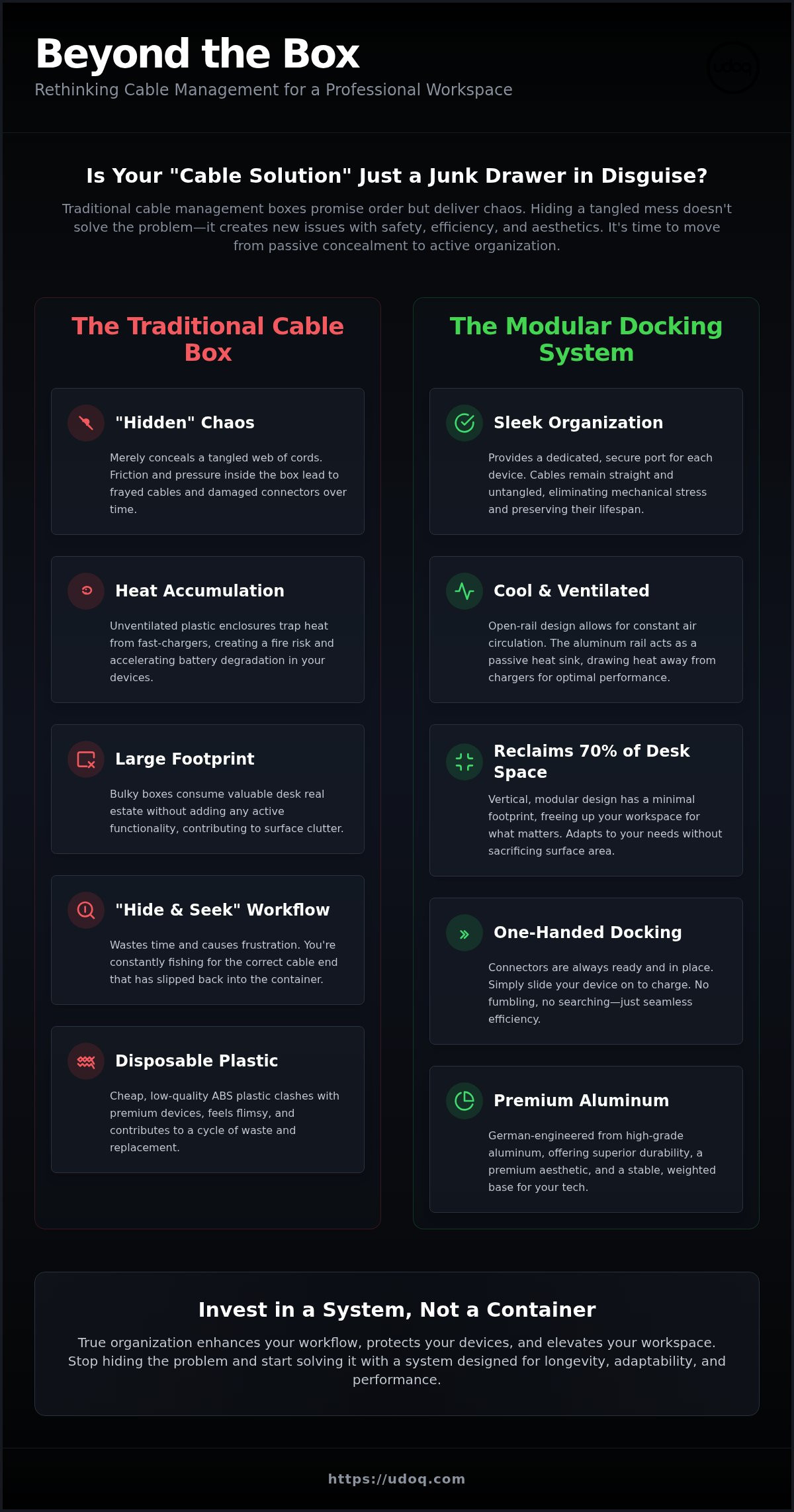
A cable management box is essentially a junk drawer for your power strip. It's the "fast fashion" of office organization. You buy it for an immediate visual fix, but the underlying problem remains untouched. Cords continue to rub against each other inside the dark enclosure, leading to friction that can eventually fray delicate outer casings. Hiding the mess doesn't organize it. It just creates a localized zone of entropy that makes your daily tasks more difficult and your hardware less accessible.
Most users find that these boxes take up valuable desk real estate without adding any functionality. They are bulky, static, and difficult to clean around. If you're tired of the "hide and seek" game with your chargers, it's time to explore cable management alternatives that integrate with your desk rather than just sitting on top of it. Effective cable management should prioritize active accessibility over mere passive concealment. Stop settling for a container that hoards chaos and start looking for a system that eliminates it.
The Out of Sight, Out of Mind Fallacy
Visual order is not functional order. Your brain registers the mess even when it's under a lid. When cables are trapped in a lidded container, swapping devices becomes a chore. Most boxes fail to accommodate the variety of modern tech. They struggle with oversized tablet chargers or the specific magnetic pucks used for wearables. The moment a cable end slips back through the entry hole and into the box, your workflow grinds to a halt. You're back to fishing for connectors in a plastic bin, wasting time and energy.
Material Matters: Plastic vs. Premium
Don't compromise your workspace aesthetic. A cheap plastic box sitting next to a precision-milled, $2,000 laptop is a significant design failure. Many low-cost options use thin ABS plastic that feels hollow and looks dated almost immediately. These materials lack the weight to stay in place and the durability to survive a long-term professional environment. Choosing higher-quality materials isn't just about looks; it's about longevity. Disposable organizers contribute to a cycle of waste. Invest in solutions that align with the high standards of your existing hardware and your personal brand.
Safety and Performance: What Your Cable Box Is Hiding
Hiding cables in a plastic box creates a thermal trap. Modern fast-chargers, especially high-wattage GaN adapters, generate significant heat during operation. When you cluster these devices inside an unventilated enclosure, you're creating a localized hotspot on your desk. This isn't just a performance issue; it's a safety concern. Standard Workplace Electrical Safety Standards emphasize the importance of proper ventilation for electrical equipment to prevent overheating and potential fire hazards.
Switching to open-rail cable management alternatives ensures that your power components remain cool. Unlike enclosed boxes, an open system allows for constant air circulation. This natural convection prevents the buildup of stagnant, hot air around your power strips and adapters. It also allows you to visually inspect your connections without opening a lid, ensuring everything remains securely plugged in and free of dust accumulation. You don't have to worry about what's happening inside a dark container when your power source is visible and ventilated.
Protecting Your Device Battery Health
Ambient heat is the primary enemy of lithium-ion battery longevity. When a device charges in a high-temperature environment, the chemical degradation of the battery accelerates. Fast-charging technology requires even more aggressive ventilation to dissipate the energy produced during the power transfer. The high-grade aluminum rail of udoq serves as a passive heat sink, drawing thermal energy away from chargers to maintain optimal operating temperatures. Maintaining a cool charging environment is the simplest way to extend the life of your expensive smartphones and tablets.
Cable Longevity and Connector Care
Cramped cable boxes often force cords into tight angles that exceed their recommended bend radius. This repeated kinking leads to internal wire fatigue and eventual failure of the shielding. You've likely seen the frayed ends of Lightning or USB-C cables; this is often the result of friction and mechanical stress within a disorganized container. High-quality cables contain complex circuitry that doesn't respond well to being crushed. By using cable management alternatives with fixed, sliding connectors, you eliminate this strain. Cables remain straight and secure, while the connectors stay exactly where you need them. This structural approach preserves your investment in expensive peripherals. Consider moving to a system designed for longevity rather than just concealment.
Box vs. Dock: A Comparison of Desk Organization Systems
Choosing between a box and a dock is a choice between hiding a problem and solving it. A cable management box is a passive container that merely relocates clutter. A modular dock is an active tool designed for performance. While a box requires a significant horizontal footprint, a vertical dock utilizes height to reclaim your workspace. This vertical orientation saves approximately 70% more desk surface compared to standard storage containers. It's the difference between a sprawling parking lot and a sleek skyscraper.
Accessibility is the primary differentiator in daily use. Passive boxes force a "two-handed hunt" where you must hold the cable with one hand and the device with the other. High-quality cable management alternatives prioritize efficiency through one-handed docking. This mechanical precision reduces digital friction and keeps your workflow fluid. You no longer have to dig through a plastic bin to find a dropped connector. Your tech stays exactly where you need it, ready for immediate use.
The Modular Advantage
Static organizers fail the moment you upgrade your hardware. If you switch from Lightning to USB-C, a traditional box offers no help. The udoq rail system solves this through a patented design that allows you to slide, swap, and rearrange connectors in seconds. It follows the "one outlet rule," powering your entire ecosystem from a single wall plug. This adaptability ensures your investment remains relevant as industry standards evolve. For a deeper look at these systems, consult The Ultimate Guide to Choosing a Charging Station in 2026.
Ergonomics and Productivity
Productivity thrives on visibility. When devices lay flat inside or on top of a box, notifications are missed and screens are useless. A dock holds your smartphone or tablet at an optimal viewing angle, transforming them into functional second screens. This setup creates a dedicated home base for every family member's tech, ending the search for missing chargers. By keeping your devices upright and organized, you reduce the mental load of a chaotic environment. You aren't just cleaning a desk; you're optimizing a high-performance workspace.
Choosing the Right Setup for Your Device Ecosystem
Audit your daily carry before selecting a solution. Count every smartphone, tablet, and wearable in your rotation. Precision is the hallmark of professional organization, yet generic boxes offer a one-size-fits-all approach that fits nothing well. Effective cable management alternatives require a tailored fit. Choosing the right rail length and connector mix is the first step toward a friction-free workspace. Don't guess your requirements; measure them against your actual device count.
The udoq 250 is a compact anchor for personal workstations. It provides a slim footprint while keeping your primary devices accessible. For households or multi-device power users, the udoq 700 offers an expansive rail that can power up to 10 devices from one outlet. USB-C is now the universal standard, but many ecosystems still rely on older connectors. A modular system allows you to mix C-CABLES and L-CABLES on a single rail. You can also integrate a WIRELESS ADAPTER or a MAGNETIC ADAPTER to keep your setup versatile as your tech evolves.
The Minimalist Desk Setup
The udoq 250 is the definitive choice for those seeking a clean, architectural aesthetic. It replaces the bulk of a plastic bin with a slim profile that maintains a clear line of sight across your desk. Select a finish that complements your workstation to create a cohesive, high-end environment. This isn't just about hiding wires; it's about curated design. For more inspiration on refined workspaces, read our guide on How to Create a Minimalist Desk Setup: The Ultimate 2026 Guide.
The Power of High-Grade Aluminum
Choosing high-quality cable management alternatives means looking beyond aesthetics to the physics of the product. Plastic stands often slide across the desk when you attempt to undock a device with one hand. High-grade aluminum provides the necessary mass to stay stationary. This is the German Engineered difference. Every component is milled with mechanical precision to ensure a perfect fit for your connectors. It's an investment in hardware that won't fail or need replacement when the next trend arrives. Build your custom configuration today.
Transitioning to a Professional Workflow with udoq
Order is a choice. Transitioning to a professional workflow requires moving beyond the "out of sight" mentality of under-desk storage. While competitors suggest hiding your power infrastructure on the floor, true efficiency happens at your fingertips. By choosing active cable management alternatives, you transform your desk from a storage area into a high-performance station. This shift reduces the daily friction of searching for power and preserves your mental energy for deep work.
Follow these four steps to modernize your workstation:
- Step 1: Replace the bulky surge protector box with a sleek, modular rail that sits on your desk.
- Step 2: Customize your rail by selecting the exact mix of C-CABLE and L-CABLE connectors for your current tech stack.
- Step 3: Experience the psychological relief of a clear, architectural workspace that remains tidy throughout the day.
- Step 4: Scale your setup as your ecosystem grows by simply sliding in a new MAGNETIC ADAPTER or WIRELESS ADAPTER.
The udoq 250: Your First Step to Clutter-Free Living
The udoq 250 serves as the essential starting point for a minimalist professional setup. It is designed to host 2-3 primary devices, effectively eliminating the need for a separate cable management box. This compact rail provides a permanent home for your smartphone and tablet without consuming your entire desktop. udoq’s patented slide and swap mechanism allows you to reposition or replace connectors in seconds without tools. It is the definitive choice for those who value both space and accessibility.
A Sustainable Investment in Your Workspace
Longevity is the ultimate marker of quality. Choosing a modular dock is a commitment to sustainability that plastic boxes cannot match. Most cable containers are made of cheap ABS plastic that eventually cracks or ends up in a landfill when your device standards change. In contrast, our high-grade aluminum construction is built for decades of use. It adapts to new technology through simple connector swaps rather than total replacement. This approach respects both your budget and the planet. Invest in a system that evolves with you. Explore udoq Charging Stations and secure your workspace for the future.
Reclaiming Your Professional Focus
A tidy desk is more than an aesthetic choice; it's a prerequisite for peak performance. While traditional boxes offer a quick way to hide clutter, they fail to address the core issues of accessibility, heat dissipation, and long-term hardware health. By exploring superior cable management alternatives, you move from passive concealment to active organization. You deserve a workspace that matches the precision and quality of the technology you use every day.
Transitioning to a modular system ensures your setup remains relevant as industry standards shift. Our patented German engineering and high-grade aluminum construction provide a stable, sophisticated foundation compatible with all major smartphone and tablet brands. It's time to stop digging through plastic bins and start experiencing the psychological relief of a truly clear environment. Upgrade from a box to a professional udoq Dock and transform your workflow today. Your future self will appreciate the order you create now.
Frequently Asked Questions
Do I still need a cable management box if I use a udoq dock?
No, you don't need a box when using a udoq dock. The modular rail organizes your cables internally, eliminating the need for bulky containers. It streamlines your desktop by consolidating power into a single, sleek unit. This approach offers a cleaner aesthetic than traditional cable management alternatives that simply hide clutter. It's a comprehensive system that manages the connection and the cord simultaneously.
Will a cable management box work for my large laptop power brick?
Most boxes fit standard bricks, but large adapters create significant space constraints. A high-wattage laptop brick can fill half the volume of a standard plastic box. This leaves no room for air circulation or other cables. If you have multiple large chargers, an open-rail system is a more efficient choice for your workstation. It keeps your power sources cool and your desk surface entirely clear.
Can I use my own charging cables inside a cable management box?
You can use standard cables, but they often lead to chronic disorganization. Loose cords inside a box become tangled and difficult to retrieve. This creates the "junk drawer" effect mentioned previously. Modular systems use fixed connectors to prevent this mechanical stress and ensure your cables remain in peak condition. It's a long-term investment that protects your hardware from the friction and fraying common in cluttered bins.
Is a cable management box a fire hazard?
Enclosed boxes pose a risk if they lack adequate ventilation. High-wattage chargers generate heat that must escape to prevent damage to wire insulation. Without airflow, internal temperatures can rise to unsafe levels. Open systems provide natural convection, which is a safer approach for high-performance charging setups. Maintaining visibility of your power components allows you to monitor for dust buildup or loose connections that could cause issues.
What is the best material for a cable management box?
High-grade aluminum is the premium choice for workspace organization. While cheap plastic is common, it lacks the weight and thermal conductivity of metal. Aluminum acts as a natural heat sink, drawing warmth away from your chargers. It also offers a sophisticated finish that matches high-end hardware and professional decor. Choosing durable materials ensures your organization system lasts as long as the technology it supports.
How do I organize cables if I have more than five devices?
Scale your setup with a longer rail system. The udoq 700 is designed specifically for high-density environments, supporting up to 10 devices simultaneously. It's one of the most effective cable management alternatives for families or power users. This keeps every tablet and smartphone upright and accessible without cluttering your desk surface. You can reclaim your space while keeping your entire tech ecosystem powered and ready for use.
Does udoq work with thick phone cases?
Yes, the connectors are fully adjustable for depth. You can move the connector up or down within the rail to accommodate various case thicknesses. This ensures a solid connection for everything from slim skins to rugged protective covers. You won't have to remove your case every time you need to charge your device. It's a practical design that prioritizes your time and the safety of your hardware.
How do modular docks handle different connector types like USB-C and Lightning?
Modular docks utilize interchangeable connectors that slide into a central rail. You can easily combine C-CABLE and L-CABLE units to support a mix of Android and Apple hardware. This flexibility allows you to update your setup in seconds as you acquire new technology. It's a future-proof solution that evolves with industry standards. You won't need to replace the entire dock when you switch to a new device brand.