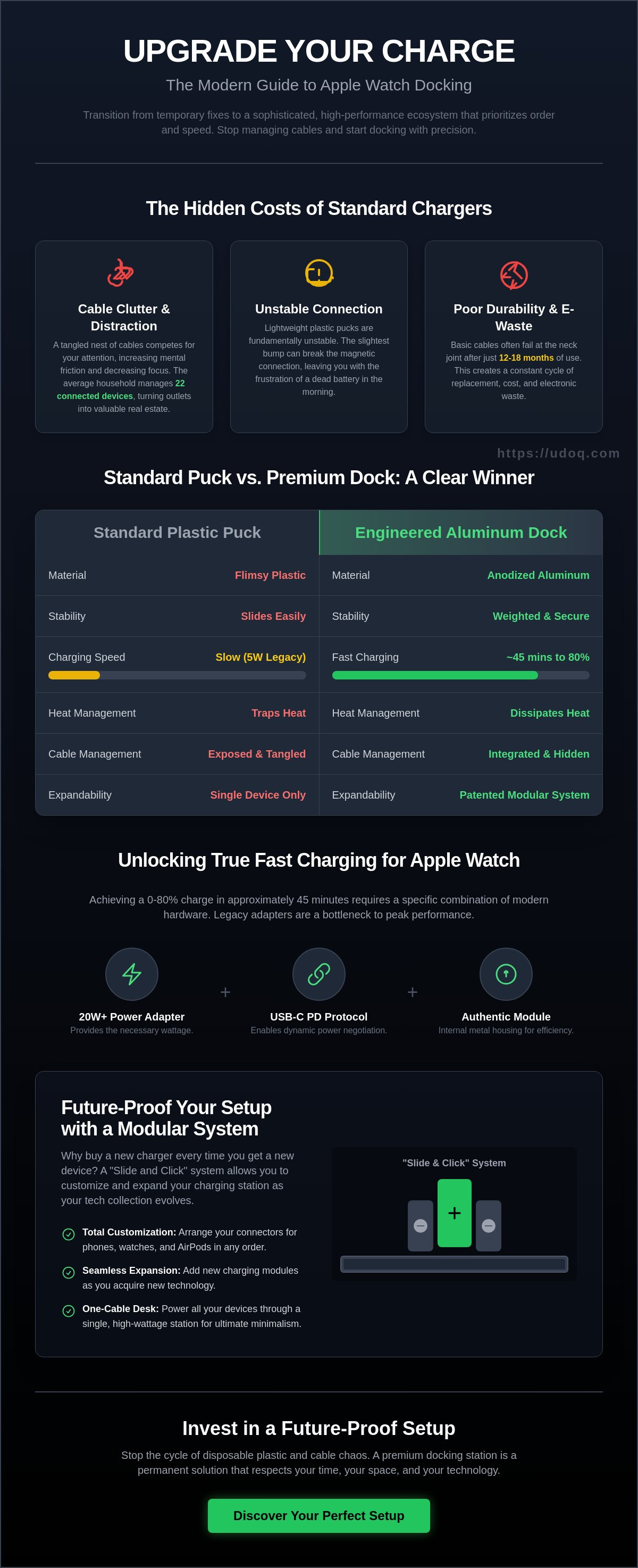
Your high-performance Apple Watch shouldn't be tethered to a flimsy piece of plastic that slides off your nightstand every time you move. It's an insult to the design of the device itself. You likely struggle with a tangled nest of white cables or the disappointment of a dead battery because your magnetic puck shifted overnight. With the average household now managing 22 connected devices according to a 2023 Deloitte report, wall outlets have become the most valuable real estate in your home.
You deserve a workspace that reflects your standards. This guide helps you transition from these temporary fixes to a sophisticated, high-performance docking ecosystem that prioritizes order and speed. Discover how to select an apple watch charger that offers more than just power. We'll explore the best solutions for 2026, focusing on patented modularity and German engineering that eliminates chaos for good. Power up in style and experience the relief of a truly clutter-free environment. It's time to invest in a future-proof setup that respects your time and your space.
Key Takeaways
- Transition from cable clutter to a professional, minimalist workspace by choosing a dock that serves as a high-end lifestyle accessory.
- Learn the specific USB-C Power Delivery profiles required for your apple watch charger to hit 80% battery in just 45 minutes.
- Compare the structural advantages of German-engineered aluminum against standard plastic solutions for a truly future-proof investment.
- Discover how a modular "Slide and Click" system allows you to customize and expand your charging station as your tech collection evolves.
The Evolution of the Apple Watch Charger: Why Cables Aren’t Enough
The Apple Watch has undergone a massive transformation since its initial release in 2015. When you examine the Apple Watch history, it's clear the device has moved from a simple notification hub to a critical health and productivity tool. In 2026, your apple watch charger should reflect this importance. It's no longer just a utility. It's a desk-defining accessory. The standard 1-meter white cable that comes in the box fails the minimalist test. It's light, it's messy, and it doesn't respect the clean lines of a modern workspace. Clutter is a silent productivity killer. Research from the Princeton University Neuroscience Institute shows that physical clutter in your surroundings competes for your attention. This leads to increased mental friction and decreased focus. A tangled web of white plastic cords isn't just an eyesore; it's a distraction that costs you time. Professionals now demand a setup that offers the relief of order and the efficiency of a dedicated power zone. To better understand how the right setup changes your experience, watch this helpful video:The Problem with Basic Magnetic Pucks
Standard magnetic pucks are fundamentally unstable. Because they lack weight, the slightest bump to your nightstand or desk can break the inductive connection. Many users have experienced the frustration of waking up to a dead battery because the watch shifted by a few millimeters overnight. Beyond connectivity, there is the issue of durability. Basic cables often fail at the neck joint after 12 to 18 months of regular use. This creates a cycle of electronic waste. Visual clutter is the final dealbreaker. A dangling cord ruins the aesthetic of a high-end office, making even the most expensive apple watch charger look like a cheap afterthought.Transitioning to an Integrated Workspace
The move toward a "one-cable" desk is a deliberate choice for quality. Transitioning to an integrated charging station simplifies your morning routine instantly. You stop hunting for cables. You start docking with precision. The industry is shifting away from cheap plastics toward premium materials like anodized aluminum. This isn't just for looks. Aluminum provides the structural integrity and weight needed for a stable docking experience. It's about a permanent solution rather than a disposable one. By using a patented sliding track system, you can align your devices perfectly. This is the "Docking Advantage." You get:- Total cable management that hides the mess.
- Perfect visibility of your watch face in Nightstand mode.
- A future-proof setup that adapts to new device generations.
Technical Requirements: Fast Charging for Series 11 and Ultra 3
Modern Apple Watch hardware demands precision. The Series 11 and Ultra 3 require specific power profiles to achieve a 0-80% charge in approximately 45 minutes. Using an outdated 5W "cube" from 2015 is no longer just slow; it's a bottleneck that prevents your apple watch charger from reaching its peak performance. These legacy adapters lack the communication protocols needed for rapid induction. Efficiency is the priority in 2026.
Decoding Power Delivery (PD) Standards
Fast charging relies on USB-C Power Delivery. You need a 20W or higher adapter to unlock the full potential of your Series 11. The architecture uses a magnetic fast charger linked to a USB-C interface. This setup negotiates power levels dynamically. The udoq POWER series manages this high-wattage distribution across multiple devices. It ensures every connected unit receives the exact voltage required without interference. This "one for all" approach eliminates the need for a tangle of individual bricks. To ensure you are getting the correct speed, identify the charging module. Standard inductive pucks lack the internal metal housing found in authentic fast-charging modules.
Battery Health and Heat Management
Heat is the enemy of lithium-ion longevity. Cheap plastic pucks often trap heat against the watch casing. High-quality docking stations, like those found in our premium charging stations, use aluminum and open-air designs to dissipate thermal energy. This prevents accidental thermal throttling, which slows down charging to protect the hardware. Safety remains paramount for all users. While charging, devices must adhere to FCC guidelines on wireless device safety to ensure electromagnetic emissions stay within healthy limits.
Stable, upright docking also supports "Optimized Battery Charging." This software feature learns your routine; it waits to finish charging past 80% until you actually need it. A secure apple watch charger ensures the connection stays constant throughout this delicate cycle. Avoid the frustration of a misaligned watch that stops charging at 3:00 AM. Trust in German engineering to keep your workspace organized and your battery healthy for the long term.
Discover how a refined workspace can improve your daily routine. Explore the udoq modular system for a seamless power experience.
Roundup: The Best Apple Watch Charging Solutions for Every Setup
Choosing the right apple watch charger depends entirely on your environment. You generally have three paths to follow. Portable pucks offer mobility but fail at desk organization. Multi-device stands stabilize your nightstand. Modular docking stations define the professional workspace. Understanding how wireless charging works for wearables reveals why alignment matters. Inductive charging creates heat and loses efficiency if the coils don't match perfectly. Precision is non-negotiable for battery health.
The market has shifted toward specialized solutions for different contexts:
- Portable Pucks: Best for travel. They're lightweight but create a "cable nest" on flat surfaces.
- Fixed Stands: Good for bedside use. They provide a dedicated spot but lack the flexibility to adapt to new watch sizes.
- Modular Docks: The premium standard. These systems use sliding components to ensure a perfect fit regardless of your watch model or protective case.
The Minimalist Choice: Modular Aluminum Docks
The udoq 400 Premium Watch represents the peak of German engineering for the Series 11 and Ultra models. It uses a patented sliding track system. You move the magnetic adapter to match your specific strap or case thickness. This ensures the apple watch charger maintains constant contact. It's built from high-grade anodized aluminum, providing a weighted base that won't slide when you grab your device. Modularity prevents obsolescence. If Apple changes the watch dimensions in 2026, you simply slide the adapter to a new position. It's a sustainable, one-time investment for a clutter-free desk.
The Travel Companion: Portable Magnetic Adapters
Compact USB-C magnetic "keys" are essential for transit. These devices plug directly into the side of a MacBook or iPad. They eliminate the 1-meter cable tangle in your carry-on bag. There's a clear trade-off here. While convenient, these small adapters often lack the 15W fast-charging architecture found in premium home stations. They typically charge at a slower 5W rate. Use them for a quick 20% boost during a flight or a coffee shop session. They shouldn't be your primary home solution. Relying on them daily leads to loose ports and disorganized workspaces. Keep your travel gear in your bag and your professional dock on your desk.
Critical Selection Criteria: What to Look for in a Premium Watch Dock
A standard cable is a temporary fix. A premium dock is a permanent solution. When you choose an apple watch charger for a professional workspace, material quality is the first benchmark. Aluminum beats plastic. It's that simple. High-grade anodized aluminum provides the structural integrity needed for a permanent desk fixture. Plastic degrades. It yellows. It cracks under the heat of constant induction. A premium dock is an investment in your workspace's future.
Compatibility must be absolute. Your dock should accommodate everything from the 41mm Series models to the 49mm Ultra 3. Precision engineering ensures that the induction coils align perfectly every time. If the alignment is off by even two millimeters, heat builds up. This inefficiency can reduce your battery's long-term health by 15 percent over a 12-month period. Look for a solution that hides the wires entirely. A dock that simply holds the white plastic puck is just a glorified stand. You want a system that integrates the technology into the architecture of the dock.
The "German Engineering" Standard
Precision is the hallmark of German design. Our docks utilize a patented sliding mechanism. This allows you to adjust connectors with sub-millimeter accuracy to fit your specific device. A weighted base is non-negotiable. While mass-produced plastic stands often tip over when you dock a heavy Ultra 3, a solid metal base provides the necessary counterweight for one-handed operation. We design for a 10-year lifecycle. Most cheap alternatives end up in landfills within 10 months. Sustainable design means your dock adapts to your next upgrade instead of becoming obsolete.
Multi-Device Synergy
Clutter dies when you consolidate. A modular system lets you pair your apple watch charger with iPhone and AirPods modules seamlessly. You can power up to 10 devices from a single wall outlet. This eliminates the "cable jungle" that ruins modern office aesthetics. Efficiency isn't just about speed; it's about organization. For a deeper dive into organizing your tech space, explore the Ultimate Guide to Choosing a Charging Station.
Stop managing cables and start managing your time.
Discover the udoq modular charging system today.The udoq Advantage: Seamlessly Integrating Your Watch
The udoq system redefines how you interact with your technology. It transforms the standard, tangled apple watch charger into a refined industrial centerpiece. Crafted from high-grade anodized aluminum, the rail serves as a stable foundation for your entire ecosystem. Our patented "Slide and Click" system allows you to customize your dock in seconds. You aren't locked into a static configuration. You have the freedom to move, add, or swap connectors as your device collection grows.
The udoq 250 and 400 represent the gold standard for Apple users. These models provide ample space for an iPhone, iPad, and Apple Watch simultaneously. While traditional docks become obsolete when charging ports change, udoq remains relevant. You simply swap the cable, not the entire station. This modularity is a hallmark of German engineering, ensuring your workspace remains functional for years to come.
Creating Your Custom Charging Rail
Building your ideal setup is intuitive. Follow these steps to integrate your watch:
- Slide the Magnetic Adapter into the udoq rail from the side.
- Position the adapter to align with your preferred viewing angle.
- Click the cable into the internal track to secure it.
By positioning your watch horizontally, you maintain full Nightstand Mode visibility. This turns your apple watch charger into a functional bedside clock or a desktop notification hub. The internal cable routing eliminates the "cable nest" behind your desk once and for all. Every wire is hidden within the rail, leaving only clean lines and accessible power.
Investment in Quality
Choosing udoq is a decision to end the cycle of disposable tech accessories. It's the last charging station you'll ever need to buy. The solid construction and timeless aesthetic provide the relief of a clean, organized, and high-status workspace. You'll no longer hunt for cables or deal with plastic stands that topple over. You're investing in a system designed to adapt to the next decade of innovation. Experience the clarity of an optimized environment. Shop the udoq collection today and reclaim your desk space.
Master Your Workspace Architecture
Your environment dictates your focus. As technology advances toward the 2026 landscape, the technical requirements for the Series 11 and Ultra 3 demand more than a loose apple watch charger on your nightstand. Efficient fast charging requires stability and precision. You've seen how cable clutter compromises both aesthetics and functionality. The shift toward integrated docking stations isn't just about style; it's about reclaiming your space and protecting your hardware.
udoq provides the ultimate solution through patented German engineering. The modular design ensures compatibility with every generation, while the sustainable anodized aluminum construction offers a level of durability that plastic alternatives can't match. This system allows you to organize multiple devices on a single, elegant track. It's a long-term investment in a clutter-free lifestyle. Stop managing cables and start managing your day. You've earned a desk that reflects your standards for quality and order.
Build your custom, clutter-free Apple Watch docking station here.
Take the first step toward a more streamlined and sophisticated tomorrow.
Frequently Asked Questions
Does the Apple Watch Series 11 come with a charger?
No, Apple doesn't include a wall power adapter with the Series 11, continuing a policy established in 2020. You receive the 1-meter magnetic USB-C fast charging cable in the box, but the plug is sold separately. To achieve the 0 to 80% charge in 45 minutes, pair it with a 20-watt USB-C adapter. Our modular systems organize these components into a single, elegant power hub.
Can I use my old Apple Watch charger with the new Ultra 3?
Yes, every Apple Watch model since the 2015 original uses the same inductive charging standard. Your existing chargers will physically connect to the Ultra 3 without issue. However, older USB-A versions lack the 5-watt power delivery required for fast charging. Upgrade to a modern apple watch charger setup to ensure your high-capacity Ultra battery powers up efficiently.
What is the difference between a standard charger and a fast charger for Apple Watch?
Fast charging reduces your wait time by 33% compared to standard versions. This technology, introduced with the Series 7 in 2021, utilizes a USB-C connector and specific internal coils to boost efficiency. A standard charger takes about 90 minutes for a full cycle. Fast chargers achieve the same result in roughly 60 minutes when paired with a 20-watt power brick.
Is it safe to leave my Apple Watch on a charging dock overnight?
It's completely safe to charge your watch overnight. Apple's watchOS 7 software introduced Optimized Battery Charging to limit wear by holding the charge at 80% until you actually need it. Our anodized aluminum docks provide a stable, heat-dissipating surface. This prevents the 35-degree Celsius temperature spikes that can degrade lithium-ion battery health over long periods.
How do I enable Nightstand Mode on my Apple Watch dock?
Enable Nightstand Mode by navigating to Settings, selecting General, and toggling Nightstand Mode to 'On'. Your watch displays the time and alarm status when positioned horizontally or vertically on a dock. The udoq system holds your device at a precise 15-degree viewing angle. A simple tap on your bedside table wakes the display instantly for clear visibility.
Why is my Apple Watch charging so slowly on my multi-device station?
Slow charging typically occurs when your multi-device station shares a single 10-watt or 12-watt power source. Most 3-in-1 stations require at least a 30-watt input to provide the necessary 5 watts to the apple watch charger component. Check your power adapter's output. Insufficient amperage prevents the simultaneous fast charging of your iPhone and Watch, leading to 200% longer wait times.
Can I charge my Apple Watch using a USB-C port on my iPad or MacBook?
You can charge your Apple Watch directly from the USB-C port on an iPad Pro or MacBook. This feature has been a standard capability since the 2018 iPad Pro release. It's a perfect solution for mobile professionals who value a minimalist kit. The port provides a steady 5-volt output. This ensures your watch stays powered without needing to find an extra wall outlet.