Your MagSafe charger isn't solving your cable problem. It's just relocating it. That loose puck on your nightstand, the tangled cord snaking across your desk, the wireless pad your phone slides off at 2am - these aren't charger failures. They're system failures. And a single charging disc was never going to fix them.
You already know wireless charging should feel effortless. The frustration is real: misaligned pads that deliver a fraction of their rated speed, a nightstand that looks like a cable graveyard, and a growing suspicion that "MagSafe compatible" on a product box doesn't actually mean much. The confusion between true MagSafe performance and standard Qi output alone costs you time and battery life every single day.
This guide changes that. You'll learn exactly how the MagSafe ecosystem works in 2026, what separates a genuine magsafe compatible charging station from a Qi pad wearing a magnet, and how a modular rail system transforms scattered chargers into a single, organized power hub. From desk to nightstand, from one device to many, a cleaner setup is closer than you think.
Key Takeaways
- MagSafe is a proprietary magnetic alignment and charging system - not just a wireless pad - and understanding that distinction will change how you evaluate every charger you buy.
- Not all "MagSafe compatible" products deliver the same performance: you'll learn exactly how to tell the difference between true MagSafe output and standard Qi masquerading as something better.
- A genuine magsafe compatible charging station does more than charge - it creates a structured, cable-free environment where every device has a designated home.
- The rise of Qi2 has reshaped the market, and knowing how it relates to Apple's original magnetic standard helps you make smarter, future-proof purchasing decisions.
- udoq's patented modular rail system and MAGNETIC ADAPTER offer a concrete, professional-grade solution for consolidating multiple devices into a single, organized power hub.
What is Apple MagSafe? Defining the Modern Charging Standard
MagSafe didn't start as a phone technology. It started as a safety mechanism. Apple's original MagSafe connector, introduced with MacBook laptops in 2006, was designed to disconnect cleanly if someone tripped over the power cable, protecting the machine from a hard floor landing. That same principle, using magnetism to create a reliable, repeatable connection, eventually found a far more ambitious application in the iPhone 12 in 2020.
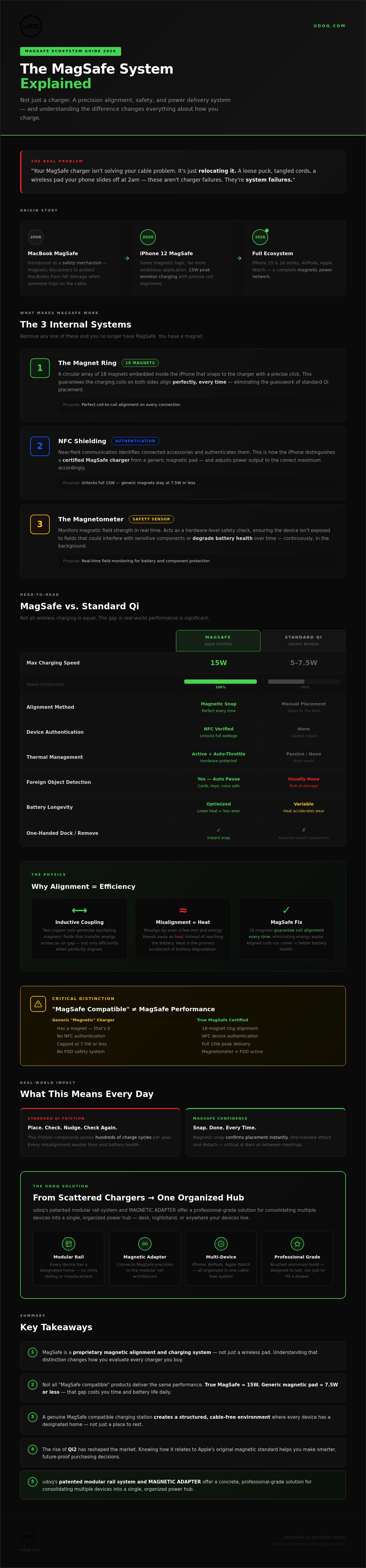
The modern MagSafe standard is a 15W peak power delivery system that uses precise magnetic alignment to minimize heat loss and maximize charging efficiency. That single sentence explains why it matters. Standard Qi charging is imprecise by design. MagSafe is not.
By 2026, the MagSafe ecosystem spans the full Apple device lineup: iPhone 16 and 15 series, AirPods cases with wireless charging support, and Apple Watch through the Magnetic Fast Charging standard. Each device connects to a growing network of accessories built around that same magnetic logic. A genuine MagSafe compatible charging station doesn't just accommodate one device in that network. It organizes all of them.
The Components of a MagSafe System
Three internal elements make MagSafe work, and understanding them explains why not every magnetic charger performs equally:
- The magnet ring: A circular array of 18 magnets embedded inside the iPhone snaps to the charger with a satisfying, precise click. This isn't decorative. It ensures the charging coils on both sides align perfectly, every time.
- NFC shielding: The iPhone uses near-field communication to identify connected accessories. This is how the phone distinguishes a certified MagSafe charger from a generic magnetic pad, and adjusts power output accordingly.
- The magnetometer: This sensor monitors magnetic field strength in real time. It acts as a safety check, ensuring the device isn't exposed to fields that could interfere with sensitive components or degrade battery health over time.
These three systems work together. Remove any one of them from the equation and you no longer have MagSafe. You have a magnet.
What Does MagSafe Mean for Your Daily Routine?
The practical difference is immediate. With standard Qi, you place your phone and hope. You check the screen. You nudge the device slightly. You check again. That friction compounds across hundreds of charge cycles a year.
MagSafe eliminates that doubt. The magnetic snap confirms placement instantly. Attachment and detachment are one-handed, which matters when you're reaching for your phone at 6am or docking it quickly between meetings. For anyone building a multi-device setup around a magsafe compatible charging station, that reliability isn't a convenience. It's the foundation the entire system rests on.
The Science of Magnetic Alignment: How MagSafe Functions
Wireless charging isn't magic. It's physics. Two copper coils, one inside the charger and one inside the phone, generate oscillating magnetic fields that transfer energy across a small air gap. This process, called inductive coupling, works without any physical contact. The catch is that it only works efficiently when those coils are precisely aligned. Misalign them by even a few millimeters and energy bleeds away as heat instead of reaching the battery.
That's the problem MagSafe was engineered to solve. The 18-magnet ring doesn't just hold your phone in place. It guarantees coil-to-coil alignment every single time, eliminating the energy waste that makes standard Qi pads run warm and charge slowly. Precision isn't a feature here. It's the entire mechanism.
Thermal management follows directly from that alignment. A misaligned Qi connection generates excess heat, and heat is the primary accelerant of lithium-ion battery degradation. MagSafe's aligned coils run cooler by design. The thermal architecture also includes a temperature sensor that throttles power delivery if the device gets too warm, protecting the battery at the hardware level rather than relying on the user to notice.
Two additional safety systems run in the background. Foreign Object Detection, or FOD, uses sensor data to identify metallic objects between the charger and the phone. A credit card, a key, a coin. If something's in the way, charging pauses automatically. Magnetic shielding around the coil assembly prevents field leakage from interfering with the iPhone's NFC antenna, compass, or other sensitive components.
Charging Speeds: 7.5W vs. 15W
Speed depends on certification, not just magnets. A certified MFi (Made for iPhone) accessory communicates directly with the iPhone via NFC, unlocking the full 15W output. Without that handshake, the phone defaults to 7.5W, the same cap applied to uncertified Qi chargers. The power brick matters too: a 20W USB-C adapter is the minimum recommended for reaching peak MagSafe speeds. Pair a certified charger with an underpowered adapter and you'll cap out well below 15W regardless. Any serious MagSafe compatible charging station should account for this at the power delivery level, not just the magnetic one.
Battery Health and Magnetic Charging
The concern that magnets damage iPhone batteries is a persistent myth. The battery cells themselves are not magnetically sensitive. What does affect battery health is heat, and MagSafe's aligned charging actually reduces thermal stress compared to a poorly positioned Qi pad running at full draw. iOS reinforces this through Optimized Battery Charging, which learns your daily schedule and slows the final charge phase to reduce time spent at 100%. That software layer integrates directly with MagSafe, making a well-aligned magnetic connection the foundation of a genuinely battery-friendly charging routine.
MagSafe vs. Standard Qi Charging: A 2026 Comparison
Place a standard Qi pad on your desk and you'll spend the next thirty seconds nudging your phone until the charging icon appears. Place it on a MagSafe charger and it snaps into position with an immediate, tactile click. That difference sounds minor. Across hundreds of charge cycles a year, it isn't.
The efficiency gap between the two standards is real and measurable. Standard Qi relies on broad coil coverage to compensate for imprecise placement. When alignment drifts, energy that should reach your battery dissipates as heat instead. Studies from wireless power consortium research consistently show that misaligned Qi connections can waste a significant portion of transferred energy through thermal loss. MagSafe's magnetic ring removes that variable entirely. The coils meet in the same position every time, which is why a certified MagSafe connection runs cooler and delivers power more consistently than a Qi pad operating at its rated output.
MagSafe vs. Qi2: What's the Difference in 2026?
Qi2, ratified by the Wireless Power Consortium in 2023 and now widely adopted across Android flagships and mid-range devices, borrowed Apple's magnetic alignment ring design directly. The result is a 15W open standard that delivers genuine snap-and-charge reliability without requiring Apple hardware. For Android users, it's a meaningful upgrade. For iPhone users, the distinction matters more than most product listings suggest.
Qi2 and MagSafe share the same physical magnet geometry, which means MagSafe accessories physically attach to Qi2 devices. But attachment isn't authentication. Apple's NFC handshake, the communication layer that unlocks full 15W output and deep iOS integration, only fires between an iPhone and a certified MFi accessory. A Qi2 device using a MagSafe charger will charge, but it won't benefit from the same software-level power management. iPhone users building around a magsafe compatible charging station should prioritize MFi-certified hardware, not just Qi2 compatibility, to get everything the platform offers.
The Problem with Loose MagSafe Cables
A MagSafe puck on a loose cable solves one problem and creates another. The magnetic connection is reliable. The cable beneath it isn't. Standard white rubber cables fray at stress points, typically within six to twelve months of daily use. The puck migrates across your nightstand. The cable tangles with everything near it. What looked like a clean wireless solution becomes the same desk clutter problem you started with, just slightly more expensive.
The fix isn't a better cable. It's removing the cable from the equation entirely. Integrating a MagSafe charger into a structured, rail-mounted system keeps the puck anchored and the cable managed out of sight. If you're evaluating how to build that kind of setup from scratch, The Ultimate Guide to Choosing a Charging Station in 2026 covers the full decision framework. The short version: a loose puck was never the destination. It was always just the starting point.
Building a Clutter-Free MagSafe Workspace
Every device on your desk deserves a fixed address. Not a general area. Not "somewhere near the monitor." A specific, repeatable position it returns to every single time. That one principle separates a workspace that feels calm from one that feels like controlled chaos, and it's the philosophy that should drive every charging decision you make.
The shift from horizontal to vertical changes everything. A flat Qi pad demands surface space and offers nothing in return visually. A vertical mount lifts your iPhone off the desk entirely, turning dead real estate into an active display. Your phone becomes a bedside clock, a notification panel, a FaceID-ready screen you can unlock without picking up. Fixed-position MagSafe mounting isn't just tidier. It changes how you interact with your device throughout the day.
Cable spaghetti isn't a cable problem. It's a routing problem. Most desk setups fail because cables run wherever gravity takes them, which is usually directly across the surface you're trying to work on. The solution is routing cables behind the desk structure before they reach the surface at all, then terminating them at a single organized hub rather than individual wall outlets. One cable in. Clean desk out.
Essential Accessories for the Minimalist Desk
Case material matters more than most buyers realize. Thick silicone or rugged cases with metal reinforcement can weaken the magnetic connection between your iPhone and a MagSafe charger, reducing snap strength and occasionally interfering with the NFC handshake that unlocks full charging speed. Cases designed for MagSafe compatibility keep the magnet ring accessible and the coil gap within spec. Check thickness before you buy.
Weighted bases and magnetic mounts solve different problems. A weighted base stabilizes a charger on a surface without anchoring it permanently. A rail-mounted system fixes the charger's position absolutely, which is what you actually want for a desk that looks the same every morning. For a complete framework on building this kind of environment from the surface up, How to Create a Minimalist Desk Setup: The Ultimate 2026 Guide covers the full methodology.
Multi-Device Management
Three devices. One outlet. That's the goal. iPhone, Apple Watch, and AirPods each have different charging requirements, but they don't need three separate wall plugs to meet them. A properly configured magsafe compatible charging station consolidates all three into a single power draw, with each device in a fixed, dedicated position.
Aluminum rails are the right material for this. Plastic stands flex under cable tension, retain heat, and degrade visually over time. Aluminum dissipates heat passively, holds its form under load, and ages without losing its finish. udoq's modular rail system is built on exactly this logic: a German-engineered aluminum backbone that accepts the MAGNETIC ADAPTER and WIRELESS ADAPTER as sliding components, so your iPhone, Apple Watch, and AirPods each dock in the same position every day. The cables disappear behind the rail. The surface stays clear.
That's not a marginal improvement over a loose puck and a charging pad. It's a different category of solution entirely. Explore udoq's modular charging stations to see how the system scales from a single device to a full desk setup without adding a single extra cable to your wall.
The udoq Advantage: Modular MagSafe Integration for Professionals
A loose MagSafe puck is a starting point, not a solution. udoq's patented sliding system is what comes next. The core innovation is mechanical: adapters slide along a precision-machined aluminum rail and lock into position without tools, without adhesives, and without compromise. That rail becomes the spine of your entire desk charging environment.
The MAGNETIC ADAPTER is the component that bridges Apple's ecosystem and udoq's modular architecture. Slide it onto any udoq rail, connect it to your power source, and your iPhone snaps into the same fixed position every time. No nudging. No guessing. The magnetic connection is reliable because the adapter's position is fixed. That's the distinction between a magsafe compatible charging station built around a system and one that's simply a puck with a different shape.
Material choice is a design decision with long-term consequences. Plastic docks flex under cable tension, scratch under daily use, and yellow under desk lighting over months. Polished aluminum does none of those things. It dissipates heat passively, holds its geometry under load, and looks identical on day one thousand as it did on day one. German engineering isn't a marketing phrase here; it's a measurable standard that shows up in tolerances, finish quality, and structural rigidity.
Future-proofing matters in a market where connector standards shift. Apple's transition from Lightning to USB-C reshaped accessory compatibility across an entire product generation. udoq's modular architecture accounts for exactly this kind of change. When the next standard arrives, you swap the adapter. The rail stays. The investment doesn't depreciate with every Apple keynote.
Customizing Your udoq 400 for an Apple Ecosystem
The udoq 400 Premium Watch configuration demonstrates what a fully resolved Apple setup looks like in practice. Within a 400mm footprint, you can position the MAGNETIC ADAPTER for your iPhone, integrate the WIRELESS ADAPTER for Apple Watch charging, and run the udoq C-CABLE for high-speed USB-C iPad charging alongside both. Three devices. One rail. One outlet. The surface beneath them stays completely clear.
Sustainability and Quality
The e-waste problem is partly a design problem. Products built to be replaced generate the waste that ends up in landfill. udoq's aluminum construction and modular adapter system are a direct argument against that cycle. Buy the rail once. Update the adapters when the technology changes. That's a 'buy it for life' philosophy with a concrete mechanical basis, not a marketing claim.
In a professional office environment, the aesthetic consequence is equally real. A polished aluminum rail on a clean desk signals the same attention to detail that the work produced there is supposed to reflect. Clutter communicates something. So does its absence.
Build your custom udoq charging station today and replace the cable graveyard with something that earns its place on your desk.
Your Desk Deserves Better Than a Cable Graveyard
MagSafe changed what wireless charging could feel like. Precise alignment, reliable magnetic snap, consistent power delivery. But the technology was always only half the equation. The other half is the system you build around it.
Three things hold true after everything covered here. First, not all magnetic chargers are equal, and MFi certification is the line that separates genuine performance from a convincing imitation. Second, a magsafe compatible charging station isn't just a tidier version of a loose puck; it's a fundamentally different approach to how your devices live on your desk. Third, the right foundation doesn't become obsolete when Apple announces something new.
udoq's patented modular rail system is built on exactly that logic. German-engineered aluminum construction, a sliding adapter system that scales to support up to 10 devices from a single outlet, and a design that upgrades with technology rather than fighting it.
The cable graveyard on your desk isn't inevitable. Upgrade your workspace with udoq today and replace the chaos with something built to last.
Frequently Asked Questions
Does MagSafe charge faster than a standard USB-C cable?
No. A wired USB-C connection is faster than MagSafe in raw throughput terms. USB-C can deliver 27W or more to a compatible iPhone, while MagSafe peaks at 15W. What MagSafe offers instead is convenience and precision: one-handed docking, consistent alignment, and no port wear from repeated plugging. For overnight charging or desk docking, that trade-off is worth it. For a quick top-up before leaving the house, a cable wins on speed.
Will MagSafe magnets damage my credit cards or hotel keys?
Yes, they can. The magnetic array inside a MagSafe charger is strong enough to demagnetize cards that use a traditional magnetic stripe. Hotel key cards are particularly vulnerable. NFC-based payment cards are generally unaffected, but the safest habit is keeping stripe-based cards away from the charger itself, not just your phone. Don't store cards directly behind an iPhone that's actively docked on a MagSafe mount.
Do I need a special case to use MagSafe charging?
Not necessarily, but case choice matters. Any case thicker than roughly 3mm, or one with metal reinforcement near the back, can weaken the magnetic connection and reduce charging speed. Cases labeled "MagSafe compatible" are designed to keep the magnet ring accessible and the coil gap within spec. If you're using a rugged or wallet-style case and your phone charges slowly on a magsafe compatible charging station, the case is the first thing to investigate.
Is MagSafe compatible with older iPhones like the iPhone 11?
No. MagSafe requires the internal magnet array and NFC authentication hardware introduced with the iPhone 12. The iPhone 11 and earlier models don't have that hardware, so they can't physically snap to a MagSafe charger or unlock its 15W output. These older devices support standard Qi wireless charging up to 7.5W, but they won't benefit from magnetic alignment or any of the software-level power management features tied to MagSafe.
Can I use a MagSafe charger with an Android phone?
Physically, it depends. Android devices with Qi2 support use the same magnetic ring geometry as MagSafe, so a MagSafe charger will snap to them and deliver wireless power. However, Apple's NFC handshake only fires between an iPhone and a certified MFi accessory, so Android devices won't unlock the same software-level power management. Non-Qi2 Android phones won't snap at all, though they may still charge slowly if placed over the coil. It's functional, not optimized.
Does MagSafe cause the iPhone to overheat?
MagSafe is actually better for thermal management than a misaligned Qi pad. Precise coil alignment reduces the energy that bleeds away as heat during charging. Apple also builds in a hardware temperature sensor that throttles power delivery if the device runs too warm. That said, charging any phone inside a thick case, on a surface that traps heat, or while running processor-intensive apps will raise temperatures regardless of the charging method. Remove the case if heat is a consistent issue.
What is the difference between MagSafe and Qi2 in 2026?
Qi2 is an open wireless standard ratified by the Wireless Power Consortium that adopted Apple's magnetic alignment ring design. It delivers 15W charging with reliable snap-and-charge behavior across Android and Apple devices alike. MagSafe is Apple's proprietary implementation of that same concept, with one critical addition: NFC authentication. That handshake between a certified MFi charger and an iPhone unlocks deep iOS integration and the full software-level power management stack. For iPhone users building around a magsafe compatible charging station, MFi certification matters more than Qi2 compatibility alone.
How do I clean my MagSafe charger and accessories?
Use a dry or very lightly dampened lint-free cloth for the charging surface. Avoid alcohol wipes directly on the puck's charging face, as repeated use can degrade the surface coating over time. The magnet ring attracts fine metallic debris, so inspect it periodically and remove any particles with a soft brush before they affect connection quality. For aluminum rail accessories like udoq's modular system, a dry microfiber cloth is sufficient to maintain the finish without scratching the surface.