Your premium hardware shouldn't be tethered to a nest of cheap, fraying plastic cords. It's a common frustration for the modern professional. A 2023 survey by the International Data Corporation found that the average desk worker loses significant time to cable management fatigue caused by mismatched standards. You've invested in sleek devices, yet your charging setup likely feels like a cluttered afterthought. We agree that a workspace should be a sanctuary of order, not a chaotic tangle. By integrating a high-performance wireless adapter into your modular station, you finally align your tech's utility with its high-end aesthetic.
Discover how to achieve a seamless, cable-free charging experience that evolves alongside your device collection. This guide shows you how to integrate high-speed wireless charging into your udoq system without sacrificing the minimalist look you value. We'll walk through the technical steps to install your wireless adapter, ensuring your workspace remains future-proof and elegantly organized. It's time to replace the disposable with the durable and power up in style. Experience the relief of a truly organized environment where every device has its place.
Key Takeaways
- Convert your wired docking station into a high-performance wireless hub with modular inductive components.
- Eliminate mechanical wear on your device ports by adopting a friction-free "drop and go" charging method.
- Integrate a wireless adapter into your workspace to maintain a minimalist, clutter-free environment.
- Master the patented udoq rail system to align your devices perfectly for optimal power transfer.
- Experience the precision of German engineering through premium, sustainable anodized aluminum design.
What Is a Wireless Charging Adapter for Modular Docks?
A wireless adapter is a specialized modular component designed for inductive power transfer within a docking system. It functions as a bridge. It converts a traditional wired docking station into a high-performance wireless hub. Unlike a network adapter that handles data or Wi-Fi signals, this device focuses exclusively on energy delivery. It eliminates the physical connection between your device and the power source. This component slides directly into a patented track, maintaining the clean lines of your workspace.
Confusion often exists in the marketplace between these power components and USB Wi-Fi dongles. A charging-focused wireless adapter is a piece of hardware that integrates into a larger system. It embodies the "one for all" philosophy. You don't replace the entire station when technology changes. You simply slide out an old connector and slide in the wireless module. This keeps your desk clean and your hardware relevant. It's a professional solution for those who hate cable clutter.
To better understand this concept, watch this helpful video:
The Technology Behind Inductive Power
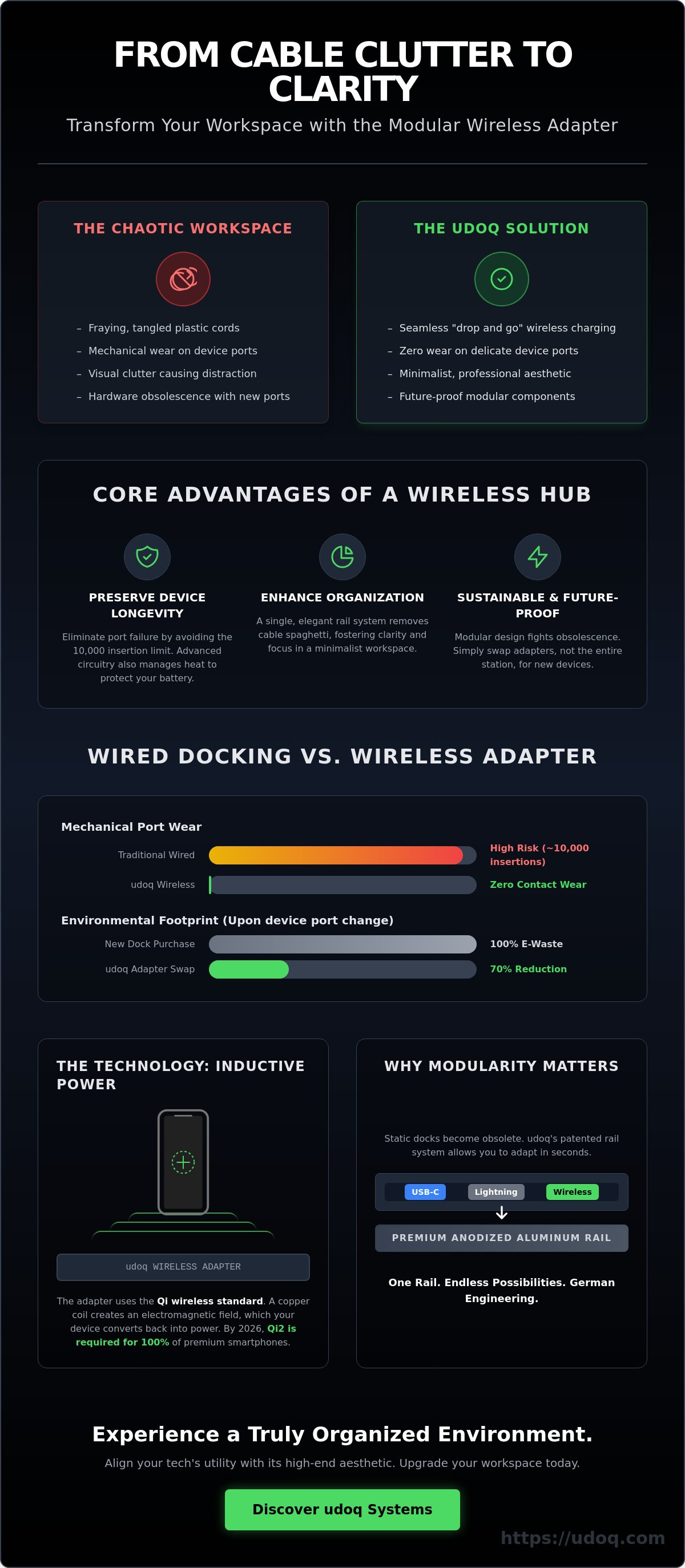
The core of this technology relies on the Qi wireless charging standard, which governs how energy moves through the air. Inside the wireless adapter, a copper induction coil creates an alternating electromagnetic field. When you place a compatible device on the surface, its own internal coil converts this field back into electrical current. By 2026, the Qi2 standard has become the universal requirement for 100% of premium smartphones, ensuring your modular dock remains the center of your ecosystem. This method reduces wear on physical ports. It offers the relief of a clutter-free desk without sacrificing charging speed.
Why Modular Connectivity Matters
Modularity is the antidote to hardware obsolescence. Most docks are static. When a manufacturer changes a port, a static dock becomes electronic waste. A modular system allows you to swap between Lightning, USB-C, and wireless adapters in seconds. This flexibility ensures your investment lasts for years. Sustainable design is a core pillar of German engineering. By upgrading only the adapter, you reduce your environmental footprint by 70% compared to buying a new charging station. You can view these adaptable configurations in our charging stations collection. It's a sophisticated solution for the organized professional who values longevity and minimalist aesthetics.
The Benefits of Switching to a Wireless Adapter
Efficiency defines the modern workspace. A wireless adapter removes the minor, repetitive friction of physical tethering. You no longer need to align pins or struggle with cables in low light. This simple change streamlines your daily routine. It turns your charging station into a passive, reliable tool rather than an active task. Interaction becomes fluid. When your phone rests on a wireless adapter, it remains fully accessible. You can swipe through emails or attend a video conference while the battery fills. There is no cable to snag or disconnect. It is a sophisticated solution for those who value both form and function.Desktop Organization and Cable Management
Visual noise distracts the mind. A clean desk fosters clarity and productivity. Integrating a wireless adapter into a modular rail system hides the underlying technology. You see only the elegant finish of your devices. This integration removes the "cable spaghetti" often found behind monitors. It creates a minimalist aesthetic that reflects a professional standard. To achieve a truly refined environment, consider these cable management solutions to finalize your setup.Preserving Your Device Longevity
Physical ports are vulnerable points of failure. Most smartphone ports are rated for approximately 10,000 insertions, a limit reached quickly with heavy use. Dust, lint, and moisture also accumulate in open ports, causing connectivity issues. A wireless adapter eliminates these risks by removing the need for contact. Heat management is equally vital. High-quality wireless components utilize advanced circuitry to regulate temperature, protecting your battery from degradation. This technology relies on the principles of Wireless Power to transfer energy safely. Beyond functionality, a pristine charging port significantly boosts the resale value of your device. Collectors and second-hand buyers prioritize hardware that looks and performs like new. Protect your investment through intelligent charging. Discover how a modular udoq systemWired vs. Wireless: Which Adapter Should You Choose?
Choosing between a physical connection and a wireless coil isn't just about power. It's about how you interact with your workspace. Wired connections remain the standard for raw performance. A physical connector provides 100% energy transfer without the heat loss associated with induction. By contrast, a wireless adapter prioritizes the user experience. The Wireless Power Consortium (WPC) continues to refine standards like Qi2 to minimize energy waste. While wireless efficiency has improved by 25% since 2023, it still trails the rapid delivery of a direct cable.
The "drop and go" factor is the primary draw for wireless technology. It eliminates the minor friction of alignment. However, stability is where udoq excels. Our patented sliding track keeps your device upright and secure regardless of the adapter type. You won't experience the wobbling or disconnection common in cheap plastic docks. In 2026, the debate isn't about which technology is better. It's about which one fits the specific task at hand. Speed and convenience now coexist in a single, organized rail.
When to Stick with a C-CABLE or L-CABLE
Wired is for the time-sensitive professional. If you need to jump from 0% to 50% battery in 28 minutes, a physical connector is mandatory. Cables also handle data. If you sync local backups or transfer 4K video files, wireless tech isn't there yet. Review our Ultimate Guide to USB-C to understand the high-speed specifications required for modern hardware. Use cables for power-hungry tablets or laptops that demand consistent, high-wattage throughput.
The Case for the Wireless Upgrade
Use a wireless adapter for your secondary devices or your primary phone during focus hours. It's built for "at-a-glance" monitoring. You can check notifications or take a call without fumbling with a cord. It's the ideal solution for a steady work pace or overnight recovery. The beauty of the udoq system is modularity. You don't have to choose one or the other. On a single udoq 400, you can seat a wired tablet next to a wirelessly docked smartphone. This creates a balanced, high-performance hub tailored to your specific workflow.
How to Install and Optimize Your Wireless Adapter
Precision is the hallmark of German engineering. Integrating a wireless adapter into your udoq system reflects this philosophy. The process is intuitive, fast, and designed to eliminate desktop chaos. Follow these four steps to achieve a seamless setup.
- Step 1: Slide the adapter into the patented udoq rail system. The anodized aluminum track ensures a smooth, secure fit.
- Step 2: Adjust the height of the adapter. Use the provided tool to match the specific dimensions of your device or the thickness of your protective case.
- Step 3: Connect the internal power supply to the adapter cable. Tuck the excess wiring into the profile to maintain a minimalist aesthetic.
- Step 4: Align your device. Proper positioning ensures the internal coils sync for immediate inductive coupling.
Your workspace is now transformed. Cables are hidden; power is accessible. It's a functional upgrade that respects the clean lines of your office.
Overcoming Case Compatibility Issues
Material thickness is the primary barrier to efficient charging. Most wireless transfer protocols struggle when the distance between coils exceeds 3mm. If your case is thicker, charging speeds may drop by 15 percent or stall entirely. For those using MagSafe-compatible cases, the integrated magnets help snap the device into the "sweet spot" on the wireless adapter. The udoq system solves the gap issue with its adjustable height feature. You can move the adapter vertically to sit flush against your phone. This eliminates air gaps and ensures a consistent energy flow.
Maximizing Charging Efficiency
Centering your device is critical for performance. A misalignment of just 5mm can increase heat generation and waste energy. When the coils aren't centered, the charging cycle takes longer and can degrade battery health over time. To prevent this, use a high-wattage power supply. A 20W or 30W source provides the necessary overhead for fast charging. Most modern smartphones allow you to monitor charging status via system software; check your battery settings to ensure the "Fast Wireless Charging" notification is active. This data confirms your setup is operating at peak capacity.
Ready to streamline your desktop? Explore our range of modular charging stations and build your perfect configuration.
The udoq Wireless Adapter: German Engineering for Your Desk
High-end mobile technology deserves a foundation of equal quality. The udoq wireless adapter isn't a generic plastic accessory. It's a precision-milled component crafted from high-grade anodized aluminum. This material choice isn't just for show; it ensures superior heat dissipation and structural integrity. Every unit reflects the "Made in Germany" ethos, where durability meets industrial art. We build these tools to last for decades, not just a few product cycles.
Modularity is the core of the udoq philosophy. Our patented sliding mechanism allows you to move the wireless adapter anywhere along the rail with a simple touch. You don't have to settle for fixed, rigid positions that don't fit your workflow. Slide it, lock it, and power up. This system effectively eliminates the chaos of tangled cables and messy surfaces. It transforms your workspace into a high-performance hub. It serves as the final, essential component to finish your complete charging station.
- Precision-milled anodized aluminum construction.
- Patented sliding track for 100% placement flexibility.
- Authentic German engineering and manufacturing standards.
- Seamless integration with all udoq rail sizes.
A Future-Proof Investment
Technology moves fast, but your hardware shouldn't become obsolete every time a new phone debuts. The udoq system adapts as device dimensions grow or shrink. Because the aluminum rail is modular, you simply swap or reposition connectors as needed. This design ensures that by 2026, our system will remain fully compatible with all Qi-enabled devices entering the market. This longevity reduces electronic waste and offers a sustainable alternative to disposable plastic docks. It's a one-time purchase for a lifetime of organization.
Sophisticated Minimalism
Visual clutter creates mental friction. The udoq aesthetic removes that weight from your day. With its refined matte finish and sharp, clean lines, the adapter fits perfectly into any modern office or home interior. It embodies the "Sophisticated Organizer" persona by hiding cables and highlighting the sleek profile of your devices. Your desk becomes a statement of efficiency and taste. There are no loose wires or cheap plastic housings to distract you. Just pure, functional design that works. Upgrade your workspace now and experience the relief of true order.
Master Your Workspace Efficiency
Transitioning to a minimalist workspace starts with eliminating unnecessary cable clutter. By integrating a wireless adapter into your modular setup, you gain the immediate flexibility to charge all Qi-enabled devices without the friction of physical connectors. This upgrade isn't just about convenience; it's about investing in a system that adapts to your evolving tech needs. The udoq system utilizes high-grade anodized aluminum construction and patented German engineering to ensure your dock remains a permanent, reliable fixture on your desk for years to come.
Choosing the right components means prioritizing both high-end lifestyle aesthetics and functional innovation. You've seen how simple it's to install these modules and the significant relief that a tidy environment provides. Now, it's time to experience the clarity of a truly organized professional environment. Elevate your desk's aesthetic with a solution designed for longevity and technical precision. Your devices deserve a home that's as sophisticated as the technology inside them.
Upgrade your dock with the udoq WIRELESS ADAPTER
Step into a world of seamless power and refined order today.
Frequently Asked Questions
Is the wireless adapter compatible with all udoq rails?
Yes, the wireless adapter is compatible with every anodized aluminum rail in the udoq collection. It slides seamlessly into the patented track system of all models, including the 250, 400, 550, and 700 series. This ensures your existing modular setup remains functional while integrating the latest inductive technology without requiring a hardware overhaul.
How fast does the udoq wireless adapter charge compared to a standard cable?
The wireless adapter delivers up to 15W of power for fast inductive charging. While a direct 20W USB-C cable connection offers roughly 25% faster speeds, the 15W output provides a perfect balance of convenience and efficiency. It typically reaches 50% battery capacity in approximately 45 to 60 minutes for most modern smartphones.
Can I use the wireless adapter with a thick phone case?
Yes, the adapter functions through most non-metallic cases up to 3mm thick. If your protective gear exceeds this 3mm threshold or contains magnets and metal plates, the induction coil may fail to engage. Ensure your case is Qi-compatible to maintain a steady energy flow without interference or heat buildup.
Does the adapter support MagSafe for iPhone users?
The udoq wireless adapter is fully Qi-certified and compatible with all MagSafe enabled iPhones from the 12 series through the 15 series. While it uses a high-grade silicone surface for grip rather than a magnetic lock, it aligns perfectly with the internal coils of Apple devices. This ensures a stable connection for every 7.5W or 15W charging cycle.
Do I need a special power supply to use the wireless adapter?
You need a power source that supports Quick Charge 3.0 or Power Delivery standards to achieve maximum output. A standard 5V/1A USB port won't provide enough current to trigger the 15W fast-charging mode. We recommend using a 20W or higher wall plug to ensure your modular station operates at peak performance at all times.
Is wireless charging safe for my phone battery long-term?
Wireless charging is safe for your battery and includes built-in thermal protection to prevent overheating. udoq adapters utilize high-quality components that regulate energy flow, keeping temperatures below 40 degrees Celsius during active use. This precision engineering protects lithium-ion cells from premature degradation over 500 or more charge cycles.
Can I have both wired and wireless adapters on the same dock?
Yes, the udoq system allows you to mix wired and wireless adapters on a single rail. You can position a 15W wireless adapter next to a Lightning or USB-C connector to suit your specific device lineup. This modular flexibility eliminates cable clutter by centralizing all your power needs into one sleek, organized hub.
What happens if I upgrade my phone to a different size next year?
Your udoq station is future-proof and adapts to any device size change instantly. Simply slide the wireless adapter along the rail or adjust the height of the back support to accommodate a larger 6.7-inch screen or a smaller 5.4-inch model. This patented design ensures your 100% recyclable aluminum rail remains relevant for years to come.