A cluttered desk is a silent drain on your cognitive bandwidth. Every tangled cable and misplaced device competes for your attention, creating an environment of subtle, persistent anxiety. You've likely tried to clear the surface before, only to find the mess returning as soon as you plug in your phone, tablet, and watch. Achieving a true minimalist desk setup requires more than just hiding the chaos. It demands a functional system that prioritizes order and efficiency.
We understand that your workspace should inspire focus, not distraction. This guide provides the blueprint to master a clutter-free environment using research-backed strategies and precision-engineered tools. You'll learn to transform a crowded surface into a professional, high-performance workspace that reduces mental fatigue. We'll explore how to consolidate your power needs into a single, modular hub while maintaining a future-proof aesthetic that reflects superior manufacturing standards.
Key Takeaways
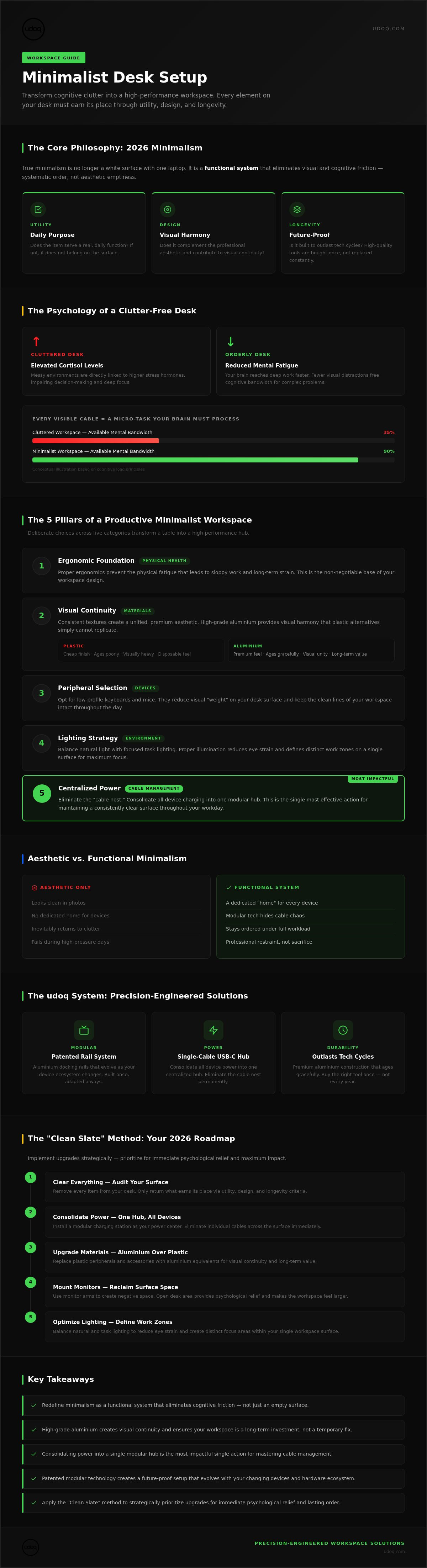
- Redefine minimalism as a functional system that eliminates cognitive friction rather than just an empty surface.
- Understand the role of high-grade aluminum in creating visual continuity and ensuring your workspace remains a long-term investment.
- Master cable management by consolidating power into a single hub to finalize your minimalist desk setup.
- Leverage patented modular technology to create a future-proof charging station that evolves with your changing devices.
- Apply the "Clean Slate" method to strategically prioritize your organization upgrades for immediate psychological relief.
What Is a Minimalist Desk Setup in 2026?
In 2026, the definition of a minimalist desk setup has evolved. It's no longer just about a white surface and a single laptop. True minimalism is the intentional reduction of visual and cognitive friction. It's a functional system designed to support your work, not a museum exhibit that's impossible to maintain. This shift reflects a move from aesthetic emptiness to systematic order.
Every object on your desk must earn its place. If a tool doesn't contribute to your focus or provide a specific utility, it's a distraction. You can explore the broader philosophical roots of this movement by researching What is Minimalism? to understand how these principles apply to physical spaces. Investing in a refined workspace is a direct investment in your professional output. High-quality materials like aluminum offer durability that plastic alternatives lack. Achieving a sustainable minimalist desk setup means choosing tools that evolve with your hardware. This core philosophy rests on three pillars:
- Utility: Does the item serve a daily purpose?
- Design: Does the item complement the professional aesthetic?
- Longevity: Is the item built to last through tech cycles?
In 2026, we view the desk as a high-performance hub where technology and ergonomics intersect. Every square inch is valuable real estate.
The Aesthetic vs. Functional Minimalism Debate
Looking minimal is simple. Staying minimal during a high-pressure workday is the real challenge. A workspace that looks "clean" in a photo but lacks a dedicated home for your devices will inevitably fail. Functional minimalism prioritizes a "home" for every device. It uses modular technology to hide the chaos of power cables. You don't have to sacrifice personality for order; simply exercise professional restraint. Integrate your tech into a charging station to maintain clean lines and ensure your workflow remains uninterrupted by cable hunting.
The Psychological Benefits of Workspace Order
Visual clutter acts as a constant drain on your energy. Your brain has a "distraction reflex" that triggers whenever an out-of-place object enters your peripheral vision. Research suggests a direct link between a messy environment and elevated cortisol levels, which impairs decision-making. A tidy desk allows your mind to settle into a state of deep work faster. Orderly environments promote clarity. Your workspace design directly dictates your available mental bandwidth; every cord you see is a micro-task your brain must subconsciously process. Reducing these micro-tasks frees your brain to solve complex problems.
The 5 Pillars of a Productive Minimalist Workspace
A high-performance minimalist desk setup isn't an accident. It's the result of deliberate choices across five specific categories. These pillars transform a simple table into a professional hub where every element supports your workflow without causing distraction. By focusing on these foundations, you create a space that remains orderly even during your busiest hours.
- Ergonomic Foundation: Start with your physical health. A proper ergonomic desk setup prevents the fatigue that leads to sloppy work and physical strain.
- Visual Continuity: Use consistent textures. High-grade aluminium provides a premium, unified aesthetic that plastic simply cannot match.
- Peripheral Selection: Opt for low-profile keyboards and mice. They reduce the visual "weight" on your desk and keep the lines of your workspace clean.
- Lighting Strategy: Balance natural light with focused task lighting. Proper illumination reduces eye strain and helps define different work zones within a single surface.
- Centralized Power: Eliminate the "cable nest" by consolidating all device charging into one location. This is the secret to maintaining a clear surface.
Selecting High-Quality Materials
Minimalism emphasizes quality over quantity. Plastic accessories often feel disposable and clutter the environment with their cheap finish. In contrast, aluminum and solid wood offer durability and a superior tactile experience. These materials don't just look better; they age gracefully. Choosing tools made from sustainable, high-end materials ensures your setup remains relevant for years. It's about buying the right tool once rather than replacing cheap alternatives every tech cycle. When your environment feels substantial, your focus deepens naturally.
Optimizing Your Digital-Physical Interface
The space between you and your screen is critical. Use monitor arms to create "negative space" on your desk surface. This open area provides psychological relief and makes the desk feel larger than it is. For those who move between mobile and desktop environments, a single-cable USB-C setup is essential. It allows you to dock your laptop instantly without fumbling for multiple connectors. To truly anchor your workspace, consider how a modular charging station can organize your mobile devices in one dedicated spot. You can build your ideal system to match your specific device list and aesthetic preferences.
Mastering Cable Management: The Final Frontier
Cables are the primary obstacle to a clean minimalist desk setup. Most people try to hide them under the desk, but this only masks the chaos rather than solving it. True order requires consolidation. Aim for the "One Cable" Rule: only one power line should lead from your desk to the wall outlet. This approach reduces visual noise and eliminates the risk of "cable spaghetti." Tangled wires aren't just unsightly; they can trap heat and strain connectors, potentially impacting device battery health or creating unnecessary fire hazards over time.
Consolidating your power isn't a luxury; it's a functional requirement for a high-performance workspace. When you eliminate loose wires, you remove the physical and mental friction of fumbling for the right connector. Your desk becomes a tool for focus rather than a reminder of unfinished organization.
The Problem with Standard Multi-Port Chargers
Many users turn to generic 5-port USB hubs, thinking they've solved the issue. They haven't. These hubs still result in a chaotic sprawl of varying cable lengths and colors across your desk. This creates persistent visual friction that drains your focus. Instead of a mess of third-party wires, transition to a centralized charging station. A dedicated hub replaces individual charging bricks and provides a permanent, organized home for every mobile device. It turns a temporary fix into a long-term infrastructure investment.
Step-by-Step Cable Elimination
Achieving a professional-grade workspace requires a systematic approach. Follow these three steps to reclaim your surface and ensure your technology serves your workflow:
- Step 1: Audit your power needs. List every active device you use daily. Identify which ones require permanent power and which are mobile devices that need frequent docking.
- Step 2: Implement a rail system. Use a precision-engineered rail to anchor your essential lines. This keeps connectors exactly where you need them and prevents them from sliding behind the desk.
- Step 3: Consolidate power. Replace individual wall adapters with a single, high-output power source that feeds your entire dock.
By anchoring your tech, you prevent cables from tangling or cluttering your peripheral vision. This level of organization is what separates a "Pinterest-worthy" photo from a workspace that actually functions. Explore a charging station that uses modular connectors to eliminate the need for loose wires entirely. This isn't just about hiding cords; it's about engineering them out of your daily existence.
The udoq System: Precision Engineering for Your Desk
The "Charging Gap" is where most workspaces fail. You might maintain a clean surface, but the moment your phone, tablet, and watch need power, the clutter returns. The patented udoq German design multiple charging station for any mobile device closes this gap through precision German engineering. Developed by Marcus Kuchler, this modular rail system transforms a chaotic pile of devices into a streamlined minimalist desk setup. It's not just a stand; it's a high-grade aluminum hub that anchors your technology in one place. This system provides a permanent home for up to ten devices, powered from a single outlet.
The system uses a unique sliding mechanism that allows you to move, swap, and add connectors as your device list changes. This flexibility includes support for:
- Universal USB-C and Lightning connectors
- Precision-fit Magnetic Adapters for effortless docking
- Wireless charging components for Qi-enabled hardware
- Dedicated watch adapters to keep your wearables organized
Whether you choose the entry-level udoq 250, which remains the most popular choice for compact setups, or the professional udoq 700, the build quality remains uncompromising. Every rail is milled from high-grade aluminum to ensure a lifetime of service.
Modular Design: Future-Proofing Your Workspace
Fixed charging stands are inherently unsustainable. When industry standards change, fixed docks become electronic waste. The udoq system avoids this trap. If you upgrade from an older mobile device to a new USB-C model, you don't replace the dock. You simply swap the cable within the rail. This modularity ensures your minimalist desk setup remains functional for a decade or more. It's a long-term investment in your environment that respects both your time and the planet. You aren't just buying a gadget; you're installing infrastructure.
Aesthetic Integration
The udoq rail features a sleek, minimalist profile that complements modern Apple and PC hardware. Its finish provides visual continuity with your high-end devices. For those seeking the ultimate "floating" desk aesthetic, wall-mounting options allow you to clear the desk surface entirely. By moving your charging hub to the wall, you maximize your primary workspace while keeping all devices visible and accessible. It's a sophisticated solution for those who value order and fine craftsmanship.
Ready to eliminate the charging crisis for good? Build your custom udoq system to match your specific device list and reclaim your focus.
Implementing Your Minimalist Setup: A 2026 Roadmap
Transitioning to a minimalist desk setup requires a systematic execution plan. Inspiration alone won't keep your surface clear when deadlines loom. You need a roadmap that moves from total chaos to a state of functional order. By applying the "Clean Slate" method, you ensure that every item on your desk serves a specific purpose. This isn't about deprivation; it's about curation. Start with a bare surface to visualize the potential of your workspace without the burden of existing clutter.
Phase 1: The Purge and Plan
Begin by removing every single item from your desk. This physical reset is essential to break old habits. Evaluate your daily-use tech and store anything that hasn't been touched in the last week. Once the surface is clear, measure your available space. Precision matters. Determine the optimal placement for your primary monitor and keyboard to ensure ergonomic alignment. Create a "cable map" on paper before you purchase any management tools. This map should account for every power and data line, identifying exactly where they'll consolidate into your central hub.
Phase 2: The Build
Install your primary monitor and input devices first. These are the anchors of your workflow. Next, integrate your charging infrastructure. The udoq 250 serves as an ideal foundation for most users, providing a compact yet powerful rail to organize your mobile tech. It eliminates the "Charging Gap" by providing a dedicated home for your phone and tablet immediately. Once your tech is anchored, fine-tune your environment with focused task lighting and ergonomic adjustments. This final layer of detail ensures your workspace is as comfortable as it is beautiful.
Maintaining this level of order requires a daily commitment. Implement a 5-minute "reset" habit at the end of every workday. Clear your surface, dock your devices, and ensure no stray items have migrated onto your desk. This simple routine preserves the psychological relief of a tidy environment and prepares you for immediate focus the following morning. Investing in high-quality, modular tools makes this maintenance effortless. When your system is engineered for order, staying organized becomes your default state.
Finalize Your High-Performance Workspace
A minimalist desk setup is more than an aesthetic choice; it's a strategic system for professional clarity. You've learned that true order comes from intentionality, high-quality materials, and the consolidation of power. By removing visual noise and anchoring your technology, you reclaim the mental bandwidth necessary for deep work. This transition from a cluttered surface to a functional hub is the ultimate investment in your daily productivity.
Don't settle for temporary fixes or cable-hiding tricks that fail under the pressure of a real workday. Sustainable organization requires infrastructure that evolves with your hardware. Our patented German engineering provides a sleek, high-grade aluminum solution that consolidates up to 10 separate cables into a single, elegant hub. It's a precise, long-term answer to a modern environmental frustration. It's time to replace chaos with craftsmanship.
Build your custom minimalist charging station at udoq.com to finalize your workspace transformation. Take control of your environment today. You'll find that when your desk is clear, your mind follows suit.
Frequently Asked Questions
What are the essential items for a minimalist desk setup?
Essential items include a high-resolution monitor on a gas-spring arm, a low-profile keyboard, and a precision mouse. A high-grade aluminum surface or solid wood desk provides the necessary durability for professional use. Beyond peripherals, a centralized charging station is vital to prevent cable sprawl. Every component must serve a daily function. If an item doesn't improve your workflow, it shouldn't occupy space in your minimalist desk setup.
How do I hide cables on a minimalist desk?
Hiding cables starts with consolidation rather than just tucking wires away. Use under-desk trays for fixed power bricks and a single, high-output cable to reach the wall outlet. For mobile devices, a modular rail system keeps connectors anchored and organized on the surface. This prevents cords from sliding out of reach or tangling. By reducing multiple cables into one, you eliminate the visual noise that typically disrupts a clean workspace.
Is a minimalist desk setup actually better for productivity?
Yes, a reduced environment directly lowers cognitive load and improves focus. Visual clutter triggers a subconscious distraction reflex, forcing your brain to process irrelevant information constantly. A tidy workspace allows you to enter a flow state faster and sustain focus for longer periods. Research indicates that orderly environments help regulate cortisol levels. This leads to better decision-making and reduced mental fatigue during complex professional tasks.
Can I have a minimalist setup with multiple monitors?
You can maintain a minimalist aesthetic with multiple screens by using dual monitor arms. These arms lift the displays off the desk, creating valuable negative space underneath the hardware. Use a single-cable docking solution to connect your laptop to both monitors simultaneously. This keeps the surface clear of redundant data cables. The goal is to maximize your digital screen real estate while minimizing the physical footprint on your desk.
How does the udoq dock help with cable management?
The udoq dock uses a patented aluminum rail to house all your charging connectors internally. Instead of multiple wires snaking across your desk, all cables are routed through the back of the rail into a single power source. This system allows you to slide and swap connectors like USB-C and Lightning without exposing any wiring. It transforms a chaotic charging area into a sleek, unified hub that complements your minimalist desk setup.
What is the best material for a minimalist desk surface?
High-grade aluminum and solid hardwoods like oak or walnut are the superior choices for a professional desk. These materials offer the structural integrity needed for a long-term investment in your workspace. Unlike plastic or cheap laminates, they age gracefully and provide a premium tactile experience. Aluminum, in particular, matches the industrial design of modern tech peripherals. It creates a cohesive visual language that reinforces the sophisticated feel of your environment.
How do I maintain a minimalist desk every day?
Maintenance requires a disciplined five-minute reset at the end of each workday. Return every device to its dedicated home and clear any paperwork or stray accessories from the surface. Adopt a one-in, one-out policy for new desk tools to prevent gradual clutter accumulation over time. When every item has a fixed, functional location, tidying becomes an effortless habit. This ritual ensures you start every morning with a clean slate.
Is a modular charging station worth the investment?
A modular station is the only sustainable choice for a modern, tech-heavy workspace. Fixed docks become obsolete when charging standards change, but a modular system allows you to simply swap internal cables. This adaptability makes it a permanent solution that evolves with your hardware. It saves money over multiple tech cycles and significantly reduces electronic waste. For the meticulous organizer, the psychological relief of a permanent, tidy device home is invaluable.