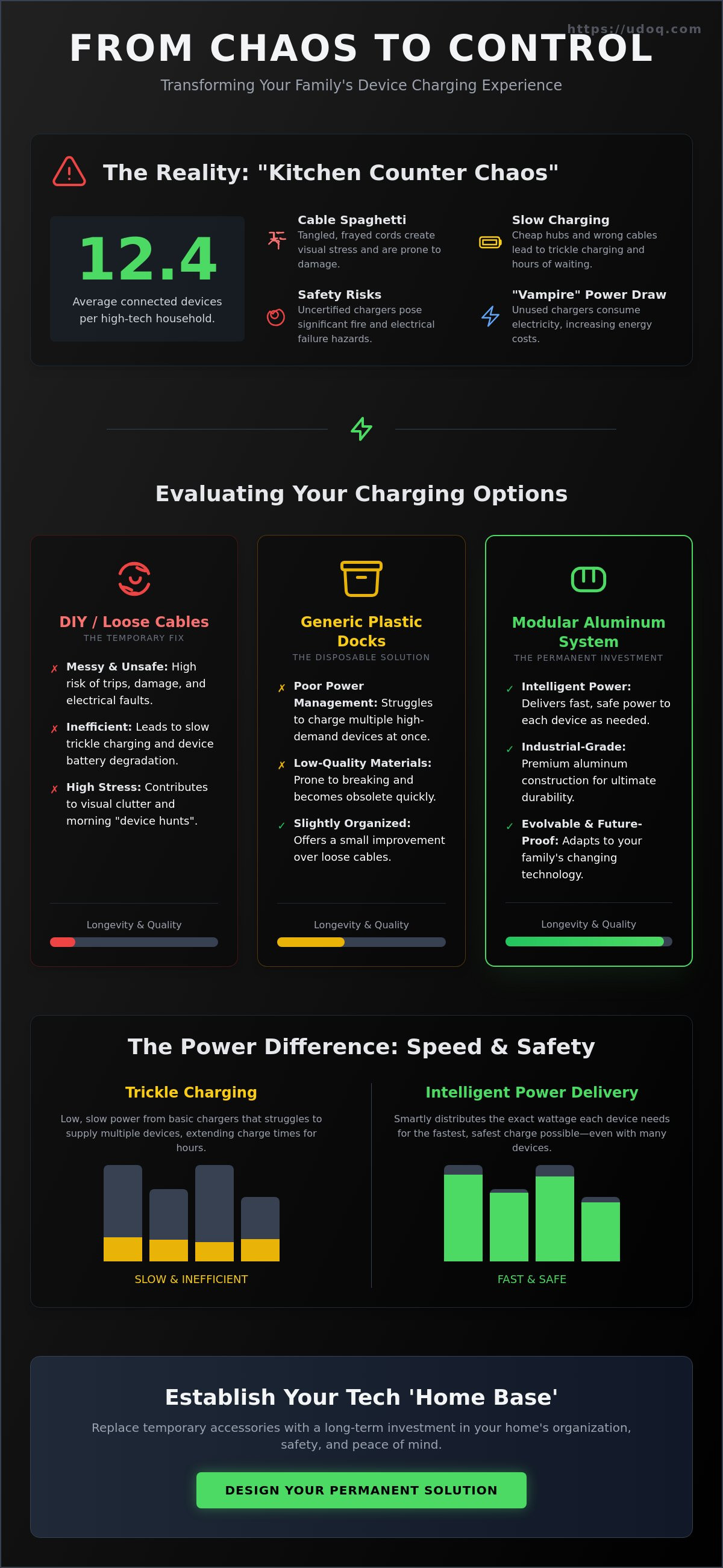
The average high-tech household now manages 12.4 connected devices. Most of these end up scattered across kitchen counters or lost under couch cushions. Finding the best way to charge kids tablets in one place is no longer just a minor organizational task. It's a necessity for preserving your sanity and your hardware. You've likely dealt with the frustration of frayed cables and slow charging speeds from cheap, plastic USB hubs. It's exhausting to manage a home that feels like a cluttered IT department.
This guide shows you how to transform that chaos into a sophisticated, centralized charging hub. You'll learn to protect your devices while simplifying your daily routine. We'll explore how modular, industrial-grade systems create a permanent home for your family's technology. Discover how to achieve a premium look that matches your decor and provides the fast, safe power your devices require. It's time to replace temporary accessories with a long-term investment in your environment and your peace of mind.
Key Takeaways
- Establish a dedicated tech home to eliminate morning friction and the psychological weight of household clutter.
- Understand the technical difference between trickle charging and intelligent power management for multiple high-demand tablets.
- Identify the best way to charge kids tablets in one place by comparing the longevity of modular systems against temporary DIY fixes.
- Learn how to select the ideal location for your charging station to balance daily accessibility with high-end aesthetic standards.
- Explore how industrial-grade aluminum rails and patented cable management create a permanent, evolvable solution for family technology.
The Family Tech Dilemma: Why You Need a Centralized Charging Station
Modern households are digital hubs. Managing an average of 12.4 connected devices requires more than just a few wall outlets; it demands a dedicated "tech home." For many families, the kitchen counter has become a graveyard of tangled cords and half-charged devices. This "Kitchen Counter Chaos" is the primary friction point for parents today. Finding the best way to charge kids tablets in one place is about more than simple organization. It's about reclaiming your living space and your mental clarity from the encroachment of messy hardware.
Standard wall outlets weren't designed for the 2026 tech load. Relying on a patchwork of cheap wall warts and various cables leads to slow speeds and safety risks. To ensure your devices receive the correct voltage and current, you need a system that supports modern standards like USB Power Delivery. A centralized station provides a professional-grade power supply that protects your hardware while keeping it ready for use. It's the difference between a temporary fix and a permanent home investment.
To better understand the practical side of device management, watch this helpful video:
The Hidden Cost of Cable Spaghetti
Visual clutter isn't just an eyesore; it's a source of low-level chronic stress in shared family spaces. Tangled "cable spaghetti" creates an environment that feels unfinished and disorganized. Beyond aesthetics, loose cables are prone to physical damage from being stepped on or bent at sharp angles. They also contribute to "vampire" power draw, where chargers consume electricity even when no device is attached. A centralized station eliminates these risks by securing cables within a sleek, industrial frame that prevents tripping and cable fatigue.
Establishing a Tech 'Home Base'
A single, predictable location for all family tech changes the household dynamic. It ends the morning "where is my tablet?" panic. Parents can easily monitor screen time simply by seeing which devices are docked. This "home base" also teaches children responsibility. When a tablet has a designated spot, docking it becomes a part of their daily routine. Transitioning to a centralized charging station is the best way to charge kids tablets in one place while ensuring your home remains a place of relaxation, not a cluttered office. It provides a sense of order that matches a high-end lifestyle.
Understanding the Tech: Power Delivery and Safety for Multiple Tablets
Managing a fleet of family tablets is a technical challenge. Most households rely on "trickle charging," which provides a low, steady stream of power that takes hours to reach full capacity. Modern tablets require fast charging to remain useful. To achieve this, your hub must utilize intelligent power management. When you connect five or more devices simultaneously, a standard charger often struggles to distribute current effectively. This leads to some devices charging while others remain drained. Finding the best way to charge kids tablets in one place requires a system that communicates with each device to provide the exact wattage it needs.
Safety is the most critical component of any multi-device setup. Cheap, uncertified multi-port chargers found on discount sites are significant fire risks. They often lack the internal circuitry needed to prevent overvoltage or short circuits. For peace of mind, prioritize charging safety by choosing hardware that meets rigorous international standards. High-quality systems protect your home and your expensive hardware from electrical failure. If you are looking for a reliable foundation for your home, consider exploring professional charging stations designed for longevity.
Amps, Watts, and Why Your Kids' Tablets Charge Slowly
Every device has unique power requirements. An iPad typically demands higher wattage than a basic Amazon Fire tablet. If your charging block provides only 5W per port, an iPad will charge at a glacial pace. The cable also plays a vital role; a damaged or low-quality cable can't carry the current required for high-speed charging. Power Delivery (PD) is the gold standard for 2026 tablet charging, allowing the charger and device to negotiate the fastest possible speed safely. This protocol ensures that every tablet in the dock reaches 100% efficiently without damaging the internal battery.
Thermal Management: Keeping Tech Cool
Heat is the enemy of lithium-ion batteries. Simultaneous charging generates significant thermal energy, a common concern discussed frequently on platforms like Reddit. Plastic docks are often problematic because they act as insulators, trapping heat against the device's back panel. This can lead to thermal throttling, where the tablet slows its charging speed to protect itself from damage. Aluminum is a natural heat sink. It draws heat away from the devices and dissipates it into the air. A well-designed rail system also ensures proper air-flow between docked tablets, maintaining an optimal temperature even when the station is at full capacity. This technical precision is what defines the best way to charge kids tablets in one place.
Evaluating Your Options: DIY vs. Generic Docks vs. Modular Systems
Choosing the best way to charge kids tablets in one place requires a shift in perspective. Most families start with a basic power strip or a cheap plastic organizer. These temporary fixes rarely survive the rigors of a high-tech household. You must choose between three primary paths: the labor-intensive DIY project, the generic "disposable" dock, or a professional modular system. Each approach impacts your home's aesthetic and the longevity of your hardware differently. A permanent solution should feel like a piece of high-end furniture, not a cluttered afterthought.
Many homeowners consider the DIY route to save costs, but they often encounter the "Hidden DIY Tax." This includes the price of specialized tools, quality materials, and the inevitable mistakes during construction. More importantly, DIY stations are rigid. If you build wooden slots for today's thin tablets, they won't accommodate the rugged, shockproof cases your kids will need next year. This lack of adaptability leads to a cycle of rebuilding and frustration. Investing in a precision-engineered system avoids these pitfalls from the start.
The Problem with 'Toaster' Style Plastic Docks
Generic "toaster" docks are the fast fashion of the tech world. These lightweight plastic stands often slide across the counter when a device is inserted or removed. Their fixed slots are notoriously narrow. They rarely fit the thick, protective cases required for children's electronics. Because these docks use integrated, non-replaceable cables, a single frayed wire can render the entire unit useless. This contributes to the growing global e-waste problem. For a deeper look at different organizational styles, explore our multi device charging station guide. You'll see why industrial-grade materials outperform plastic every time.
The Modular Advantage: Future-Proofing Your Investment
A modular aluminum rail system represents the best way to charge kids tablets in one place. It offers universal utility that evolves with your family. As of 2026, the European Union mandate for USB-C charging has standardized the industry, but many households still manage a mix of legacy Lightning and modern C-Cables. A modular hub allows you to swap connectors in seconds. You can slide adapters along the rail to adjust spacing for everything from a small smartphone to a 12.9-inch iPad Pro. This "One-Time Purchase" philosophy ensures your station remains relevant for a decade. Choose hardware that adapts to new technology rather than needing replacement every two years.
Best Practices for Setting Up Your Family Charging Hub
Implementation is as critical as hardware selection. To establish the best way to charge kids tablets in one place, you must first identify your home's natural traffic patterns. Most families debate between the kitchen and the entryway. The kitchen allows for active monitoring during homework or meal prep. The entryway creates a "digital valet" experience, where devices are deposited immediately upon arrival. Choose a location that minimizes friction while maintaining your home's aesthetic standards.
A truly minimalist setup requires hiding the power supply. Modern systems allow you to tuck the power brick behind the rail or within a cable box. This eliminates the visual clutter of bulky adapters and excess cord length. If you're looking for more ways to streamline your space, see our guide on how to create a minimalist desk setup. Whether on a sideboard or a wall, your charging hub should look like an intentional design choice rather than a tech necessity.
Choosing the Right Location
Visibility is your greatest tool for managing screen time. Placing the hub in a high-traffic area ensures that devices aren't being used in isolation. However, accessibility for the children is equally important. Mount your station at a height where kids can dock their own devices without assistance. This fosters independence and ensures the tablets actually return to their home base. A premium charging station should be easy to reach yet integrated into your furniture's layout.
Protecting Your Ports and Cables
Younger children often fumble with loose cords, leading to the "bend and break" cycle. Rough handling is the primary cause of hardware damage. Industry data suggests that 90% of tablet charging failures are caused by cable strain or damaged internal ports. Fixed-connector docks eliminate this risk entirely. By using a slide-and-dock mechanic, the tablet makes a secure connection without any sideways pressure on the port. This protects your investment and ensures the best way to charge kids tablets in one place remains functional for years. Stop replacing frayed cords and switch to a more durable, engineered solution.
Ready to reclaim your kitchen counter? Explore our range of modular charging solutions to find the perfect fit for your family.
The udoq 700: The Ultimate System for Tech-Heavy Families
The udoq 700 represents the definitive professional-grade answer to household tech clutter. It's more than a dock; it's a piece of precision-engineered furniture designed to consolidate up to 10 devices into a single, elegant footprint. By utilizing a single wall outlet, the udoq 700 eliminates the need for multiple power strips and unsightly wall adapters. This is the best way to charge kids tablets in one place while maintaining a high-status home environment. The system's patented aluminum rail design allows you to hide all internal cabling, ensuring that only your devices are visible.
German engineering heritage is evident in every millimeter of the milled aluminum frame. This isn't disposable plastic. It's a heavy, stable base that stays put when children dock their tablets. The minimalist aesthetics complement any modern interior, turning a source of stress into a focal point of order. You're investing in a system that values technical precision and material durability above temporary trends. It's the psychological relief of a tidy environment made physical.
Designed for the Modern Family
Modern families don't use just one brand. Your rail might need to accommodate an iPad, a Kindle, and several smartphones simultaneously. The udoq 700 handles this diversity effortlessly. It supports a mix of connectors that slide along the rail for custom spacing. One of the most common pain points is the rugged, oversized case used for children's tablets. We solved this with adjustable connector heights. You can raise or lower the charging tip to ensure a perfect connection, even with the thickest shockproof covers. This adaptability makes it the best way to charge kids tablets in one place as your children grow and their hardware preferences change.
A Sustainable, Long-Term Solution
Sustainability in tech is often ignored. Most charging docks become obsolete when industry standards shift. The udoq system is different. It's a "buy it once" product designed for a decade of use. When you upgrade from a legacy tablet to a new USB-C model, you don't replace the station. You simply swap the internal cable. This modularity reduces e-waste and protects your initial investment. The high-grade aluminum ensures the station looks as sophisticated in ten years as it does today. It's an evolution of the home environment that prioritizes quality and longevity. Explore the udoq charging station collection to find the hub that finally ends your tech chaos.
Elevate Your Household Tech Management
Reclaiming your living space from cable chaos starts with a fundamental shift in perspective. You've seen how a centralized tech home reduces daily friction while protecting your hardware investment. By prioritizing intelligent power delivery and thermal management, you ensure your devices remain safe and efficient. Choosing a modular, industrial-grade system over disposable plastic organizers is the best way to charge kids tablets in one place. It's a long-term commitment to order, quality, and aesthetic clarity.
udoq provides the definitive solution with patented German engineering. Charge up to 10 devices from a single outlet and enjoy the lasting security of a 5-year warranty on our high-grade aluminum rails. It's time to replace the clutter with a permanent, sophisticated hub that evolves with your family's needs. Stop settling for temporary fixes and invest in a system that respects your time and your home.
Build your custom family charging station today. Your home deserves the psychological relief of a tidy, well-managed environment.
Frequently Asked Questions
What is the best way to charge multiple tablets at once?
The most effective method is using a modular, industrial-grade docking station with a high-wattage power supply. This approach centralizes all devices on a single rail and eliminates the need for multiple wall adapters. It's the best way to charge kids tablets in one place because it provides a permanent home for tech while ensuring consistent power delivery to every device.
Are multi-device charging stations safe for kids' rooms?
Yes, provided the station utilizes certified internal components and high-quality materials like milled aluminum. Aluminum acts as a natural heat sink, dissipating thermal energy more efficiently than plastic alternatives. Always ensure the station is placed on a stable surface or secured with a wall mount to prevent it from being knocked over during daily activity.
Will a charging dock work with thick, rugged kids' cases?
Professional modular systems with adjustable connector heights are designed specifically for this challenge. Unlike fixed-slot plastic docks, these stations allow you to raise the charging tip to accommodate thick, shockproof silicone cases. This ensures a secure connection without the frustration of removing protective covers every time a tablet needs power.
How do I stop my kids from breaking their charging cables?
Transitioning to a fixed-connector docking system is the most reliable solution. By securing the cable within a rigid frame, you prevent children from bending the cord at sharp angles or pulling it by the wire. A slide-and-dock mechanism protects the cable and the tablet's internal port from the mechanical strain that causes 90% of charging failures.
Is it better to use a USB hub or a dedicated docking station?
A dedicated docking station is superior for family use because it offers physical organization alongside power management. USB hubs often result in a cluttered mess of loose cables on a flat surface, which leads to hardware damage. A docking station like the udoq 700 keeps devices upright and protected, providing a sophisticated look that matches your home decor.
How many tablets can I charge from a single wall outlet safely?
You can safely charge up to 10 devices from a single wall outlet if you use a station with an integrated, high-capacity power supply. These systems are engineered to manage total amperage and prevent circuit overloads. Choosing the best way to charge kids tablets in one place involves selecting hardware that meets international safety standards like CE and RoHS.
Can I mix Apple and Android devices on the same charging station?
Yes, modular systems allow you to mix L-Cables and C-Cables on the same rail effortlessly. This flexibility is essential for modern households that manage a variety of brands and device generations. You simply slide the appropriate connectors into place, allowing iPads, Kindles, and smartphones to share a single, organized hub.
Does fast charging damage tablet batteries over time?
Modern tablets feature sophisticated battery management systems that prevent damage from fast charging. These devices communicate with the charger to negotiate the optimal voltage and current. High-quality docking stations support these safety protocols, ensuring your hardware reaches 100% quickly without compromising the long-term health of the lithium-ion cells.