Your protective case should never be a barrier to a functional workspace. For many, the search for a docking station that fits phone with case on ends in compromise or the daily chore of stripping away armor. You deserve a solution that respects both your device's safety and your time.
It's frustrating when standard docks force you to choose between protection and convenience. You've likely dealt with flimsy stands that tip over or cables that refuse to seat properly through a thick silicone shell. We promise to show you why modular design is the only way to guarantee a perfect charging fit for every case, from slim aesthetics to heavy-duty protection. We will explore how adjustable connector heights and precision engineering eliminate cable clutter, providing a seamless experience that survives your next phone upgrade.
Key Takeaways
- Identify why standard charging stands fail and how adjustable connector heights bridge the gap created by protective cases.
- Learn why a modular docking station that fits phone with case on offers superior longevity compared to fixed, model-specific alternatives.
- Protect your hardware with integrated back-plate support designed to eliminate leverage strain on your device's charging port.
- Select the optimal rail length for your workspace, whether you need the compact udoq 250 or the high-capacity udoq 700.
- Transform your environment by replacing cable chaos with a streamlined, industrial-grade charging system.
The Design Flaw: Why Most Docks Fail with Phone Cases
A professional docking station should simplify your workflow, not create new obstacles. Most manufacturers design their hardware for "naked" devices, ignoring the reality that most users rely on protective shells. This oversight leads to a fundamental mismatch between the dock and your device. When the base clearance is too shallow, the connector cannot reach the port. You're left with a choice: compromise your phone's safety by removing the case or struggle with a connection that constantly drops.
To better understand this concept, watch this helpful video:
The "Millimetre Gap" is a silent killer of productivity. Even a slim 2mm silicone sleeve can prevent a secure power connection. When you force a phone into a poorly fitted dock, you aren't just charging; you're applying lateral pressure to the internal port. Over time, this strain causes loose connections and hardware failure. Finding a docking station that fits phone with case on shouldn't be a gamble. It requires a design that accounts for the physical depth of modern protection.
The Problem with Fixed Connector Docks
Static plastic molds are built for specific dimensions that change every year. These docks often lack the necessary back-plate support for cased phones. Without a solid surface to lean against, the entire weight of your device rests on the charging pin. It's a fragile arrangement that leads to broken connectors. Repetitive case removal is tedious and wears down the material of your case. A high-end workspace deserves better than a temporary plastic stand that becomes obsolete with your next upgrade. Explore our charging stations to see how we solve these engineering challenges with a more permanent approach.
How Cases Interfere with Power Delivery
Case thickness varies wildly between brands. A rugged armor case might add 5mm of depth at the base, while the connector on a generic dock only extends 3mm. If the port opening in your case is narrow, the connector housing won't even enter the cavity. This physical obstruction is why many struggle to find a docking station that fits phone with case on. Wireless charging is often cited as a fix, but it's far from perfect. Thick materials cause heat buildup and slower charging speeds. For those who value efficiency, a direct, secure physical connection remains the gold standard for power delivery.
Essential Features of a Case-Compatible Docking Station
While many reviews focus on data transfer rates or port counts, the physical architecture of a dock determines its daily utility. A docking station that fits phone with case on must solve the mechanical challenge of reach and support. If the connector housing is too bulky or the pin is too short, the most advanced electronics in the world won't help you. You need a solution that prioritizes physical access and structural integrity over generic compatibility claims.
Adjustability: The Key to Universal Fit
Vertical adjustment is the single most important feature for anyone using a protective shell. It allows you to raise the connector height to bridge the gap created by thick armor or battery cases. Without this, you're forced to remove the case every time you charge. Horizontal sliding is equally beneficial for multi-device setups. It lets you customize the spacing between your phone, tablet, and earbuds to prevent crowding on the rail. Modular adjustability is the ability to move connectors to match any device-case combination. This system ensures your dock remains functional regardless of how your device collection changes. It's a proactive approach to organization that values your time and your hardware's safety.
Stability and Build Quality
Weight and material choice are often overlooked during the buying process. Cheap plastic stands are lightweight; they slide or tip when you dock a heavy device. High-quality aluminum provides the mass needed for one-handed operation. It stays firmly in place, allowing for a seamless "drop and charge" experience. Aluminum also offers superior heat dissipation compared to plastic, which can trap heat during high-speed charging cycles. Finding a docking station that fits phone with case on is about more than just the connector; it's about the entire build quality of the station.
Leverage is another silent threat to your phone's longevity. A well-designed dock includes a sturdy back-plate to support the device's weight. This prevents the charging port from acting as a fulcrum, which can lead to bent pins or loose internal connections. The udoq 400 exemplifies this focus on stability and protection. It provides a rock-solid foundation for multiple devices while maintaining a minimalist aesthetic. Modular cable swapping allows you to upgrade individual connectors as technology shifts from Lightning to USB-C or beyond. You can find a tailored solution among our charging stations that fits your specific needs. It's a long-term investment in a clutter-free workspace.
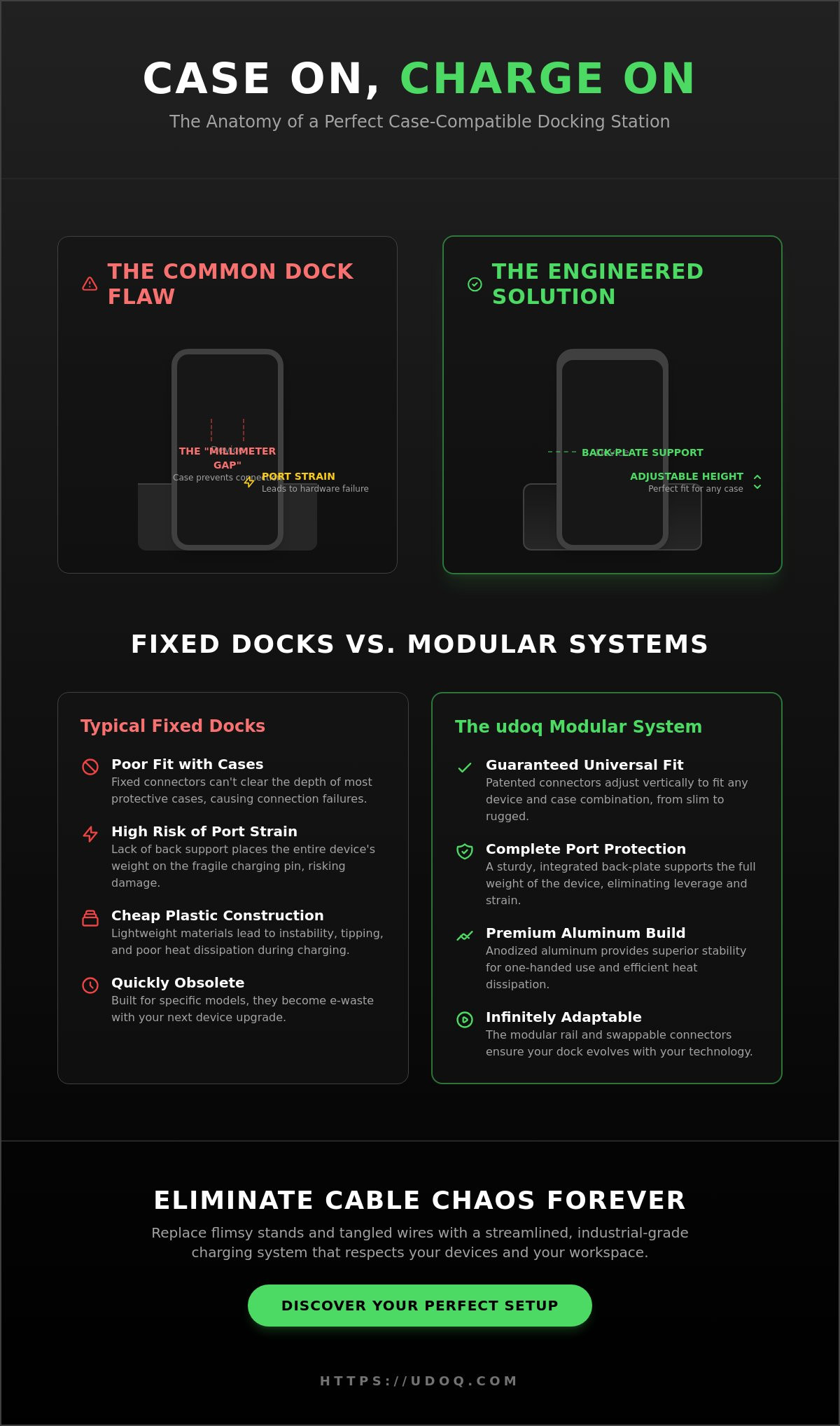
Fixed vs. Modular Docks: Which Is Better for Cased Phones?
Most charging accessories are designed as temporary solutions. They serve a single device generation and then disappear into a drawer. A docking station that fits phone with case on must be more than a static piece of molded plastic. It should be a permanent fixture of your workspace. The choice between a fixed dock and a modular system is a choice between disposable tech and a long-term investment. Fixed docks are rigid; modular systems are fluid.
Fixed docks represent a significant design limitation. They are built to the exact specifications of a "naked" phone at the time of manufacture. If you add a protective case, the fit is compromised. If you upgrade your phone, the dock often becomes obsolete. This cycle creates unnecessary waste and constant frustration. A modular, rail-based system solves this by decoupling the frame from the connector. You buy the foundation once and adjust the components as your needs shift.
The Longevity of Modular Systems
Adaptability is the hallmark of premium engineering. As industry standards change, your hardware should keep pace without requiring a total replacement. Swapping an L-CABLE for a C-CABLE takes seconds. This allows you to transition from Lightning to USB-C devices effortlessly. You can add or remove devices from the rail to match your current kit. Whether you're docking a smartphone, a tablet, or a set of earbuds, the system grows with you. This sustainable approach reduces your environmental footprint by prioritizing hardware that lasts for years rather than months.
Fixed Dock Limitations
Budget docking stations suffer from a "one size fits none" reality. They lack the clearance needed for rugged armor and the stability required for larger tablets. Maintenance is another often-overlooked hurdle. Fixed-port docks are notorious for collecting dust and lint in deep, unreachable crevices. This debris can eventually interfere with power delivery or even scratch your device. Modular systems allow you to slide connectors out for easy cleaning and inspection. Explore all charging stations to see how modular design eliminates these common constraints.
The aesthetic impact of your choice is immediate. A fixed dock with multiple ports often looks cluttered once cables are attached. A rail system organizes your devices into a clean, industrial display. It replaces a tangled web of wires with a single, streamlined hub. It's about more than just power; it's about the psychological relief of an orderly environment. Your desk should reflect your focus, not your cable management struggles.
The udoq Solution: Precision Engineering for Every Case
udoq represents a paradigm shift in device management. Born from patented German engineering, this system is a testament to precision and durability. The udoq 250 and its larger counterparts, such as the udoq 700, are crafted from high-grade aluminum. This choice of material is deliberate. It provides the weight required for stability and a minimalist aesthetic that complements any professional environment. This national manufacturing heritage ensures that every component meets rigorous quality standards. It is a long-term investment in your environment, not a temporary accessory. This is the ultimate docking station that fits phone with case on because it treats your device's protection as a primary design requirement.
How udoq Handles Thick Cases
udoq solves the "Millimetre Gap" through a proprietary sliding connector mechanism. Unlike static docks, udoq allows for manual height adjustment of every connector. You can raise your C-CABLE or L-CABLE to perfectly clear the bottom of rugged armor or thick silicone shells. The mechanism is intuitive. You simply set the height once to match your specific case and the connector stays locked in place. This eliminates the guesswork and the risk of damaging your port through repeated, misaligned attempts to charge. Your device sits securely on the sleek rail, supported by a sturdy back-plate. It accommodates smartphones, tablets, and e-readers in a single, organized row. You no longer need to sacrifice protection for the sake of a charge.
Reducing Desktop Chaos
Order is a prerequisite for productivity. udoq eliminates the visual noise of a tangled desk by hiding all internal routing. Cables are tucked neatly within the aluminum profile, leaving only the connectors visible. This creates a centralized "home" for all family or office devices. By consolidating your power needs, you reclaim physical and mental space. The udoq system acts as a systemic solution to environmental frustration. With udoq POWER versions, you can charge up to 10 devices from a single wall outlet. It's an efficient use of space that simplifies your daily routine. For more insights on optimizing your workspace, read our guide on How to Create a Minimalist Desk Setup.
Stop settling for disposable plastic stands that fail when you add a case. Invest in a system designed for longevity and aesthetic excellence. Build your custom udoq system today and experience the psychological relief of a truly organized desk.
Setup Guide: Optimizing Your Charging Station in 2026
Achieving a clutter-free desk requires more than just high-end hardware. It demands a systematic approach to configuration. Start by auditing your current device mix. Consider your smartphones, tablets, and smartwatches. For a minimalist nightstand, the udoq 250 provides a compact footprint. If you manage a household of tech, the udoq 700 offers the expansive rail length needed for up to six or more devices. Proper planning ensures your docking station that fits phone with case on performs at its peak from day one. It's about creating a ritual of order.
Configuring Your Modular Dock
Configuring your rail is an intuitive process. Slide your chosen connectors into the side of the aluminum profile. Position them to allow for easy access and visibility. Before locking them in place, you must account for your specific case depth. Adjust the connector height manually until you feel a secure click when docking. This precision prevents port strain and ensures a consistent power connection every time. For an even more effortless experience, consider adding a Magnetic Adapter. It simplifies the "drop and charge" motion for your most frequently used devices. This modular adjustability is the only way to maintain a docking station that fits phone with case on as your protection needs change.
Maintenance and Upgrades
Cable management is the final step in your setup. Route your C-CABLE or L-CABLE through the internal channels of the rail. This hides the messy wiring from view. The result is a clean, industrial aesthetic that elevates your workspace. By 2026, device standards will continue to evolve. Your udoq system is ready for these changes. You can swap individual components without replacing the entire foundation. It's a sustainable choice for a modern home. It respects your time and your environment.
Maintenance is straightforward. Keep your aluminum rail pristine by wiping it with a dry microfiber cloth. Avoid abrasive cleaners that might mar the premium finish. Periodically check your connector heights if you switch to a new protective case. This ensures your hardware remains perfectly calibrated. Your environment should be a place of focus and order. Take the final step toward a more organized lifestyle. Build your custom udoq docking station today and reclaim your space.
Future-Proof Your Workspace Today
Your desk should be a sanctuary of focus, not a source of frustration. Standard charging stands often fail because they ignore the physical reality of protective shells. By choosing a modular system, you ensure your hardware remains relevant across every device upgrade. Precision German engineering allows for the manual height adjustments necessary to create a docking station that fits phone with case on, regardless of how rugged your protection is.
This system is a permanent commitment to order and efficiency. The high-grade aluminum construction provides the stability you need, while hidden cable routing removes the visual noise of tangled wires. It's time to stop fighting with your hardware and start enjoying a seamless charging experience. You deserve a workspace that reflects your standards for quality and craftsmanship. It is an investment in your productivity that pays dividends every time you dock your phone.
Explore the udoq 250: The Ultimate Case-Compatible Dock and discover how our patented modular design fits any device with any case. Take control of your environment and enjoy the clarity of a truly organized desk.
Frequently Asked Questions
Will an udoq dock fit an Otterbox or other rugged cases?
Yes, udoq is specifically designed to accommodate rugged cases like those from Otterbox. The sliding connector mechanism allows you to manually set the height of your C-CABLE or L-CABLE. This ensures the connector reaches the port through even the thickest protective shells. It is the only docking station that fits phone with case on that provides this level of mechanical precision. You won't have to remove your armor to charge again.
Can I charge an iPad and an iPhone on the same station with their cases on?
You can charge an iPad and an iPhone simultaneously on any udoq rail. The modular design lets you slide connectors horizontally to create the perfect spacing for each device. Because each connector height is adjusted individually, both your tablet and phone will fit perfectly with their cases attached. This versatility makes it a superior solution for multi-device households. It maintains an orderly aesthetic while delivering reliable power to all your hardware.
What happens if I change my phone from Lightning to USB-C?
You simply replace the individual cable rather than the entire station. If you transition from a Lightning device to a USB-C model, swap your L-CABLE for a C-CABLE. This takes less than a minute and preserves your initial investment in the aluminum rail. udoq is built for longevity, ensuring your workspace evolves alongside industry standards. It is a sustainable approach to tech organization that eliminates the need for disposable plastic docks.
Is it safe to leave my phone on a docking station overnight?
It is entirely safe to leave your devices docked overnight. udoq utilizes high-quality internal components and aluminum construction to manage heat effectively. The sturdy back-plate ensures your phone remains in a stable, upright position, preventing any leverage strain on the charging port. This secure environment protects your battery health and your hardware's physical integrity. You can rest easy knowing your devices are organized and charging safely for the next day.
How many devices can a single udoq 250 actually hold?
The udoq 250 is designed to hold approximately two to three devices. Its 250mm rail length is ideal for a smartphone and a set of earbuds, or a single tablet and a phone. If your device mix grows, you can easily upgrade to a larger rail like the udoq 400 or udoq 700. This flexibility allows you to customize your charging station based on your specific desktop footprint and the number of devices you own.
Do I need a special cable to use a docking station with a case?
udoq utilizes proprietary C-CABLE and L-CABLE components designed for its unique sliding rail. These cables are engineered to fit within the aluminum profile and offer the necessary vertical adjustability for case compatibility. You don't need third-party cables; the udoq system provides everything required for a secure fit. This integrated approach ensures that your docking station that fits phone with case on remains stable and aesthetically consistent across all your devices.
What is the advantage of an aluminum dock over a plastic one?
Aluminum offers superior stability and heat dissipation compared to budget plastic alternatives. The weight of the high-grade aluminum rail prevents the dock from sliding when you remove your phone. It also acts as a natural heat sink, keeping your devices cooler during high-speed charging cycles. Beyond functionality, the minimalist metal finish provides a premium aesthetic that plastic cannot replicate. It is a long-term investment in the quality and order of your environment.
Can I wall-mount my charging station to save desk space?
You can absolutely wall-mount your system to maximize desk space. The udoq WALL MOUNT accessory allows you to secure any rail length directly to a vertical surface. This is an ideal solution for kitchens, entryways, or minimalist offices where surface area is limited. It keeps your devices at eye level and completely off your workspace. This configuration maintains the same case-compatible functionality while further reducing the visual clutter of your home or professional environment.