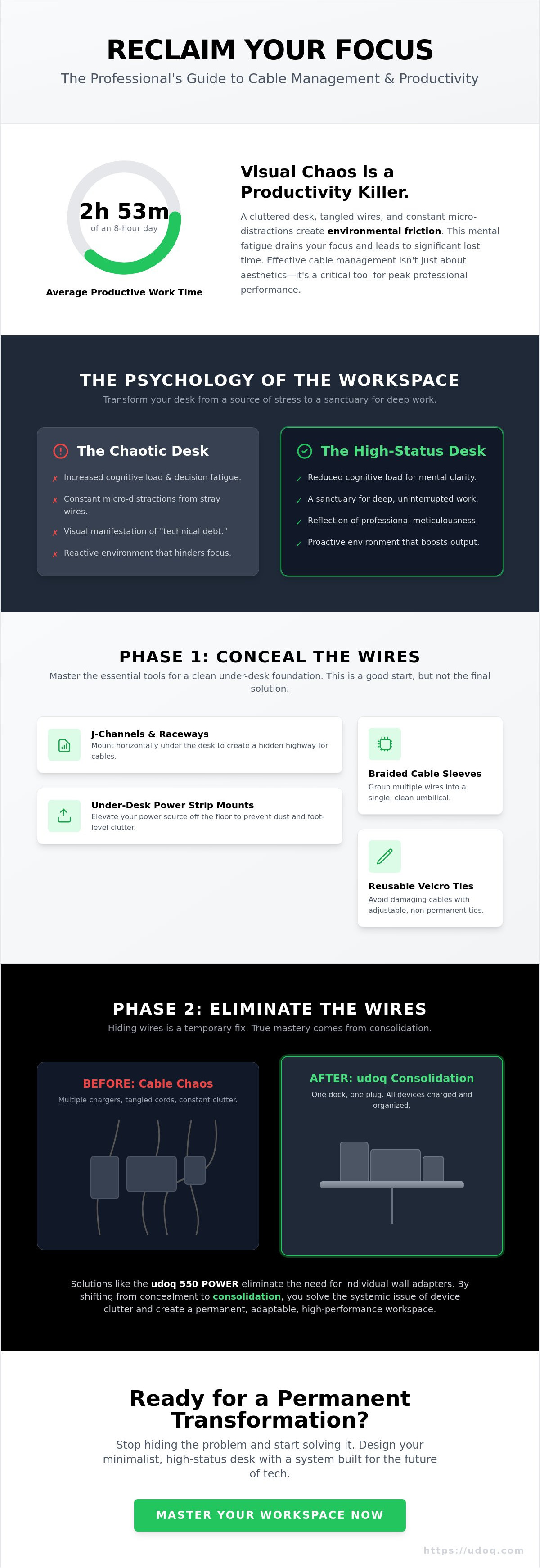
The average office employee remains productive for only 2 hours and 53 minutes of an 8-hour workday. Much of this lost time stems from environmental friction and the mental fatigue caused by visual chaos. You likely feel the frustration of dust-caked wires tangling around your feet or a crucial charger slipping behind the desk at the worst possible moment. Learning how to hide desk cables effectively is more than an aesthetic choice; it's a necessary step to reclaim your focus and professional flow.
We believe your workspace should be a sanctuary of order, not a reminder of technical debt. This guide will show you how to master cable management using professional techniques that transform your desk into a sleek, "floating" tech environment. You'll learn to move beyond cheap plastic boxes and embrace systemic consolidation with solutions like the udoq 550 POWER. We will explore modular upgrades, magnetic adapters, and the precise hardware needed to achieve a minimalist, one-plug power setup that evolves alongside your technology.
Key Takeaways
- Reduce cognitive load by treating cable management as a vital professional tool rather than a simple weekend project.
- Master the use of J-channels and cable sleeves to create a clean, horizontal foundation for all peripheral wiring.
- Address the unique challenges of floating desks by utilizing professional leg-wrap techniques for invisible power routing.
- Discover how to hide desk cables effectively by shifting from concealment to consolidation with modular power systems like the udoq 400.
- Execute a permanent workspace transformation through a rigorous device audit and a systematic surface cleaning process.
The Psychology of the Minimalist Workspace
A cluttered desk is a visual manifestation of technical debt. It signals a lack of control over your environment. Professional cable management is not merely about aesthetics; it's a fundamental productivity tool. When your workspace is clear, your mind follows. This transition from chaos to order creates what we call a "High-Status Desk," a reflection of professional meticulousness and refined taste.
Many users treat organization as an afterthought, tucking wires away in flimsy plastic boxes. This approach is a temporary fix for a systemic problem. Learning how to hide desk cables effectively requires a shift in perspective. You aren't just concealing wires; you're eliminating the environmental friction that hampers your output. A streamlined setup reduces the cognitive load that visual clutter imposes on your brain every second of the workday.
To better understand this concept, watch this helpful video:
Why Visual Order Boosts Focus
Physical order directly impacts mental clarity. Every stray wire is a micro-distraction that demands a sliver of your attention. Over time, these distractions lead to decision fatigue. You waste energy ignoring the mess instead of solving complex problems. A German-engineered aesthetic replaces the "cable nest" with intentionality. It's the difference between a reactive workspace and a proactive one. By removing visual noise, you create a sanctuary for deep work.
The Evolution of Desk Tech in 2026
The modern workflow has evolved. In 2026, the average professional manages a complex ecosystem: a primary laptop, a high-resolution tablet, and multiple mobile devices. This multi-device reality is the primary source of clutter. Disparate charging standards and tangled cords create a web of inefficiency. Research shows the average worker spends nearly 200 hours per year simply searching for information or switching between tasks. Don't let your physical environment add to that burden. Consolidation is the only permanent solution. Moving toward modular charging stations allows you to dock and power your devices in one elegant location, effectively ending the era of cable spaghetti.
True organization is about longevity. It's about choosing tools that adapt as your technology changes. Solutions like the udoq 400 provide the stability and aesthetic appeal required for a modern, high-performance office. When you understand how to hide desk cables effectively through consolidation, you stop fighting your tools and start mastering them.
5 Essential Tools to Hide Under-Desk Wires
Achieving a professional workspace requires the right infrastructure. You cannot simply shove wires out of sight and expect a permanent solution. To master how to hide desk cables effectively, you need a toolkit designed for technical precision. These five essentials form the backbone of a high-performance minimalist setup.
- J-Channels and Raceways: These serve as the hidden highway for your cables. They mount horizontally beneath the desk surface to catch and guide wires along a clean path.
- Braided Cable Sleeves: Use these to group disparate wires into a single, clean umbilical. High-quality textiles look better and last longer than the thin plastic alternatives found in generic $15 kits.
- Under-Desk Power Strip Mounts: Move your power source off the floor. This prevents dust buildup and keeps the "cable spaghetti" away from your feet.
- Weighted Cable Blocks: These anchor points prevent chargers from slipping behind the desk when disconnected. It's a small detail that saves significant daily frustration.
- Reusable Velcro Ties: Avoid plastic zip ties that can pinch or damage cable shielding. Velcro allows for modular adjustments as your tech stack evolves.
These tools are effective for concealment, but they have a fundamental limitation. They help you manage a surplus of wires without actually reducing the number of cables in your environment. True order comes from consolidation. You want to eliminate the need for individual wall adapters entirely. While basic trays like those from Pamo or Stand Desk offer a place to hide the mess, they don't solve the systemic issue of device clutter.
Routing Cables with Precision
The underside of your desk is an invisible landscape. Treat it with the same care as the top surface. Map your routes before you stick or screw anything in place. Keep power cables and data lines separate to avoid electromagnetic interference. This is crucial for maintaining signal integrity in high-end peripherals. Always use non-destructive adhesives for your clips and channels. This protects the finish of premium wood or glass surfaces. When you prioritize this level of detail, you unlock the psychological benefits of a clutter-free environment. Order isn't just a look; it's a state of mind.
Choosing Premium Materials
Materials define the longevity of your setup. Aluminum and high-quality textiles outlast cheap plastic. Your management tools should reflect the quality of your hardware. If you've invested in a MacBook or an iPad Pro, don't compromise with low-grade accessories. The udoq philosophy is built on technical precision and material durability. Our components are designed to evolve with your technology rather than being replaced. For a truly refined finish, consider exploring integrated charging stations that replace individual cables with a single, sleek docking rail. This is the difference between hiding a problem and solving it once and for all.
Managing Cables for Floating Desks and Center-Room Setups
Floating desks represent the pinnacle of modern office design. They also present the most significant technical challenge. Without a wall to mask the descent of wires, your cable management must be flawless. Every cord is exposed to the eye. Learning how to hide desk cables effectively in an open-plan room requires a disciplined, architectural approach that treats wiring as part of the furniture's structure.
The "Leg Wrap" technique is essential for these setups. By securing your primary power feed along the back of a single desk leg, you create a clean vertical line. Use high-quality clips or a braided sleeve that matches the finish of your furniture. This turns a necessary wire into a deliberate design element. Avoid the clutter of floor-box outlets if you aren't prepared for permanent construction. While floor outlets offer the cleanest look, they lack flexibility. Low-profile cable protectors are a practical alternative, provided they blend seamlessly with your flooring materials.
The Single-Cord Strategy
The Single-Cord Strategy is the gold standard for floating desks, consolidating all power requirements into one heavy-duty braided extension. Instead of multiple wires snaking across the floor, you manage exactly one. This cord acts as the lifeblood of your desk. It feeds a hidden under-desk power strip that services all your peripherals. If your layout allows, route this single line beneath a rug or along floor trim to achieve a truly wireless aesthetic. This method ensures that your "island" desk remains a clean, focused environment without the visual noise of multiple floor runs.
Vertical Organization Solutions
Vertical space is often underutilized in center-room setups. You don't need every device on your desk surface to maintain productivity. Offload non-essential charging tasks to nearby walls to keep your primary workspace pristine. The WALL MOUNT is an ideal solution for this. It keeps your devices visible and accessible without consuming valuable real estate. By creating a dedicated charging zone away from your keyboard, you reinforce the boundary between your focus area and your tech storage. This strategy not only clears the desk but also helps you master how to hide desk cables effectively by reducing the total number of wires present at the workstation. It's about moving from a reactive mess to a proactive, systemic solution.
Beyond Hiding: Consolidating Power with Modular Docking
Hiding cables is a defensive strategy. It treats the symptom rather than the cause of workspace chaos. To truly master how to hide desk cables effectively, you must shift your focus from concealment to elimination. Standard power strips are a primary culprit in technical clutter. They might move the plugs out of sight, but they leave you with a "cable spaghetti" of individual charging bricks and tangled cords. This approach is inefficient, visually distracting, and difficult to maintain.
Modular docking rails represent a systemic breakthrough in office organization. Instead of ten individual wall adapters, you utilize a single, high-performance power source. This consolidated infrastructure allows you to charge up to 10 devices from one outlet. The udoq 250 exemplifies this principle, replacing a swarm of stands and wires with one elegant, German-engineered rail that anchors your entire mobile ecosystem.
The Power of One Outlet
Powering a full tech suite from a single wall plug requires precision engineering. High-quality power supplies provide stable, regulated current to every device simultaneously. This is vastly superior to cheap multi-port hubs that often struggle with heat and inconsistent power delivery. Beyond performance, consolidation is a safety imperative. Eliminating "daisy-chained" power strips significantly reduces fire risks in the home office. You gain a cleaner aesthetic and peace of mind through technical order. It's a professional-grade solution for a high-performance environment.
Modular Flexibility for Future Tech
Fixed cable management systems often fail when technology moves forward. If you upgrade your smartphone or switch from Lightning to USB-C, a static setup becomes obsolete. Modular systems solve this through adaptable, interchangeable connectors. Sliding adapters for USB-C, Lightning, and wireless charging allow your setup to evolve in seconds. This makes the udoq system a sustainable investment that outlasts the desk itself. It's not a temporary accessory; it's a long-term solution for your evolving digital life. You no longer need to worry about changing industry standards because your foundation is built to adapt.
Stop managing the mess and start eliminating it. Explore our range of modular docking solutions to reclaim your desk today.
Implementing Your Permanent Minimalist Workspace
A professional environment is not built by accident. It's engineered. Mastering how to hide desk cables effectively requires a disciplined implementation phase. Do not settle for the "hidden chaos" of stuffing wires into a generic plastic box. That approach makes troubleshooting difficult and creates a fire hazard through heat buildup. Follow this five-step protocol to establish a workstation that reflects your professional standards.
- Step 1: Audit your devices. Distinguish between essential daily tools and occasional tech. Remove anything that doesn't serve your primary workflow.
- Step 2: Clear and clean. Strip the desk to its foundation. Clean all surfaces to ensure adhesives for clips and channels bond permanently.
- Step 3: Install a central docking station. Position a modular rail like the udoq 250 to anchor your mobile devices in one place.
- Step 4: Route fixed peripherals. Guide monitor and keyboard lines through desk grommets or along the underside using J-channels.
- Step 5: Consolidate power. Use a single, high-quality power source to energize the entire system, eliminating the need for multiple wall plugs.
Maintenance and Adaptability
Your tech stack will change. Your cable management must be ready for it. Modular systems allow you to swap connectors in seconds without dismantling your entire setup. This adaptability is vital for maintaining order over the long term. Label your cables at the power source for quick identification during hardware upgrades. Maintaining a strict "Clean Desk Policy" ensures your productivity remains high. When every wire has a designated path, cleaning becomes effortless. Order becomes a habit rather than a chore.
Final Touches for the Design-Conscious
Material choice defines the workspace. Plastic degrades and looks cheap. Choose aluminum finishes that complement the industrial design of your MacBook or high-end peripherals. This level of detail is a core component of the minimalist desk setup philosophy. It's about creating a cohesive aesthetic where hardware and infrastructure exist in harmony. The udoq 250 serves as the centerpiece of a professional home office, providing a stable, high-status anchor for your digital life. When you understand how to hide desk cables effectively through high-quality materials and systemic design, you transform your desk from a utility into an investment. You stop fighting the clutter and start mastering your environment.
Master Your Workspace Architecture
A minimalist workspace is a long-term investment in your cognitive clarity. You've learned that mastering how to hide desk cables effectively is not about finding better ways to tuck away a mess. It's about systemic consolidation. By auditing your tech stack and utilizing high-quality routing tools, you eliminate the environmental friction that stalls your daily productivity. True order requires moving beyond temporary plastic fixes and embracing materials that reflect the quality of your hardware.
Consolidate your digital ecosystem with a solution built for longevity and technical precision. The udoq 250 features German-engineered aluminum construction and a patented modular sliding system designed to evolve as your devices change. This professional-grade rail allows you to charge up to 10 devices from one outlet, removing the "cable spaghetti" from your desk forever. Transform your desk with the udoq 250 modular docking system and experience the psychological relief of a pristine environment. Your focus deserves a sanctuary. It's time to build it.
Frequently Asked Questions
How do I hide cables on a desk in the middle of the room?
Consolidate your power into a single braided extension cord and route it down a desk leg using the leg wrap technique. Secure the line with non-destructive adhesive clips to keep the vertical run invisible from most angles. This method maintains the "island" aesthetic by ensuring only one cord reaches the floor. Run that final line under a rug or through a low-profile floor protector to the nearest outlet.
What is the best way to group multiple charging cables?
Use high-quality braided textile sleeves to group disparate wires into a single, clean umbilical. This prevents tangling and makes the bundle easier to guide through horizontal J-channels. For mobile devices, a modular rail is superior to grouping. It replaces multiple cords with a single docking point, removing the need for a bundle entirely.
Can I hide power strips under my desk safely?
Yes, mounting power strips to the underside of the desk is safe provided you maintain proper ventilation. Use heavy-duty mounts to keep the strip off the floor and away from dust. This layout reduces heat buildup and prevents trip hazards. Always ensure you aren't "daisy-chaining" strips, as this violates safety standards and increases fire risks in the home office.
Are cable management boxes worth it for a minimalist setup?
Cable management boxes are effective for floor-level clutter but often fail to solve desk-level chaos. They merely hide a mess rather than reducing the total number of wires. To learn how to hide desk cables effectively, focus on consolidation. A modular docking system is a more minimalist investment because it eliminates the need for the box and the tangle inside it.
How do I prevent my phone charger from falling off the desk?
Utilize weighted cable blocks or a fixed docking station to anchor your connectors. These tools keep your charging tips exactly where you need them when disconnected. A modular system like the udoq 400 uses sliding adapters to secure your cables. This prevents the daily frustration of fishing for dropped chargers behind your furniture.
What tools do I need for professional desk cable management?
A professional setup requires J-channels for horizontal routing, braided sleeves for grouping, and modular rails for device docking. You also need reusable Velcro ties and non-destructive adhesives. Avoid cheap plastic kits. Aluminum components and high-quality textiles provide the technical precision and material durability required for a long-term, high-status workspace.
How can I charge multiple devices without creating a mess of wires?
The most efficient solution is a modular charging rail like the udoq 700. This system powers up to 10 devices from a single wall outlet. By replacing multiple individual charging bricks with one consolidated power supply, you eliminate the "cable spaghetti" common in multi-device workflows. It's a systemic approach that prioritizes order and efficiency.
Is it better to hide cables or use a docking station?
Using a docking station is superior because it addresses the root cause of clutter. Hiding cables is a reactive fix for an overabundance of wires. A docking station like the udoq 250 POWER helps you master how to hide desk cables effectively by reducing the total number of cords in your environment. It's a proactive investment in a permanent, minimalist workspace.