Why does every smartphone upgrade feel like a penalty for your desk's organization? You invest in high-end hardware only to end up with a chaotic web of tangled wires and docks that fail the moment you add a protective case. This udoq connector guide provides the technical roadmap to ending that cycle. It's time to move beyond disposable accessories toward a permanent, German-engineered infrastructure for your mobile devices.
We agree that physical chaos creates mental friction. You require a charging solution that mirrors the precision of your hardware and adapts as standards evolve. This guide promises to help you master the modular rail system to eliminate cable clutter for good. We will preview the specific utility of the C-CABLE and L-CABLE, show you how to achieve a seamless one-handed docking experience, and explain how to power up to ten devices from a single outlet. You are about to build a minimalist station that prioritizes both function and longevity.
Key Takeaways
- Master the "forever dock" philosophy by pairing a permanent aluminum rail with interchangeable, modular connectors that evolve with your technology.
- Follow this udoq connector guide to select the precise C-CABLE and L-CABLE configurations for your current and future device mix.
- Leverage German engineering to eliminate cable fraying and protect your charging ports with patented 8mm height adjustments for various cases.
- Audit your workspace requirements to choose the ideal rail length, ranging from the entry-level udoq 250 to the high-capacity udoq 700.
- Integrate the WIRELESS ADAPTER or MAGNETIC ADAPTER to achieve a sophisticated, cable-free aesthetic for Qi and MagSafe compatible devices.
Understanding the Patented udoq Connector Ecosystem
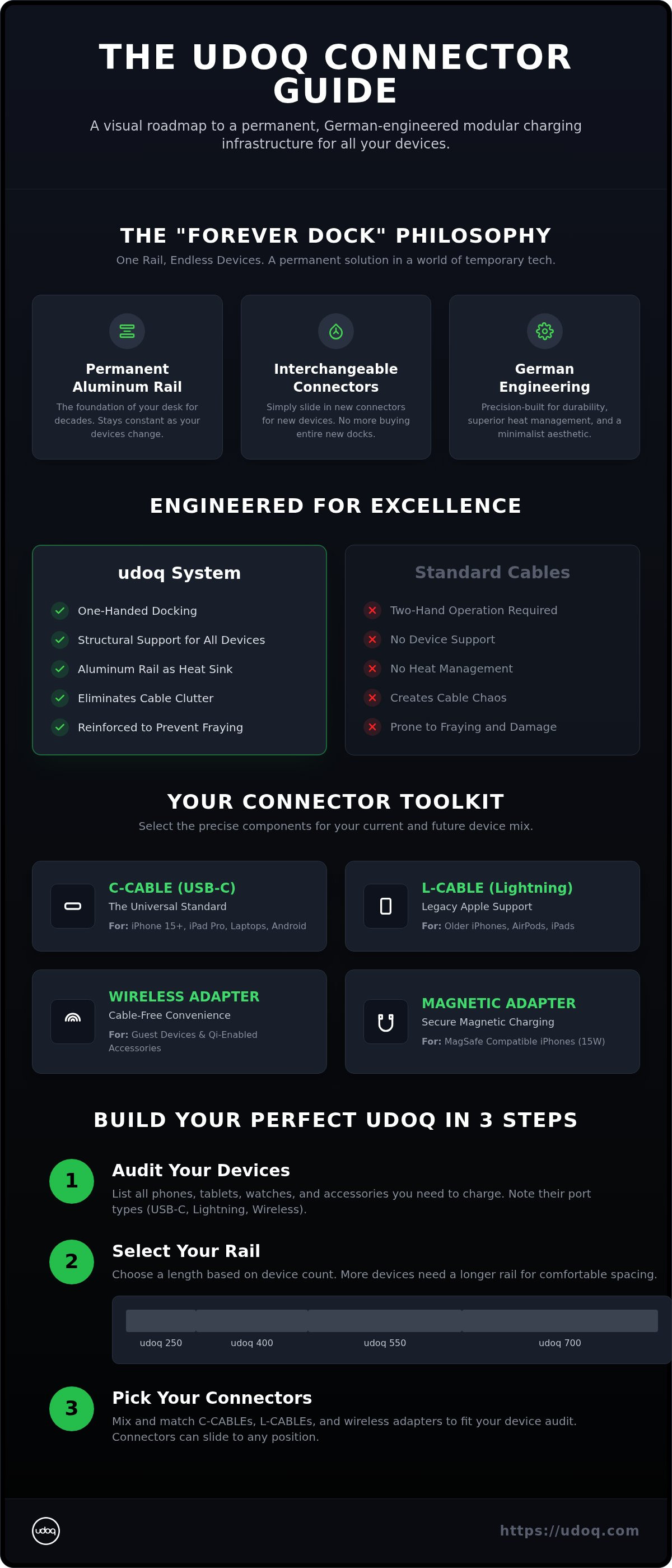
The udoq system treats your charging station as a permanent piece of premium furniture rather than a disposable tech accessory. At its core is a patented aluminum rail, engineered in Germany to remain on your desk for decades. While mobile devices change every few seasons, the rail remains a constant. You simply slide out an old connector and slide in a new one. This "forever dock" approach eliminates the waste and frustration of buying a new charging hub every time the industry pivots to a new port standard. It transforms your workspace from a site of chaotic cables into a disciplined environment of order and efficiency.
The Anatomy of an udoq Connector
Every udoq connector features a specialized sliding base. This base fits perfectly into the track of any rail length, including the entry-level udoq 250 or the high-capacity udoq 700. Unlike loose cables that clutter your surface, these connectors remain fixed yet adjustable. This udoq connector guide highlights a critical mechanical innovation: the patented 8mm height adjustment tool. This feature allows you to raise or lower the connector tip manually. It ensures your phone docks perfectly whether it's bare or protected by a thick, rugged case. Durable polymer housings protect the internal wiring, while reinforced strain relief prevents the fraying that eventually kills standard cables. You won't find this level of structural integrity in a generic charging cord.
German Engineering vs. Standard USB Cables
Standard cables are built for portability, not stability. They usually require two hands to plug in and offer zero structural support for larger devices like tablets. In contrast, udoq connectors are engineered for a seamless one-handed docking experience. The high-grade aluminum rail acts as a massive heat sink. This material science is vital during high-wattage charging, as it pulls heat away from your device to preserve long-term battery health. It’s a sophisticated solution that prioritizes the longevity of your hardware.
As the industry consolidates around the USB-C standard, the modularity of the udoq system becomes its greatest asset. You can mix a C-CABLE for your new tablet with an L-CABLE for an older accessory without adding extra wall plugs. The udoq POWER supply consolidates everything; a single outlet can energize up to ten devices simultaneously. The udoq patented rail system serves as the definitive foundation of modular charging, turning chaotic workspaces into a minimalist display of high-end hardware.
C-CABLE, L-CABLE, and Beyond: Identifying Your Connector Needs
Identification is the first step toward technical order. This udoq connector guide simplifies the selection process by matching your specific hardware to the correct interface. Whether you carry the latest flagship or a collection of legacy accessories, the modular nature of the system ensures nothing becomes obsolete. You can swap components in seconds as your device lineup evolves, maintaining a clean aesthetic without the need for additional wall plugs.
The USB-C Revolution: Why C-CABLE is the New Standard
USB-C is now the universal language of mobile power. With the iPhone 15, 16, and 17 series fully adopting this port, the C-CABLE serves as the primary connector for the modern Apple ecosystem. It’s not just about the plug shape. The C-CABLE supports high-speed Power Delivery (PD), which is essential for charging iPad Pro models and modern laptops efficiently. For a deeper technical dive into this interface, explore the ultimate guide to USB-C. It explains why this single standard is replacing a decade of fragmented cables.
Legacy Support with the udoq L-CABLE
Don't discard your reliable legacy hardware. The L-CABLE supports the Lightning port found on older iPhone models and various AirPods charging cases. Maintaining a unified dock is possible even as you transition between Apple generations. Safety remains the priority here. Every udoq L-CABLE is MFi-certified, ensuring it meets strict performance standards to protect your device's internal circuitry. It offers the same one-handed docking experience as our newer connectors, keeping your desk tidy regardless of the device's age.
Beyond traditional plugs, the system embraces cable-free convenience. The WIRELESS ADAPTER integrates the Qi wireless charging standard directly into the aluminum rail. It’s the ideal solution for guest devices or secondary accessories that don't require a physical tether. For iPhone users seeking MagSafe-style utility, the MAGNETIC ADAPTER provides a secure, 15W interface that snaps into place with satisfying precision.
Identifying your requirements is straightforward. Look at the port shape on your device. USB-C is a small, rounded rectangle. Lightning is a slim, flat tab with visible gold pins. If you're using niche or older electronics, you might find a Micro-USB port, which has a distinct trapezoidal shape. Once you've audited your ports, you can select the specific connectors needed to build your custom charging station. Precision starts with the right components.
Engineering Advantage: Why udoq Connectors Outlast Standard Cables
Standard charging cables are a primary source of modern e-waste. They are engineered for low-cost production rather than long-term performance. You've likely experienced the cycle of fraying insulation, loose connections, and declining charge speeds. This udoq connector guide explains why shifting to a modular system is the only way to break that cycle. By separating the connector from the cable's structural burden, we've created a system that prioritizes durability and hardware health.
The primary advantage lies in structural support. A standard cable forces the device's port to bear the full weight of the hardware. This stress leads to internal port damage, especially with larger tablets. The udoq rail supports your device's weight, ensuring the connector only handles power transfer. Heat management is equally critical. During fast charging, connectors generate significant thermal energy. Our high-grade aluminum rail acts as a massive heat sink, drawing warmth away from the connector and your device. This thermal regulation preserves battery health and ensures consistent charging speeds without the risk of overheating.
The 8mm Height Adjustment Explained
Most docks fail because they assume every phone is used without a case. In reality, protective cases vary wildly in thickness. Our patented 8mm height adjustment solves this "case problem" permanently. Use the included tool to raise or lower the connector head within its housing. This mechanical precision ensures a secure, flush connection for everything from ultra-slim skins to ruggedized, heavy-duty cases. You never have to compromise your device's safety just to dock it. It's a small detail with a massive impact on daily utility and ease of use.
Modular vs. Fixed Charging Stations
Fixed docking stations are destined for the landfill the moment a port standard changes. If you buy a fixed dock today and upgrade your phone tomorrow, the entire unit becomes obsolete. The udoq system treats the rail as a lifetime investment. Replacing a single connector is a logical, cost-effective alternative to discarding an entire station. This modularity ensures your workspace stays current without contributing to environmental waste. Review the ultimate guide to choosing a charging station in 2026 to see how modularity stacks up against traditional hubs. Investing in quality components today prevents the clutter and expense of tomorrow.
How to Configure Your udoq Rail: A Step-by-Step Device Audit
Configuration is where physical order begins. You've already explored the engineering and identified your connector types. Now, you must architect your setup. This udoq connector guide outlines a precise method to audit your hardware and select the ideal foundation for your workspace. Follow these steps to transition from a cluttered desk to a disciplined charging environment.
Step 1: Inventory your ports. Group your devices by their charging interface. You'll need a C-CABLE for modern flagships and an L-CABLE for legacy Apple hardware. Don't forget accessories like earbuds or e-readers that might require Micro-USB. This audit prevents the frustration of missing a critical connection during assembly.
Step 2: Calculate your required width. Your rail choice depends on your device footprint. A udoq 400 rail can accommodate four to five smartphones in portrait orientation. If you intend to dock multiple tablets or larger hardware, consider the udoq 550 or 700 to ensure adequate spacing and structural support.
Step 3: Arrange by height. For a single rail, arranging devices from tallest to shortest creates a clean, intentional visual flow. This mirrors high-end industrial design and ensures every screen remains visible. It’s a simple organizational trick that yields a significant aesthetic upgrade.
Step 4: The mechanical setup. Slide your chosen connectors into the side of the patented aluminum rail. Move them along the track to your desired positions. Once you've perfected the spacing, use the provided tool to lock the connectors firmly into place. This "slide and swap" utility allows you to reconfigure your dock in minutes as you acquire new gear.
Step 5: Consolidate power. Connect each internal cable to the udoq POWER supply. This unit allows you to energize up to ten devices through a single wall outlet. It eliminates the need for multiple power strips and bulky adapters, reclaiming your desk space immediately.
Choosing the Right Rail Size
Selecting the correct rail is vital for a minimalist footprint. The udoq 250 is the perfect entry point for a minimalist setup, typically holding a phone, watch, and earbuds. For professional environments or families with multiple tablets, the udoq 400 and 550 provide the necessary width without overwhelming your desk. These sizes offer the best balance of capacity and compact design.
Pro Tips for Cable Management
The secret to a high-end look is invisibility. You can hide excess cable length inside the hollow aluminum rail for a truly wireless appearance. If you want to clear your desk entirely, use the WALL MOUNT to turn your charging station into a functional piece of wall art. Review our guide on how to create a minimalist desk setup for more advanced organization strategies. Once you've audited your needs, build your custom station to experience the psychological relief of a tidy environment.
Future-Proofing Your Dock with Wireless and Magnetic Adapters
The ultimate goal of any charging infrastructure is to vanish into the background of your life. This udoq connector guide concludes with a look at the most advanced interfaces in our ecosystem: the wireless and magnetic adapters. These components represent the peak of modular flexibility. They allow you to transition from physical docking to a touch-and-go experience without discarding your existing aluminum rail. It's a commitment to longevity that defies the planned obsolescence typical of the consumer electronics industry.
Modularity is your primary weapon against e-waste. Most consumers replace their entire charging hub every few years because the internal hardware fails or port standards change. With udoq, you only upgrade the specific interface. As we look toward the next decade and the rise of Qi2 standards, your rail remains a permanent desk foundation. You simply swap a cable for an adapter. This approach keeps hundreds of pounds of plastic and circuitry out of landfills while ensuring your desk matches the sophistication of your newest hardware.
Integrating MagSafe and Qi Technologies
The MAGNETIC ADAPTER brings 15W MagSafe-compatible speed to your rail. It secures your iPhone in a floating orientation, which is perfect for horizontal viewing or using StandBy mode as a bedside clock. For a technical deep dive into this technology, read our report on what is MagSafe. This adapter allows for a seamless, one-handed grab-and-go experience. For other peripherals, the WIRELESS ADAPTER provides a dedicated surface for AirPods and Qi-compatible earbuds. It eliminates the need to align ports manually, prioritizing speed and aesthetic purity.
The udoq POWER Series: High-Performance Charging
A modular station is only as capable as its power source. The udoq POWER series provides the high-wattage throughput required to charge up to ten devices simultaneously at maximum speed. Using a single, high-quality power source is significantly safer than plugging five different cheap bricks into a crowded power strip. It reduces fire risk and ensures consistent Power Delivery (PD) to your C-CABLE connectors. Match your connector count with the appropriate POWER unit to maintain peak performance across all devices. Your workspace is an investment in your productivity. By choosing a system that adapts, you're choosing order over chaos. Explore our full range of charging stations to begin your transition to a future-proof environment.
Architect Your Permanent Workspace
Chaos on the desk is a choice, not a necessity. You now possess the technical roadmap to replace disposable cables with a permanent, sophisticated charging infrastructure. This udoq connector guide has detailed how the patented modular sliding system allows your setup to evolve alongside your hardware. By consolidating up to ten devices into a single-outlet solution, you reclaim both physical space and mental clarity immediately.
Every component is German-engineered for lifetime durability. These adapters and cables are designed to outlast your next five smartphone upgrades, ensuring your investment remains relevant for years. The transition from clutter to order is a deliberate upgrade in lifestyle aesthetics. Stop fighting with tangled wires and start experiencing the precision of a professional docking environment. It's time your charging station matched the quality of the devices it powers.
Build your custom udoq docking station today and rediscover the satisfaction of a perfectly organized workspace. Your hardware deserves a foundation that is as innovative as the technology itself. Embrace the relief of a tidy environment.
Frequently Asked Questions
Which udoq connector do I need for the iPhone 16?
The iPhone 16 requires the udoq C-CABLE. Since Apple transitioned the iPhone lineup to the USB-C standard, this connector provides the necessary interface for both power and data. It ensures your modern hardware docks securely while maintaining the minimalist aesthetic of your station.
Can I use my udoq connectors with any rail size?
Yes, every connector is designed with a universal sliding base. Whether you own the compact udoq 250 or the expansive udoq 700, the connectors are fully compatible. This modularity allows you to migrate your existing components to a larger rail if your device collection grows.
Do udoq connectors work with thick protective cases like OtterBox?
The system handles thick, ruggedized cases easily using the patented 8mm height adjustment tool. You can raise the connector head to bridge the gap created by heavy-duty protection. This ensures a stable electronic connection without requiring you to remove your case every time you dock.
How many connectors can I fit on an udoq 400 rail?
An udoq 400 rail typically accommodates four to five smartphones in portrait orientation. If you're docking larger tablets, the capacity will decrease based on the width of those devices. This udoq connector guide recommends auditing your device dimensions before selecting your final rail length.
Can I swap a Lightning connector for a USB-C connector later?
You can swap connectors in seconds thanks to the "Slide and Swap" utility. Simply slide the old L-CABLE out of the rail and replace it with a C-CABLE. This feature protects your investment by allowing the station to evolve as port standards change across the industry.
Does udoq support fast charging for tablets and laptops?
The C-CABLE supports high-speed Power Delivery (PD) when paired with an udoq POWER supply. This configuration provides sufficient wattage to charge tablets and modern laptops at their maximum rated speeds. It consolidates high-performance charging into a single, organized hub for all your professional hardware.
What happens if my device has a port on the side instead of the bottom?
Devices with side ports are best accommodated using the universal support set or the WIRELESS ADAPTER. These options allow for horizontal placement while maintaining a secure charge. You can also utilize the MAGNETIC ADAPTER for a floating, horizontal orientation that is ideal for viewing content while charging.
Are udoq connectors MFi-certified for Apple devices?
All udoq L-CABLE connectors are MFi-certified to meet Apple's strict performance and safety standards. This certification guarantees that the hardware won't damage your device's internal circuitry. You receive the peace of mind that comes with premium, German-engineered components designed for long-term reliability.